
GIF Tool
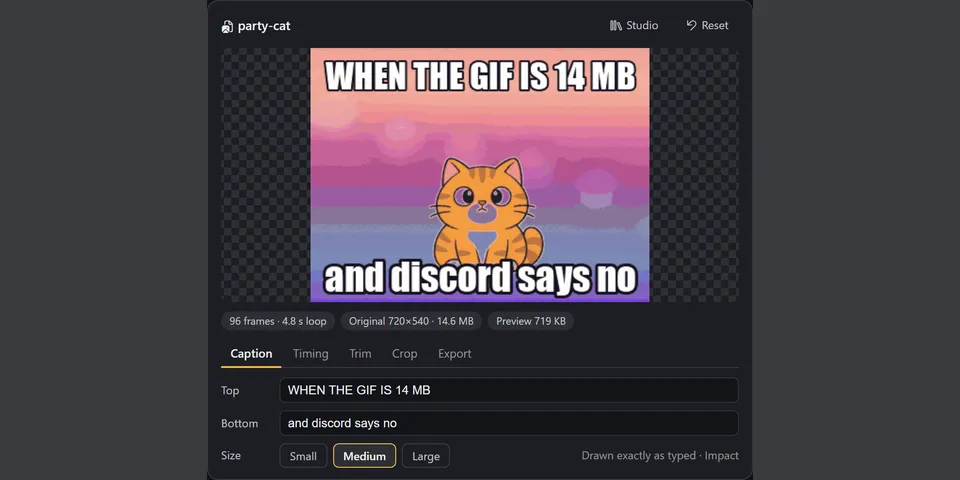
From its catalog listing
Show, edit and compress GIFs in Hermes. `gif_open` turns any GIF, animated WebP, APNG, PNG or JPEG (a file path or an https link) into a card in Hermes Desktop where you add exact captions, change speed, reverse, boomerang, trim, drop frames and crop with a live preview; the original file is never changed. `gif_export` and the card's export buttons compress for Discord (10 MB), Discord emoji (256 KB), Telegram, X (5 MB), under 1 MB, animated WebP or a size you name, shrinking until the file fits and reporting before and after sizes (pure Pillow: shared palette, frame differencing, size-targeted ladder). `gif_edit` gives the agent the same edits. `gif_create` makes a four-frame meme GIF from a prompt. A GIF Studio tab lists every GIF in the profile and takes a dropped file or a pasted link.
Good to know before installing
editing, previews and compression are local; opening a link downloads that one https URL (no cookies or credentials; private, local and link-local addresses refused, redirects and the connected peer re-checked; a GIPHY or Tenor page is followed once to its og:image); `gif_create` sends only the text prompt to chatgpt.com/backend-api/codex/images/generations through Hermes' credentialed_provider_request with the user's OpenAI Codex sign-in, using one image from the user's ChatGPT plan per call, via an undocumented endpoint; projects and rendered files are stored under the profile's plugin-data/gif-tool and cache/generated/images.
From its catalog listing.
How to install
- Install it. Hermes asks for any API keys it needs, then asks whether to turn it on.
hermes plugins install gif-tool - Said no? Turn it on later:
hermes plugins enable gif-tool - Restart Hermes so it loads the plugin.
Some plugins also need a sign-in or settings: see Full setup & settings. Memory plugins ask whether to become your memory provider instead. Steps follow the official plugins guide (opens in a new tab).
- Category
- Chat apps & voice · Hermes Desktop add-ons
- Maintained by
- tuancookiez-hub (Community)
- Needs
- No API keys declared
- Adds tools
gif_opengif_editgif_exportgif_create- Needs Hermes
- 0.22.0 or newer
- Version
- 1.0.1
- In the catalog
- 2026-11-11
Known issues (from its catalog listing)
- Restart Hermes once after installing: the card's backend routes mount at startup.
- The card needs a Hermes Desktop with tool-media renderers; older Desktops and other surfaces show the plain GIF.
- gif_create needs an OpenAI Codex sign-in in Hermes and uses an undocumented Codex image endpoint that can change without notice; every other feature works without it.
- Not yet exercised inside a running Hermes Desktop by the author: the card and backend were tested headlessly against the real plugin code with a stand-in for the plugin SDK.
Using the Hermes desktop app? See where plugins live

Full setup & settings ↗Source code ↗
More in chat apps & voice
New Hermes Agent updates every day on X. Follow @HermesWatcher