
BTW Studio
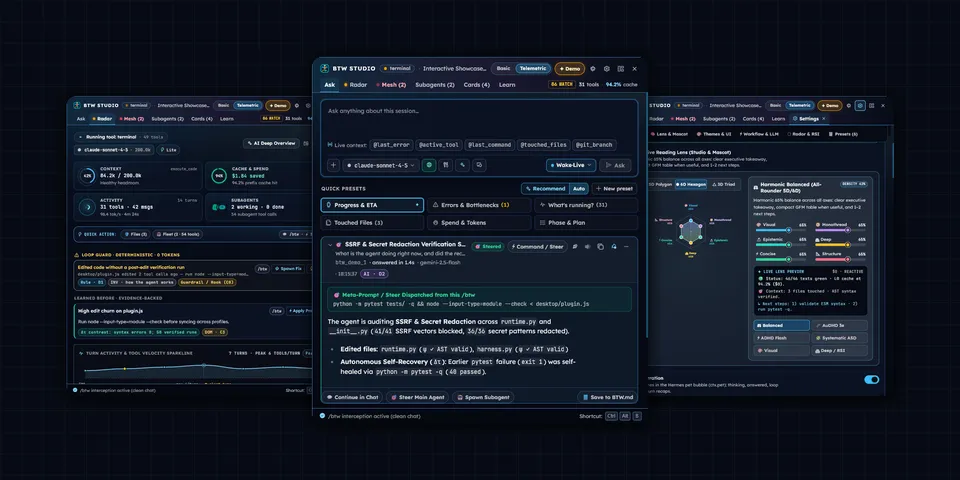
From its catalog listing
Side-channel /btw workspace, $0 read-only SQLite session radar, and Δτ steer playbook for Hermes Desktop, CLI, Gateway, and Dashboard. Intercepts /btw mid-turn in the composer (with attachments, opt-in voice STT/TTS, and @session context) to render Markdown answers in a strip, popover, floating pane, or dialog without mutating the transcript or L0 prompt cache. Reads state.db?mode=ro at $0 for token/cache metrics, AST syntax checks, 10 loop-guard detectors, and cross-session file write conflicts, steers conversation_id-stable turns or child subagents mid-flight, formats output via a 6-axis reading lens ([0,1]^6), and retains only rules verified by 3-call Δτ behavioral contrast in BTW.md.
Good to know before installing
registers 12 observer-only hooks returning None, a btw-studio.verified-playbook system-prompt section (lite/full modes), the BTW_CONVERSATION_ID session env, auxiliary tasks btw_studio_fast and btw_studio_title calling the user's own model via ctx.llm (redacted <=32 KB session digest; optional fast_base_url restricted to https:// or loopback, no redirects), 57 dashboard routes under /api/plugins/btw-studio/, 14 CLI subcommands, 12 gateway RPCs and 8 Desktop host RPCs. Reads $HERMES_HOME/state.db read-only (sibling profiles' state.db only when scan_sibling_profiles is on), curator logs, .git/HEAD, config.yaml, MEMORY.md, up to 8 cwd-confined edited .py/.json files (parsed, never run) and denylisted workspace attachments. Off by default: allow_web_search (web_search/web_extract/browser_exec), allow_media_tools, wake_word_enabled, live_voice_enabled, tts_auto_speak, memory_md_sync_mode, scan_sibling_profiles, gamify_enabled. Opt-in voice sends audio/text to the host's STT/TTS providers, the Nous audio gateway, Groq or OpenAI (keys via agent.secret_scope: TOOL_GATEWAY_USER_TOKEN, TOOL_GATEWAY_DOMAIN, GROQ_API_KEY, VOICE_TOOLS_OPENAI_KEY, OPENAI_API_KEY), or Microsoft Edge TTS when the edge provider is chosen. Writes stay in the plugin data dir unless memory_md_sync_mode is on (rewrites a marked block in $HERMES_HOME/memories/MEMORY.md) or companion pet adoption installs a pet into $HERMES_HOME/pets; no shell commands, subprocesses, servers or self-updater.
From its catalog listing.
How to install
- Install it. Hermes asks for any API keys it needs, then asks whether to turn it on.
hermes plugins install btw-studio - Said no? Turn it on later:
hermes plugins enable btw-studio - Restart Hermes so it loads the plugin.
Some plugins also need a sign-in or settings: see Full setup & settings. Memory plugins ask whether to become your memory provider instead. Steps follow the official plugins guide (opens in a new tab).
- Category
- Chat apps & voice · Hermes Desktop add-ons
- Maintained by
- SBMatthew (Community)
- Needs
- No API keys declared
- Adds hooks
pre_llm_callpost_llm_callpre_tool_callpost_tool_callpost_api_requeston_session_openon_session_starton_session_endpost_compactionpost_curator_runsubagent_startsubagent_stop- Needs Hermes
- 0.23.1 or newer
- Version
- 5.8.0
- In the catalog
- 2026-11-12
Using the Hermes desktop app? See where plugins live

Full setup & settings ↗Source code ↗
More in chat apps & voice
New Hermes Agent updates every day on X. Follow @HermesWatcher