
Pixel HQ
From its catalog listing
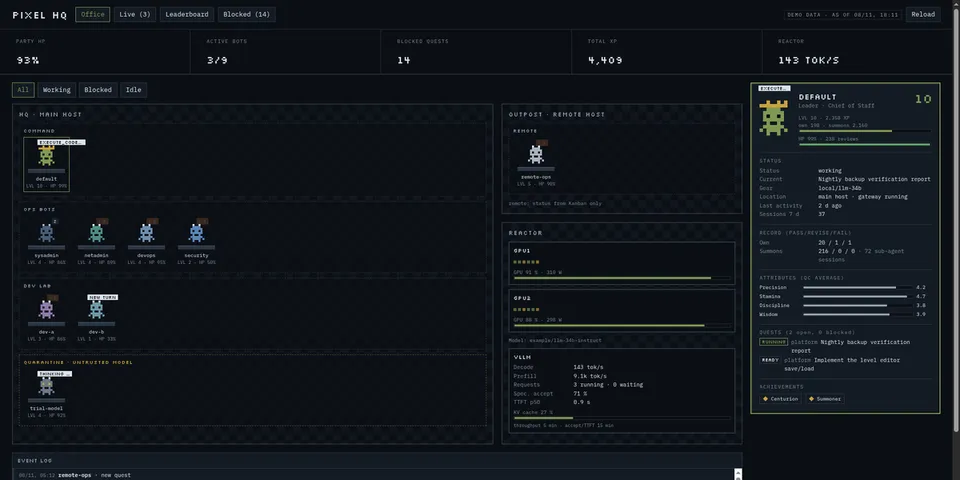
Gamified headquarters for a Hermes bot fleet: a pixel office of rooms and departments that you arrange in the page (Edit layout with drag and drop, live numbers per department: members, active, blocked, average HP, XP) and a class-based sprite per profile; each bot's character card shows its configuration (model pin, skills, toolsets, MCP servers) and edits its SOUL.md with a diff preview, a second confirming click and a restorable history; XP, levels and HP are scored automatically from Kanban outcomes (completed, changes requested, gave up, timed out, hallucinated references) plus optional pass/revise/fail reviews you give from the UI or that an orchestrator records with the `pixelhq_review` tool; a live board of what every bot is doing right now (current step, last tool call, tokens/cost, sub-agents, Kanban heartbeats) with Open session, Talk to this bot and Ask for status (prepares a draft, never submits it); a leaderboard; a blocked-card triage across all Kanban boards with Answer & unblock / Retry / Comment / Archive and a 'triage run' that opens a chat with your orchestrator profile; a GPU/LLM reactor panel; and an Update available notice for Pixel HQ itself. Works on a fresh installation: the roster is generated from your profiles, edited in the Roster tab, and settings live in the Desktop app.
Good to know before installing
reads every profile's config.yaml (model name) and state.db read-only (session titles, current step, tokens/cost and the last tool call with its first argument, e.g. a terminal command or path, clipped to 160 characters), every Kanban board database read-only, and the reviews ledger (plugin-data/pixel-hq/reviews.jsonl, plus an optional legacy ledger path you configure); through Hermes' own calls it reads a bot's profile (profiles.describe: SOUL, model pin, skill/toolset/MCP server names) when you open its Config section and the plugin list (plugins.manage list, at most every 6 h) for the update notice; no shell commands for reading; network only to the Prometheus / model endpoints you configure (none by default); bots on other hosts only through the Desktop app's own connections; writes only (a) the reviews JSONL under plugin-data when you rate a session or bot (or when an agent calls `pixelhq_review`), (b) plugin-data/pixel-hq/roster.json and its one-generation backup when you click Save or Reset in the roster or layout editor, (c) a bot's SOUL.md only through Hermes' profiles.configure after a diff preview and a second click, with the previous version kept in plugin-data/pixel-hq/soul-history/ (newest 10 per bot), and (d) Kanban changes only from your clicks in its page and only through `hermes kanban comment|unblock|archive` (unblock/retry/archive need a second confirming click; the workspace is backed up into the plugin's var/ before archive; audit log in var/actions.jsonl); the triage button opens a new chat with your orchestrator profile and submits a prompt with card ids and a host-built filter sentence only, and that agent then reads card text (untrusted) via the plugin's blockers.py; session actions never submit a prompt; no telemetry, no self-update, no credentials.
From its catalog listing.
How to install
- Install it. Hermes asks for any API keys it needs, then asks whether to turn it on.
hermes plugins install pixel-hq - Said no? Turn it on later:
hermes plugins enable pixel-hq - Restart Hermes so it loads the plugin.
Some plugins also need a sign-in or settings: see Full setup & settings. Memory plugins ask whether to become your memory provider instead. Steps follow the official plugins guide (opens in a new tab).
- Category
- Automation & multi-agent · Hermes Desktop add-ons
- Maintained by
- W4-NERF (Community)
- Needs
- No API keys declared
- Adds tools
pixelhq_review- Needs Hermes
- 0.22.2 or newer
- Version
- 1.3.0
- In the catalog
- 2026-11-10, updated 2026-11-12
Using the Hermes desktop app? See where plugins live

Full setup & settings ↗Source code ↗
More in automation & multi-agent
All automation & multi-agent plugins
New Hermes Agent updates every day on X. Follow @HermesWatcher