
Pinpoint
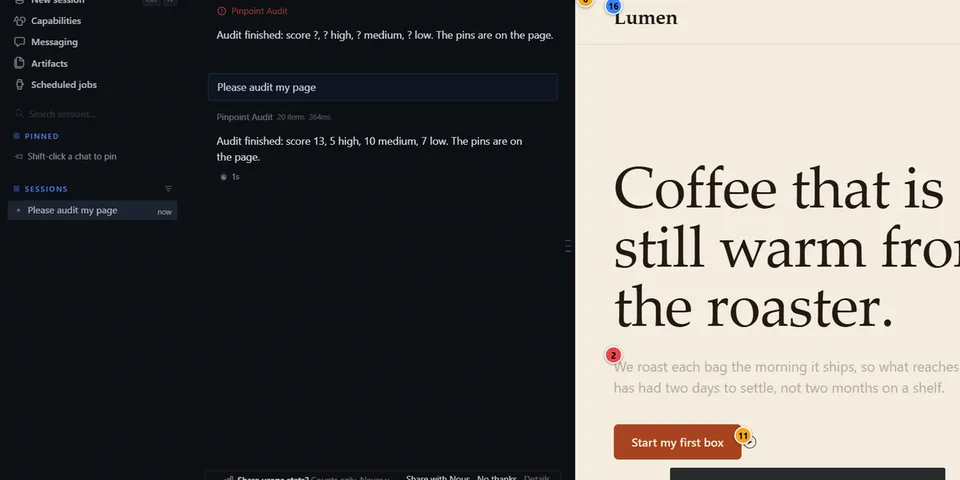
From its catalog listing
Audit mode and Design mode for the live page in Hermes Desktop's Browser pane. Measure it with in-page audits (contrast, tap targets, alt/labels, overflow, small text), pin findings on the real elements, point at any element to inspect its live box model, typography, layout and contrast, send a pin or an instruction to the agent, and re-audit to get a score delta, a pasteable receipt and a per-pin outcome: fixed (no longer reported and the same element signature is still present; not a re-measurement), gone (element signature missing, never counted as a fix) or not rechecked (unverifiable, stays open).
Good to know before installing
Pinpoint's desktop half runs its own audit script inside the web page open in Hermes Desktop's Browser pane, only after you allow it for that site (Desktop's per-origin consent dialog; revocable under Capabilities > Plugins). The script reads computed styles, layout, the page's visible text, and the values of the attributes id, name, href, src, alt and aria-label (plus title and placeholder when it works out an element's accessible name); it contains no cookie access and does not read form-field values, and it draws an overlay. Findings (CSS selectors, short element labels that can contain page text, measured values) are stored locally in a SQLite file under the plugin-data folder (`pinpoint/data.db`; at most 20 pages, 200 pins and 50 audits per page; entries older than 7 days are pruned). They are sent to the model only when the agent calls `pinpoint_audit`/`pinpoint_pins` or when you click Fix, Fix all high or Send in the Desktop pane (or its command-palette action); an event raised by the page itself never sends a chat turn. Pinpoint also adds a short hint to the system prompt that names its two tools. The desktop half polls the page every 0.5-1 s while pins are shown (via `executeJavaScript`) and re-audits automatically after page changes (switch off in the pane). `pinpoint_audit` blocks up to 90 s waiting for the Desktop (configurable) and returns `desktop_unavailable` when no Desktop window answers, including under cron. No network calls, no subprocesses, no shell, no credentials, no telemetry, no files written outside plugin-data; it never edits your source (the agent does, under normal approvals). Limits: verified on Windows 11 with Hermes 0.22.7 only (macOS and Linux are untested). Results are a limited heuristic audit, not WCAG certification, and fixed / gone describe what this engine observed, not a guarantee about your page. Disclosure — Pinpoint's desktop half runs its own audit script inside the web page open in Hermes Desktop's Browser pane, only after you allow it for that site (Desktop's per-origin consent dialog; revocable under Capabilities > Plugins); the script reads computed styles, layout, the page's visible text and the attributes id, name, href, src, alt, aria-label, title and placeholder, not form-field values or cookies, and draws an overlay. Findings (CSS selectors, short element labels that can contain page text, measured values) are stored in a local SQLite file under the plugin-data folder (pinpoint/data.db; at most 20 pages, 200 pins and 50 audits per page, pruned after 7 days) and reach the model only when the agent calls pinpoint_audit/pinpoint_pins (pinpoint_audit can also return the live box model of a model-chosen CSS selector) or when you click Fix, Fix all high or Send in the Pinpoint pane or its palette actions; an event raised by the page never sends a chat turn. The plugin adds a short hint to the system prompt naming its two tools. The desktop half polls the page every 0.5-1 s while pins are shown (via executeJavaScript) and re-audits automatically after page changes (switch off in the pane). pinpoint_audit blocks up to 90 s waiting for the Desktop (configurable) and returns desktop_unavailable when no Desktop window answers, including under cron. No network calls, subprocesses, shell, credentials or telemetry, and no files written outside plugin-data; it never edits your source (the agent does, under normal approvals). Verified on Windows 11 only; results are a heuristic audit, not WCAG certification.
From its catalog listing.
How to install
- Install it. Hermes asks for any API keys it needs, then asks whether to turn it on.
hermes plugins install pinpoint - Said no? Turn it on later:
hermes plugins enable pinpoint - Restart Hermes so it loads the plugin.
Some plugins also need a sign-in or settings: see Full setup & settings. Memory plugins ask whether to become your memory provider instead. Steps follow the official plugins guide (opens in a new tab).
- Category
- Web, research & browsing · Hermes Desktop add-ons
- Maintained by
- stupidburgers (Community)
- Needs
- No API keys declared
- Adds tools
pinpoint_auditpinpoint_pins- Works on
- windows, macos, linux
- Needs Hermes
- 0.22.7 or newer
- Version
- 0.1.0
- In the catalog
- 2026-11-11
Known issues (from its catalog listing)
- Both halves must be enabled: `hermes plugins enable pinpoint` and Desktop > Capabilities > Plugins > Pinpoint.
- The consent dialog is owned by Desktop; its text cannot be customised.
- Pin clicks and page changes reach the agent by polling every 0.5-1 s (no page-to-plugin push exists).
- Focus-indicator rule is a static CSSOM heuristic; cross-origin stylesheets and iframes and closed shadow roots are not scanned.
- Only tested on Windows 11 with Hermes 0.22.7; macOS and Linux untested.
Using the Hermes desktop app? See where plugins live

Full setup & settings ↗Source code ↗
More in web, research & browsing
All web, research & browsing plugins
New Hermes Agent updates every day on X. Follow @HermesWatcher