
Obol
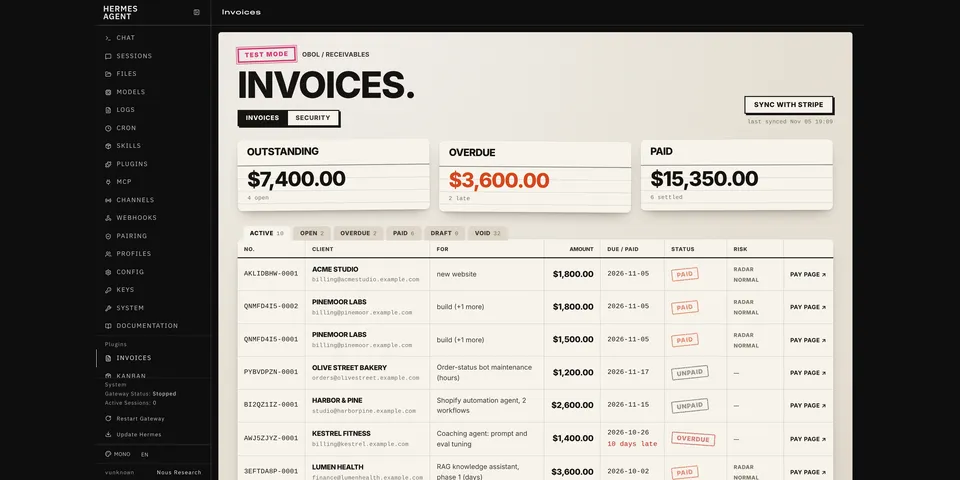
From its catalog listing
Safe invoicing for freelancers, consultants and agencies who bill clients, from any chat Hermes runs in (tested: Telegram, WhatsApp, Slack, email and the terminal). Hermes drafts invoices (also from forwarded messages via ctx.llm), sends them as Stripe payment links or as bank-transfer PDF invoices with no provider account, tracks who has paid, and adds Invoices and Security dashboard views plus /invoices in every chat. Every invoice write needs approval, with deterministic checks for prompt injection (a message can never choose the recipient), lookalike and impersonated client addresses, duplicates, unusual amounts and changed payout details; live keys are refused unless allowed, writes are refused in unattended runs, and the activity and security logs are hash-chained.
Good to know before installing
handles payments: in Stripe mode it calls api.stripe.com with your STRIPE_API_KEY (read through Hermes's secret route) and Stripe emails your clients when invoices are sent or reminded; live keys are refused unless you turn on allow_live, and in live mode the approval prompt warns that sending or reminding emails the real client; every invoice write asks for approval and writes are refused in cron runs; forwarded messages you ask it to draft from go to your configured model; bank-transfer mode makes no network calls and prints the bank details you enter in plugin settings (stored in config.yaml) on PDF invoices; data stays in plugin-data/obol/.
From its catalog listing.
How to install
- Install it. Hermes asks for any API keys it needs, then asks whether to turn it on.
hermes plugins install obol - Said no? Turn it on later:
hermes plugins enable obol - Restart Hermes so it loads the plugin.
Some plugins also need a sign-in or settings: see Full setup & settings. Memory plugins ask whether to become your memory provider instead. Steps follow the official plugins guide (opens in a new tab).
- Category
- Chat apps & voice
- Maintained by
- UEddy (Community)
- Needs
- No API keys declared
- Adds tools
obol_create_invoiceobol_send_invoiceobol_get_invoiceobol_list_invoicesobol_send_reminderobol_void_invoiceobol_mark_paidobol_draft_from_message- Adds hooks
pre_tool_call- Needs Hermes
- 0.22 or newer
- Version
- 0.1.1
- In the catalog
- 2026-11-07, updated 2026-11-09
Using the Hermes desktop app? See where plugins live

Full setup & settings ↗Source code ↗
More in chat apps & voice
New Hermes Agent updates every day on X. Follow @HermesWatcher