
Kanban Tenant Labels
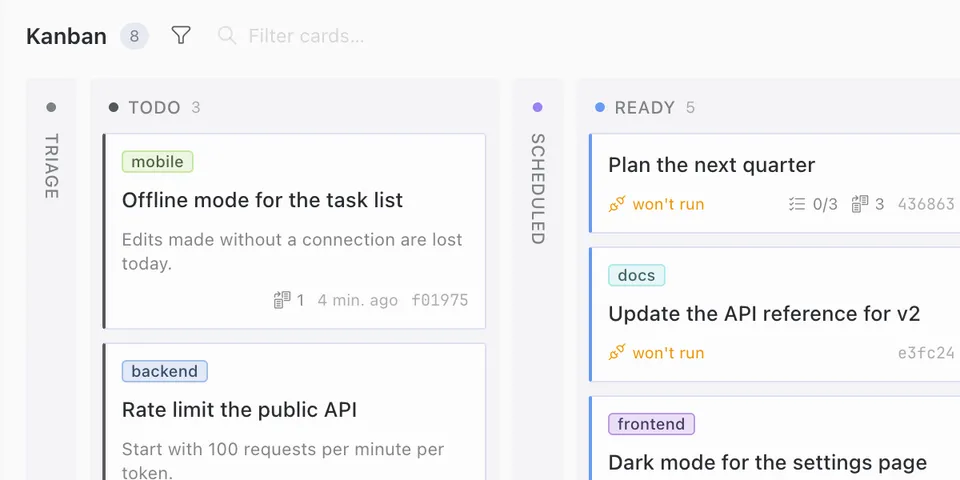
From its catalog listing
Shows each Kanban card's tenant as a colored label on the card in Hermes Desktop, with automatic colors and pinned colors in Settings.
Good to know before installing
the labels go through the Desktop SDK's Kanban card badge slot (KANBAN_CARD_AREAS.badges) and Desktop paints them; the plugin reads only what Desktop passes to its badge decorator (each card's tenant and the board's tenant list) and stores pinned colors in ctx.storage; no DOM writes, no query-cache reads, no network requests, no backend, no telemetry; no background timers, observers or listeners, only one 0 ms ctx.setTimeout that refreshes the settings page when a board's tenant list changes.
From its catalog listing.
How to install
- Install it. Hermes asks for any API keys it needs, then asks whether to turn it on.
hermes plugins install kanban-tenant-labels - Said no? Turn it on later:
hermes plugins enable kanban-tenant-labels - Restart Hermes so it loads the plugin.
Some plugins also need a sign-in or settings: see Full setup & settings. Memory plugins ask whether to become your memory provider instead. Steps follow the official plugins guide (opens in a new tab).
- Category
- Automation & multi-agent · Hermes Desktop add-ons
- Maintained by
- mszenfeld (Community)
- Needs
- No API keys declared
- Needs Hermes
- 0.22.6 or newer
- Version
- 0.4.0
- In the catalog
- 2026-11-10
Known issues (from its catalog listing)
- Desktop-only package: leave its Agent switch off. With the Agent half enabled, agent.log reports a missing __init__.py on every start.
Using the Hermes desktop app? See where plugins live

Full setup & settings ↗Source code ↗
More in automation & multi-agent
All automation & multi-agent plugins
New Hermes Agent updates every day on X. Follow @HermesWatcher