
Grok Bot Twin
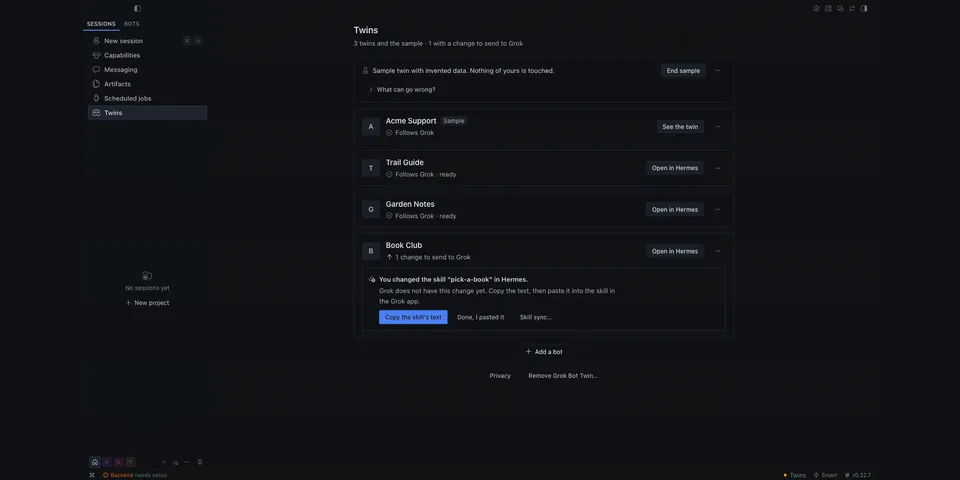
From its catalog listing
Try Hermes without leaving Grok. Gives each Grok desktop-app bot a Hermes twin profile and a Desktop Twins page (conflicts, restore points); `hermes twin demo` needs no Grok account. Name and description changes reach the twin in seconds; instructions are pasted by you or imported from the setup export the bot writes about itself (routines arrive paused, connectors as names only, its memories are dropped); skills travel through optional guided skill sync (a sync bot in your own Grok account); a bot's Grok memory and model setting are not copied. Several new twins are finished in one sheet: one model for all of them (model servers already set up in Hermes listed first) and each twin's instructions from its own setup export, picked up from Downloads, a dropped file or skill sync's shared folder; optionally Hermes does the Grok part with computer use, asking before every step. Optional and off by default: the same twins on your other Hermes computers (macOS, Linux, Windows), linked once with a short code, with settings that follow by a fixed allowlist, skills, routines and end-to-end-encrypted memory each behind its own switch, and requests from one of your computers to a twin on another. Unofficial; not affiliated with xAI.
Good to know before installing
Runs the user-installed external botport CLI (never bundled or downloaded; before it is ever run it is checked against the release SHA-256 digests shipped with the plugin or with `gh attestation verify` against hudsonwa/botport's release workflow, and its digest is pinned; `hermes twin setup --allow-unattested` is a recorded opt-out), plus `gh` (for that check only) and `hermes cron` (resume and pause on "Move routines to Hermes", create --paused when importing a setup export), each with a minimal environment; while the new-twins sheet watches for setup exports (at most 15 minutes, every 4 s) the plugin lists your Downloads folder (that folder only: names, dates, sizes) and reads new .json, .txt or .md files of at most 2 MB there and, with skill sync set up, in the shared folder's exports/ (nothing moved or deleted; only digests are kept); it writes the model you choose into each twin profile's config.yaml; via botport it reads the Grok desktop app's bot list and the selected bots' local transcript files (capped, parsed for routine changes only) and writes the twin Hermes profiles it manages; the plugin writes plugin-data/grok-bot-twin/, its own marked blocks in twin profiles' SOUL.md, plugins.enabled, a copy of itself and the allowlisted settings in each twin profile, a note per removed twin in profiles/.deleted/, and, only with their switches on, twins' skill files, memory files and cron jobs; botport keeps one owner-only key file per twin; it runs one background metadata-check/sync thread (default every 60 s) and one Grok-folder watch once a session starts, plus threads for the sharing features only while they are on; it sends no telemetry; it calls Hermes' internal skill scanner (tools.skills_guard, fail-open) for the demo's skill preview. An optional pre_tool_call hook is active only for 30 minutes after you start "Let Hermes do the Grok part" and tick that you approve each step: it makes Hermes ask before every computer_use step and refuses other apps, other chats and other typed text; pictures of the Grok window then go to that chat's model provider. Network: none unless you switch on sharing; then the computer with the Grok app listens on ONE private address (its Tailscale address, else its home-network address; never all interfaces or a public one; TCP 18777) and your linked computers connect only to that address; linking proves a one-time 12-character link code (SPEKE; the code never travels) and every later call and answer is signed with a per-computer key; plain HTTP, encrypted by Tailscale on Tailscale, readable but not forgeable on a plain home network, except a twin's memory, which the plugin encrypts end to end. Besides that, the plugin connects only to the model servers already set up in your default Hermes config.yaml, with one `GET <base_url>/models` each (at most 6, no key sent) when the new-twins sheet lists models; it never downloads a model (only `gh` reaches GitHub, for the attestation check). A request from another of your computers (off on each computer until switched on there) runs as one ordinary Hermes chat turn of that twin, under that computer's own approval rules; a step that needs approval waits on that computer unless you chose there to let your own linked computers approve. An optional background helper (a launchd agent, systemd user unit or scheduled task of your own account, set up with launchctl, systemctl or schtasks; never root or SYSTEM) keeps a linked computer following while Hermes is closed.
From its catalog listing.
How to install
- Install it. Hermes asks for any API keys it needs, then asks whether to turn it on.
hermes plugins install grok-bot-twin - Said no? Turn it on later:
hermes plugins enable grok-bot-twin - Restart Hermes so it loads the plugin.
Some plugins also need a sign-in or settings: see Full setup & settings. Memory plugins ask whether to become your memory provider instead. Steps follow the official plugins guide (opens in a new tab).
- Category
- Chat apps & voice
- Maintained by
- hudsonwa (Community)
- Needs
- No API keys declared
- Adds tools
twin_statustwin_recenttwin_ask_machine- Adds hooks
pre_llm_callon_session_starton_session_endpre_tool_call- Works on
- macos, linux, windows
- Needs Hermes
- 0.22.7 or newer
- Version
- 0.2.1
- In the catalog
- 2026-11-10, updated 2026-11-11
Known issues (from its catalog listing)
- Real twins need botport v0.2.1 on the Mac that has the Grok desktop app; you download it yourself (the Twins page opens the release file for your computer) and the plugin verifies it before it is run. Without it only the sample works. botport has no Windows build, so a Windows computer can link to your Mac but cannot share.
- Sharing between computers is signed, not encrypted by the plugin: on Tailscale it is encrypted by Tailscale; on a plain home network someone on that network can read twin names, descriptions and the settings that follow, the persona included (and skills, routines, and requests and answers, where you switched those on) but cannot change them. A twin's memory is the exception: the plugin encrypts it between the two computers.
- A linked computer finds the sharing one by the address in the link code. If a home-network address changes, unlink and link again (twins come back with their chats). Tailscale addresses do not change.
- From the Grok desktop app's local files, botport opens only the bot list and the selected bots' transcript files; those hold no instructions, skills, schedules or connections. Instructions are pasted by you or imported from the setup export the bot writes when you ask it (routines then arrive switched off, connections as names only); skills can travel through optional skill sync, whose Grok half was tested against botport in a pretend box with invented bots, not inside a Grok account; a bot's Grok memory and Grok model setting are not copied. Between your own computers skills and settings follow one way, from the Mac with the Grok app, and a connector must be set up on each computer (only its name follows).
- Staying up to date while Hermes is closed is a terminal command (`hermes twin background on`), not a button. The Twins page was clicked through on macOS only; Linux (Omarchy, no other distribution) and Windows were tested with the terminal commands.
- Finishing several twins at once was tested with invented bots and setup-export files, not inside a Grok account; whether a bot also saves its export into skill sync's shared folder when asked is not verified, so Downloads and drag and drop stay the default.
- Under plugins.isolation: host, Hermes skips plugin CLI commands, so `hermes twin` is unavailable; use `/twin` or the Twins page in Hermes Desktop.
Using the Hermes desktop app? See where plugins live

Full setup & settings ↗Source code ↗
More in chat apps & voice
New Hermes Agent updates every day on X. Follow @HermesWatcher