
Agenda Guardian
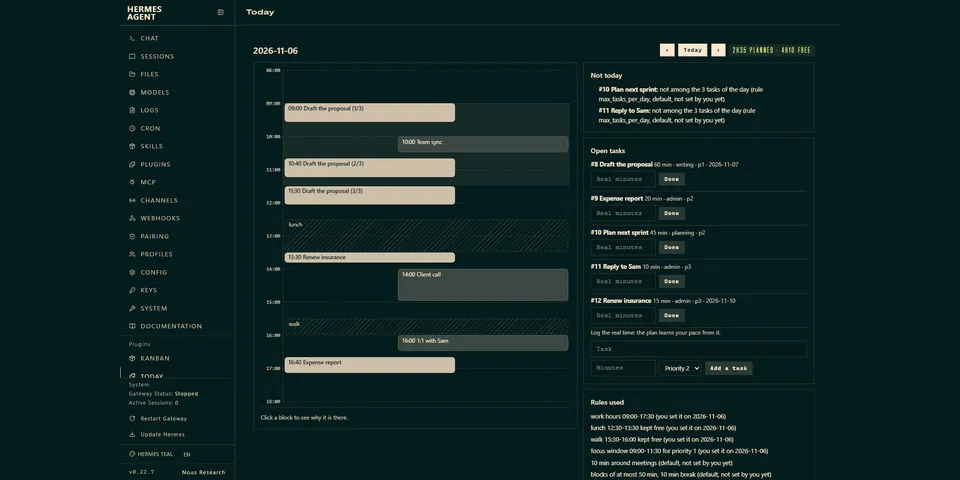
From its catalog listing
A day and week planner for people whose discipline cannot be the plan. You write your rules once (work hours, protected time, focus window, longest stretch, tasks per day), estimate each task, and report the real time when it is done: from the third finished task of a kind it multiplies your estimates by your own median error and says so. It places tasks in the free time around the meetings of any calendar source (the Google Workspace skill, an ICS file or URL, a JSON file, or any command that prints event JSON), every block states the rule it comes from, and a full day says what does not fit. Activities that are not tasks (sport, a long call, a daily course) are placed from the numbers you give: one activity, or a whole week in one request with each activity around the ones placed before it, with reasons read from eight weeks of your own calendar history (the history orders the days, the usually busy ones last, and never rules out a free day; a habit that stopped weeks ago counts for nothing), questions about what the calendar cannot show, and nothing written until you say yes. You just talk to it in your own words, in Telegram or any chat: there is no command syntax to learn, a missing length or time window is assumed from your work hours, said in the answer and settled by your yes or your correction, and never saved as if you had given it. Writing to a Google calendar is off until you type /day write on yourself; then it only adds events it marks as its own, only after a validated proposal, never edits an event, and can only remove the events it wrote. Blocks the agent composes from what you told it go through the same road (your yes, the marker, undo), and the system prompt forbids writing with any other tool. After a written session it asks how long it really took, so the next proposal follows your pace. Optional morning brief and block reminders run as two script-only cron jobs. Deterministic, no model call. English and French. Slash command, CLI, fifteen agent tools and a Today / Week dashboard tab.
Good to know before installing
no network by default; with an ICS URL it fetches that URL (https only, public addresses only, same-host redirects only, no proxy; an answer over 5 MB or cut short is an error, never an empty calendar); with the google or cmd source it runs the program you configure (no shell, 25 s timeout, a minimal environment: no provider key and no proxy variable; for the google source the program is the Google skill's script, started with the Python of the environment that holds the skill's libraries, or with the running one if that cannot start); the calendar source is set only by you, typed as /day set calendar=... or /day setup auto or through the CLI, and no agent tool can set it (google and none included); reads the calendar source you configure (event titles and times, for the next days and, when you ask for a proposal, the eight weeks before) and, for onboarding only, the timezone and language lines of config.yaml, whether the Google Workspace skill and its sign-in file exist (the file is never opened) and the name and schedule of your other cron jobs (prompts are not read); writes its own data folder (one SQLite file: rules, tasks, activity sheets, habits, proposals and the record of what it wrote), after /day cron on two small Python scripts in HERMES_HOME/scripts and two cron jobs named agenda-guardian-brief and agenda-guardian-nudge created through the cronjob_manage tool (the day_schedule tool refuses to create or remove them inside a cron run unless cron.allow_agent_scheduling is true), and, only after you typed /day write on and validated a proposal, new events (up to three per session) whose description carries a marker made of the word agenda-guardian, a colon and an event id between square brackets, created and removed through the Google Workspace skill's calendar create and calendar delete on the primary calendar (a deletion is refused unless the event id is in its own record and the marker is still on the event); registers one system-prompt section of rules for the agent (about 1,700 characters); registers two hooks: pre_gateway_dispatch, which looks at the text of each incoming chat message and acts on one case only, a message that starts with /day followed by anything but one of the format-free commands (help, list, tasks, plan, now, brief, nudge, ok, confirm, undo, write, cron) or a command that sets the calendar source (set calendar=..., setup auto), which it leaves to the command dispatcher, rewriting it into an ordinary request for the agent (it reads nothing else, stores nothing, never drops a message and does nothing on error), and pre_tool_call, which looks at the arguments of the terminal, execute_code, write_file and patch tools and, when a call plainly takes a road to the calendar source or to the plugin's own folders or database, asks Hermes to ask you first (inside a cron run it refuses; it reads no config and no file, never changes a call and does nothing on error; it is a convenience, not a security boundary); registers no middleware; no model calls; no stored credentials; no background process; no telemetry.
From its catalog listing.
How to install
- Install it. Hermes asks for any API keys it needs, then asks whether to turn it on.
hermes plugins install agenda-guardian - Said no? Turn it on later:
hermes plugins enable agenda-guardian - Restart Hermes so it loads the plugin.
Some plugins also need a sign-in or settings: see Full setup & settings. Memory plugins ask whether to become your memory provider instead. Steps follow the official plugins guide (opens in a new tab).
- Category
- Chat apps & voice · Security & privacy
- Maintained by
- Moodtuner997 (Community)
- Needs
- No API keys declared
- Adds tools
day_setupday_add_taskday_planday_doneday_tasksday_scheduleday_kindday_habitday_proposeday_confirmday_undoday_tookday_weekday_week_planday_stage- Adds hooks
pre_gateway_dispatchpre_tool_call- Works on
- linux, macos, windows
- Needs Hermes
- 0.22.7 or newer
- Version
- 0.5.4
- In the catalog
- 2026-11-09, updated 2026-11-19
Using the Hermes desktop app? See where plugins live

Full setup & settings ↗Source code ↗
More in chat apps & voice
New Hermes Agent updates every day on X. Follow @HermesWatcher