
TL;DR
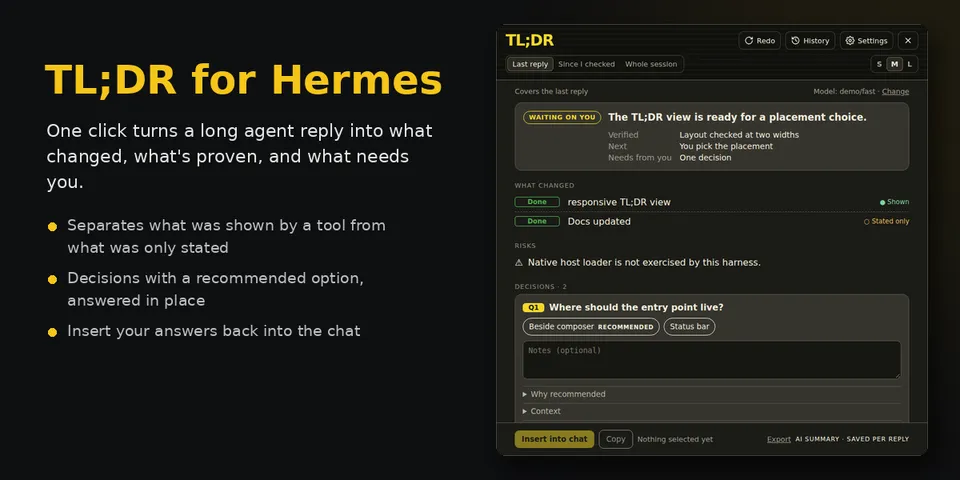
From its catalog listing
One-click summaries of long agent replies in Hermes Desktop. A card shows status first (Done, Blocked, Running, Waiting on you), what changed with each item marked Shown (backed by a tool step) or Stated only, risks, and the decisions the agent left you, with a recommended option and notes; Insert into chat drops your answers into the message box. Scope: last reply, since you last checked, or the whole session (with optional conflict warnings against earlier instructions); S/M/L length; per-reply history; reminders for skipped questions; optional automatic mode with a daily cap. Runs on its own auxiliary task (tldr_summary), so you can pick a cheap model in Models > Auxiliary without touching the chat model.
Good to know before installing
Sends the selected chat text, tool names with short argument previews (up to 160 characters, e.g. commands, paths, URLs) and your preferences note to the model assigned to its `tldr_summary` auxiliary task (Hermes' auxiliary routing, host-owned credentials), only on click or in the opt-in automatic mode (off by default, 30 per day cap); reads this profile's session database and config read-only; stores settings and answers in Desktop plugin storage; no shell, no credentials, no telemetry.
From its catalog listing.
How to install
- Install it. Hermes asks for any API keys it needs, then asks whether to turn it on.
hermes plugins install tldr - Said no? Turn it on later:
hermes plugins enable tldr - Restart Hermes so it loads the plugin.
Some plugins also need a sign-in or settings: see Full setup & settings. Memory plugins ask whether to become your memory provider instead. Steps follow the official plugins guide (opens in a new tab).
- Category
- Hermes Desktop add-ons
- Maintained by
- ShawnCRMer (Community)
- Needs
- No API keys declared
- Needs Hermes
- 0.23.0 or newer
- Version
- 6.0.0
- In the catalog
- 2026-11-10
Known issues (from its catalog listing)
- Needs Hermes Desktop; there is no CLI or TUI surface.
- Evidence labels mean a tool step backs a change, not that the result was correct; TL;DR does not see tool output.
Using the Hermes desktop app? See where plugins live

Full setup & settings ↗Source code ↗
More in hermes desktop add-ons
All hermes desktop add-ons plugins
New Hermes Agent updates every day on X. Follow @HermesWatcher