
Hermes Tether
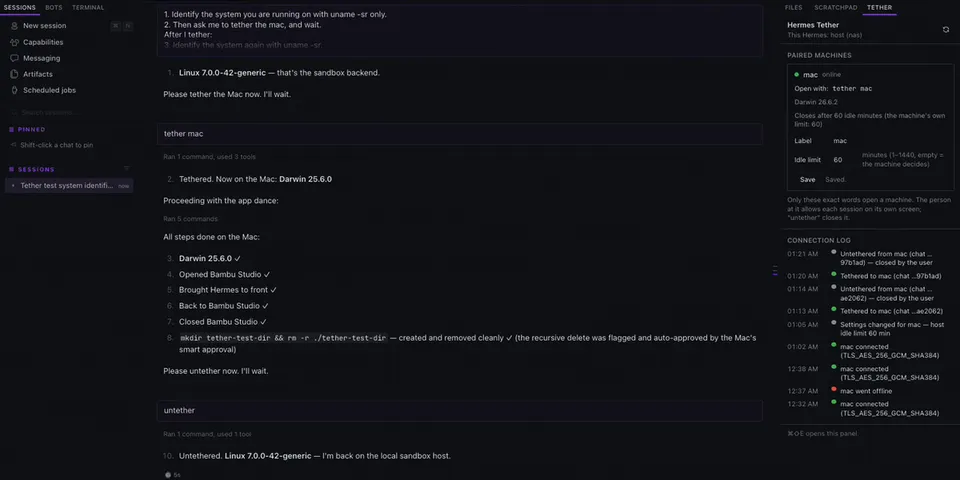
From its catalog listing
One Hermes agent, many machines: lends a remote Hermes agent the terminal, files, screen and apps of your paired desktop machines (macOS and Windows). Say 'tether <machine>' and the agent's terminal, file and computer-use tools act on that machine under its own Hermes rules and approvals; send 'untether' to bring them home. Each machine dials the host over a pinned, mutual TLS 1.3 link (256-bit suites only), and the person at the machine allows every session on its own screen before anything runs. Includes a Tether panel for Hermes Desktop (paired machines, labels, idle limits, connection log).
Good to know before installing
the host listens on the LAN or tailnet address you configure (default 127.0.0.1) and each paired device connects to it over pinned mutual TLS 1.3; no third-party services, no telemetry; while a machine is tethered, the host session's shell commands, file reads/writes and computer use run on that device after the person there allows the session, judged by the device's own Hermes rules (its hardline/deny floors always; commands the host's approval gate already passed skip the device's own approval prompts); skills opened during a tethered session are copied read-only into a per-session workspace on the device and removed when it closes; background tasks: the link listener (host), the device's connection, an idle sweeper and a settings watcher; stores one Ed25519 key per machine, encrypted at rest, with its passphrase in Hermes's secret store; adds a short per-turn note while a machine is tethered; reads private Hermes approval internals (tools.approval) and fails closed if they change.
From its catalog listing.
How to install
- Install it. Hermes asks for any API keys it needs, then asks whether to turn it on.
hermes plugins install tether - Said no? Turn it on later:
hermes plugins enable tether - Restart Hermes so it loads the plugin.
Some plugins also need a sign-in or settings: see Full setup & settings. Memory plugins ask whether to become your memory provider instead. Steps follow the official plugins guide (opens in a new tab).
- Category
- Hermes Desktop add-ons
- Maintained by
- Zek-Takai (Community)
- Needs
- No API keys declared
- Adds tools
devices- Adds hooks
pre_llm_callpost_llm_callpost_tool_calltransform_tool_result- Needs Hermes
- 0.23.0 or newer
- Version
- 0.1.0
- In the catalog
- 2026-11-11
Known issues (from its catalog listing)
- Devices must be macOS or Windows; the host must be macOS or Linux (it uses a POSIX file lock and Unix socket). On a device, Hermes must run in the signed-in desktop session so the consent prompt can appear.
- Computer use on the device needs the companion plugin tether_screen, installed by hand from plugin/tether_screen in the repository. Its validation stops at the capability probe exactly like Hermes's bundled computer-use plugin.
- Several Hermes Desktops connected to one backend share it: closing one ends the chat open in the other.
- 'untether' closes a connection only when it is sent as a message on its own.
Using the Hermes desktop app? See where plugins live

Full setup & settings ↗Source code ↗
More in hermes desktop add-ons
All hermes desktop add-ons plugins
New Hermes Agent updates every day on X. Follow @HermesWatcher