
Rich Paste
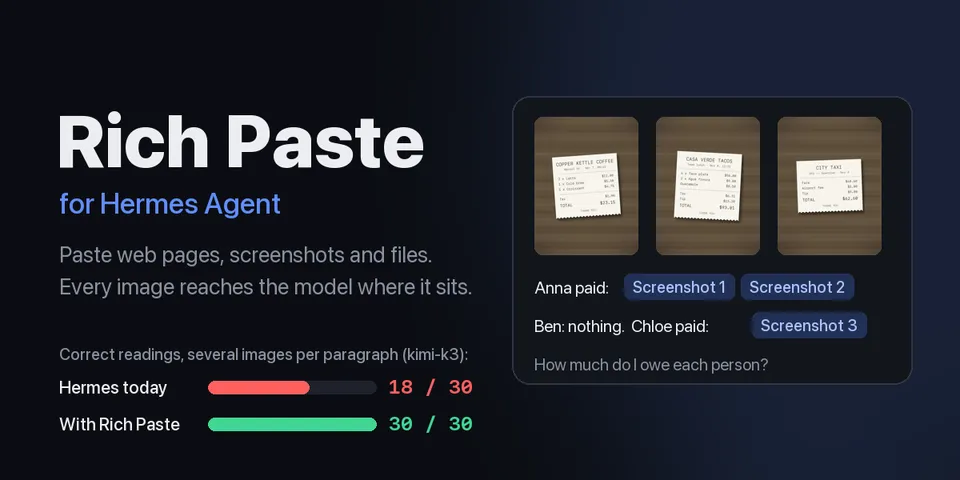
From its catalog listing
Paste web pages, screenshots and Finder files into Hermes Desktop with their structure, and send each image to the model where it sits in your text. Web HTML becomes Markdown (headings, links, lists, tables, code) with its images downloaded and attached; an llm_request middleware moves each image block next to its label instead of after all the text (kimi-k3, several images per paragraph: 18/30 today, 30/30 interleaved). Also: screenshot chips placed after what you typed, Finder files and folders as Desktop blocks, TIFF/HEIC/BMP/AVIF sent as PNG, pasted audio transcribed with Hermes's own STT, Markdown preview.
Good to know before installing
network calls only to download the images of pages you paste (http/https; loopback, private, link-local and reserved addresses refused on every redirect, except DNS answers in 198.18.0.0/15 for proxy fake-ip setups; the pasted page's URL is sent as Referer; at most 50 images per paste and 20 MB each); no telemetry. Runs /usr/bin/osascript once per file paste to read file URLs on the macOS clipboard. Reads image attachments you add (hashes them, converts TIFF/HEIC/BMP/AVIF to PNG) and Desktop's saved long-paste files. Writes only under its cache folder. Pasted audio is transcribed with Hermes's own STT, which uploads it to your configured cloud STT provider when one is set (the plugin asks first). An llm_request middleware reorders the image blocks of every user message that carries its markers in the outgoing request.
From its catalog listing.
How to install
- Install it. Hermes asks for any API keys it needs, then asks whether to turn it on.
hermes plugins install rich-paste - Said no? Turn it on later:
hermes plugins enable rich-paste - Restart Hermes so it loads the plugin.
Some plugins also need a sign-in or settings: see Full setup & settings. Memory plugins ask whether to become your memory provider instead. Steps follow the official plugins guide (opens in a new tab).
- Category
- Hermes Desktop add-ons
- Maintained by
- ZhenningLang (Community)
- Needs
- No API keys declared
- Needs Hermes
- 0.23.0 or newer
- Version
- 0.2.1
- In the catalog
- 2026-11-10
Known issues (from its catalog listing)
- Tested on macOS only. Pasting Finder files needs macOS; elsewhere, drag files into the composer.
Using the Hermes desktop app? See where plugins live

Full setup & settings ↗Source code ↗
More in hermes desktop add-ons
All hermes desktop add-ons plugins
New Hermes Agent updates every day on X. Follow @HermesWatcher