
Rehearse
From its catalog listing
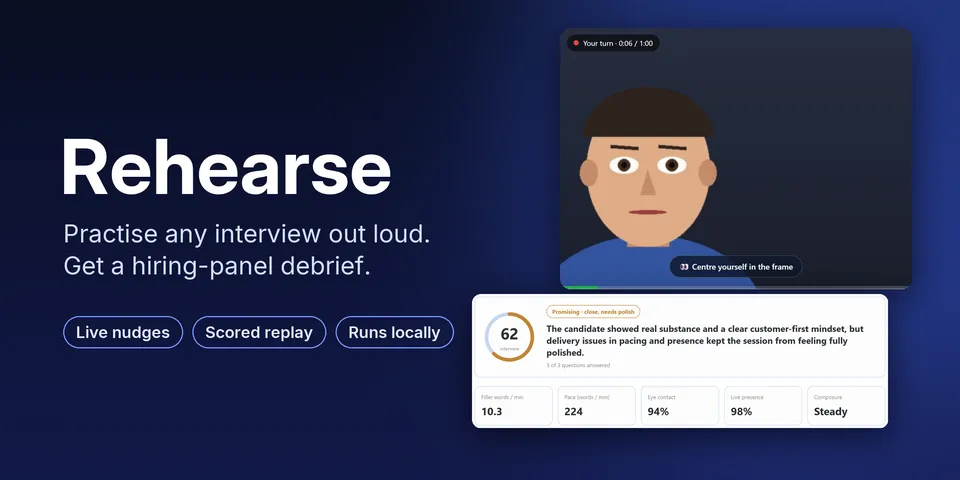
Practise any interview or talk out loud: job, technical, case, admission, visa, medical, media and podcast interviews, presentations, investor and sales pitches, product demos, thesis defences and speeches. Hermes asks realistic questions aloud in a natural voice (Hermes's own text-to-speech), you answer on camera on a Desktop page (or by microphone alone, or upload a recording), and you get a scored replay: filler words, pace, pauses, answer length and eye contact on a clickable timeline, plus content feedback with a stronger-answer outline built only from what you said; retries report the points gained. Full interview mode runs it live: the interviewer asks each question aloud, recording starts when it finishes, live nudges appear while you answer (facing, framing, distance, light), and the session ends with a hiring-panel debrief across every answer. /rehearse and three tools bring the same coaching to any chat, answering by text or voice note.
Good to know before installing
uses the camera and microphone only while the practice screen is open (about once a second a small frame is checked locally for the live nudges); speech-to-text (faster-whisper) and eye-contact analysis (OpenCV YuNet face landmarks plus pupil position) run locally and no audio or video leaves the computer; each answer's transcript goes to the user's configured model through ctx.llm for questions and feedback; one-time downloads from official sources: the faster-whisper speech model from Hugging Face and the 230 KB YuNet model from opencv/opencv_zoo at a pinned commit, verified by SHA-256 before use; stores sessions, scores and recordings under HERMES_HOME/plugin-data/rehearse (deletable from the page; keep_recordings: false deletes each take after scoring; unused uploads are removed after a day); adds /api/plugins/rehearse/ routes (upload, page calls) behind the dashboard's authentication; no shell commands, no background process beyond analysing a take just recorded, no network service or telemetry of its own; never coaches anyone to misrepresent facts.
From its catalog listing.
How to install
- Install it. Hermes asks for any API keys it needs, then asks whether to turn it on.
hermes plugins install rehearse - Said no? Turn it on later:
hermes plugins enable rehearse - Restart Hermes so it loads the plugin.
Some plugins also need a sign-in or settings: see Full setup & settings. Memory plugins ask whether to become your memory provider instead. Steps follow the official plugins guide (opens in a new tab).
- Category
- Everyday life & fun · Hermes Desktop add-ons
- Maintained by
- flamiinngo (Community)
- Needs
- No API keys declared
- Adds tools
rehearse_startrehearse_analyzerehearse_progress- Works on
- linux, macos, windows
- Needs Hermes
- 0.23.0 or newer
- Version
- 0.2.0
- In the catalog
- 2026-11-09, updated 2026-11-10
Known issues (from its catalog listing)
- Windows on ARM gets content feedback only: faster-whisper has no build there, as for Hermes's own local speech-to-text.
Using the Hermes desktop app? See where plugins live

Full setup & settings ↗Source code ↗
More in everyday life & fun
All everyday life & fun plugins
New Hermes Agent updates every day on X. Follow @HermesWatcher