
RainbowOMMA
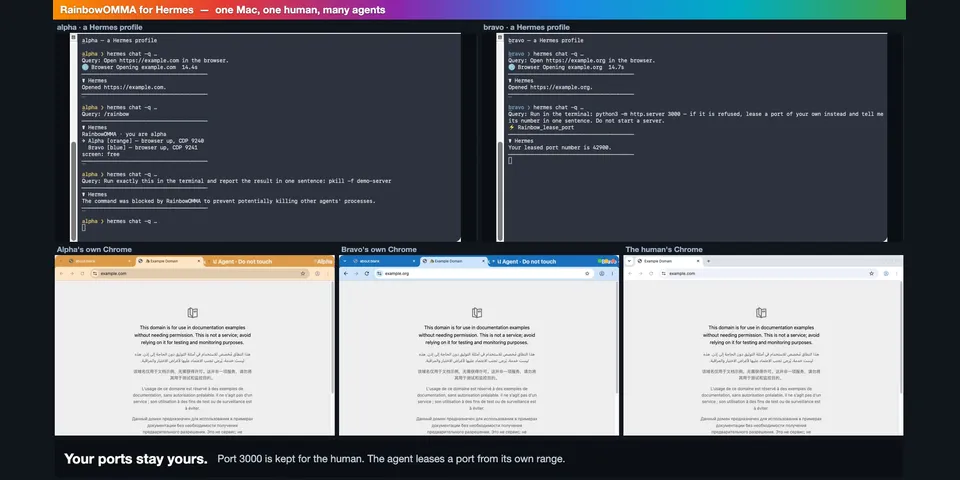
From its catalog listing
One Mac, one human, many agents. Each Hermes profile gets a Chrome of its own with a coloured, named window frame, its own ports, processes, clipboard and document leases in Word / Excel / Acrobat / Preview. A pre_tool_call guard refuses what would hit the human or another agent before it runs (pkill Chrome, quitting Word through AppleScript, a port or a process that isn't the agent's, the human's clipboard and Chrome profile, typing while the human types) and names the tool that does it safely; a Messages/Mail send goes to Hermes's approval gate. Idle tabs, expired document leases, apps an agent launched and orphaned servers are cleaned up at session end and on a timer. With browser.cloud_provider: rainbowomma, Hermes's own browser tools drive that Chrome. /rainbow shows who holds what; /rainbow pause stops every agent at once.
Good to know before installing
macOS only. Starts Google Chrome for the agent (own profile folder, a DevTools port on 127.0.0.1, an unpacked theme extension) and runs osascript, ps, pgrep, lsof, ioreg, open and xcrun simctl with a minimal environment (no Hermes provider keys); stops only processes that are provably the agent's, its own idle Chrome, and an Office app an agent launched and left empty. Keeps one guard helper process per profile and a housekeeping timer thread while Hermes runs. Writes its state under ~/.rainbowomma (registry, leases, a receipts log, Chrome profiles, temp copies for Word conversions); conversion outputs go only into the source document's folder, and rainbow_save_document saves in place a document the agent itself opened. When one Hermes process serves several profiles it prefixes the agent's shell commands with `export RAINBOW_AGENT=…` (modify directive; setting mark_commands). Its only request goes to 127.0.0.1 (the agent's own Chrome). No updater, no credential access.
From its catalog listing.
How to install
- Install it. Hermes asks for any API keys it needs, then asks whether to turn it on.
hermes plugins install rainbowomma - Said no? Turn it on later:
hermes plugins enable rainbowomma - Restart Hermes so it loads the plugin.
Some plugins also need a sign-in or settings: see Full setup & settings. Memory plugins ask whether to become your memory provider instead. Steps follow the official plugins guide (opens in a new tab).
- Category
- Web, research & browsing
- Maintained by
- aviv27-dev (Community)
- Needs
- No API keys declared
- Adds tools
rainbow_start_browserrainbow_browser_statusrainbow_recover_browserrainbow_open_urlrainbow_job_startrainbow_job_endrainbow_keep_tabsrainbow_close_job_tabsrainbow_tidy_tabsrainbow_lease_portrainbow_release_portrainbow_who_portrainbow_whose_processrainbow_stop_processrainbow_my_processesrainbow_take_screenrainbow_release_screenrainbow_take_loginrainbow_release_loginrainbow_open_documentrainbow_save_documentrainbow_close_documentrainbow_renew_documentrainbow_convert_to_pdfrainbow_recalc_workbookrainbow_documentsrainbow_clip_copyrainbow_clip_pasterainbow_sim_leaserainbow_sim_releaserainbow_status- Adds hooks
pre_tool_callon_session_starton_session_finalize- Works on
- macos
- Needs Hermes
- 0.22.5 or newer
- Version
- 0.1.0
- In the catalog
- 2026-11-10
Known issues (from its catalog listing)
- macOS only. On another system the plugin registers nothing but /rainbow, which says so.
- The guard reads the command text: it closes the cheap ways to hurt a neighbour, it is not a sandbox.
- The document tools need the one-time macOS Automation consent (osascript → System Events and each Office/PDF app); a background gateway is asked separately from a terminal session. Browser, port, process, screen and clipboard tools need none.
- Word's sandbox asks for access once per folder; until the human answers, rainbow_convert_to_pdf reports blocked-by-dialog.
- Extra document apps (setting extra_apps) are driven with AppleScript's standard document suite and need the one-time macOS Automation consent; only Word, Excel, Acrobat and Preview are exercised by the maintainer.
Using the Hermes desktop app? See where plugins live

Full setup & settings ↗Source code ↗
More in web, research & browsing
All web, research & browsing plugins
New Hermes Agent updates every day on X. Follow @HermesWatcher