
Limits
From its catalog listing
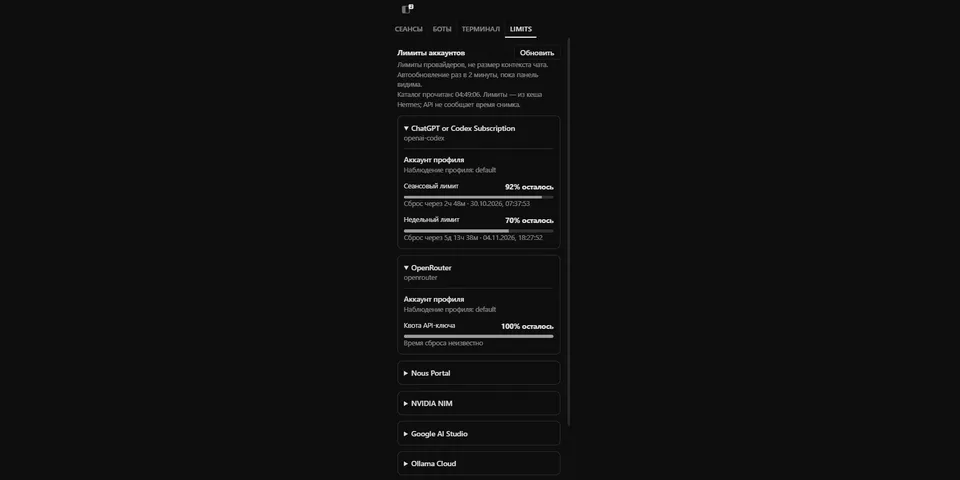
Read-only Hermes Desktop quota pane showing provider allowance windows exposed by Hermes across reachable profiles. It uses the public Hermes RPC surface and deliberately avoids direct vendor usage endpoints and credential-file access.
How to install
- Install it. Hermes asks for any API keys it needs, then asks whether to turn it on.
hermes plugins install limits-monitor - Said no? Turn it on later:
hermes plugins enable limits-monitor - Restart Hermes so it loads the plugin.
Some plugins also need a sign-in or settings: see Full setup & settings. Memory plugins ask whether to become your memory provider instead. Steps follow the official plugins guide (opens in a new tab).
- Category
- Security & privacy · Hermes Desktop add-ons
- Maintained by
- zzhan1q (Community)
- Needs
- No API keys declared
- Needs Hermes
- 0.22.5 or newer
- Version
- 0.1.0
- In the catalog
- 2026-11-02
Using the Hermes desktop app? See where plugins live

Full setup & settings ↗Source code ↗
More in security & privacy
All security & privacy plugins
New Hermes Agent updates every day on X. Follow @HermesWatcher