
Learning Workbench
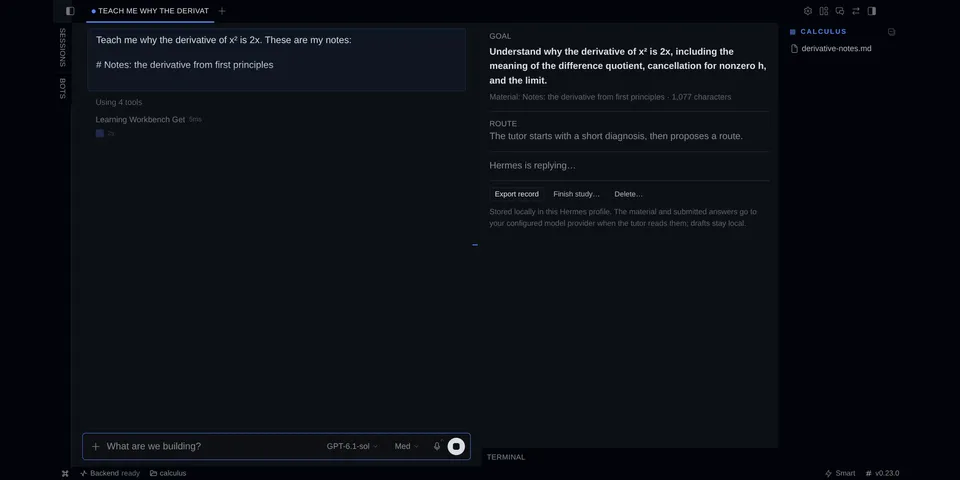
From its catalog listing
Study with Hermes in a Desktop pane: a short diagnosis, a route of 2–7 steps you can rename or skip, then one lesson and exercise at a time, answered in your own words. The plugin keeps the record honest: answer keys, rubrics and hints are frozen before you answer, only you can submit an attempt (the agent's six tools propose and read), every check must quote your words and the quote is verified, and each attempt is labelled unaided, after feedback, after hints, after help in chat or after a revealed solution. Drafts and attempts survive restarts and compaction, a contest keeps the earlier verdict, and a study exports as a Markdown record. /study covers the CLI and messaging.
Good to know before installing
studies are stored locally in $HERMES_HOME/plugin-data/learning-workbench/ (SQLite) until you delete them, including after uninstall; while an exercise is open in a chat, the pre_llm_call hook adds a short reminder with that exercise's question to the turn's user message and records that the turn happened (not its text); chats without an open exercise are untouched. No network calls of its own, no credentials, no shell commands, no background processes, no telemetry. Verdicts use the user's configured model.
From its catalog listing.
How to install
- Install it. Hermes asks for any API keys it needs, then asks whether to turn it on.
hermes plugins install learning-workbench - Said no? Turn it on later:
hermes plugins enable learning-workbench - Restart Hermes so it loads the plugin.
Some plugins also need a sign-in or settings: see Full setup & settings. Memory plugins ask whether to become your memory provider instead. Steps follow the official plugins guide (opens in a new tab).
- Category
- Hermes Desktop add-ons
- Maintained by
- alfredbirkelund (Community)
- Needs
- No API keys declared
- Adds tools
learning_workbench_startlearning_workbench_getlearning_workbench_propose_planlearning_workbench_propose_exerciselearning_workbench_assesslearning_workbench_revise_reference- Adds hooks
post_compactionpre_llm_call- Needs Hermes
- 0.23.0 or newer
- Version
- 0.2.0
- In the catalog
- 2026-11-09
Known issues (from its catalog listing)
- The Desktop pane is opt-in: after installing, turn it on under Capabilities → Plugins → Learning Workbench.
- Verdicts come from your configured model. They are proposals, not grades; contest any you disagree with.
Using the Hermes desktop app? See where plugins live

Full setup & settings ↗Source code ↗
More in hermes desktop add-ons
All hermes desktop add-ons plugins
New Hermes Agent updates every day on X. Follow @HermesWatcher