
HermesFord
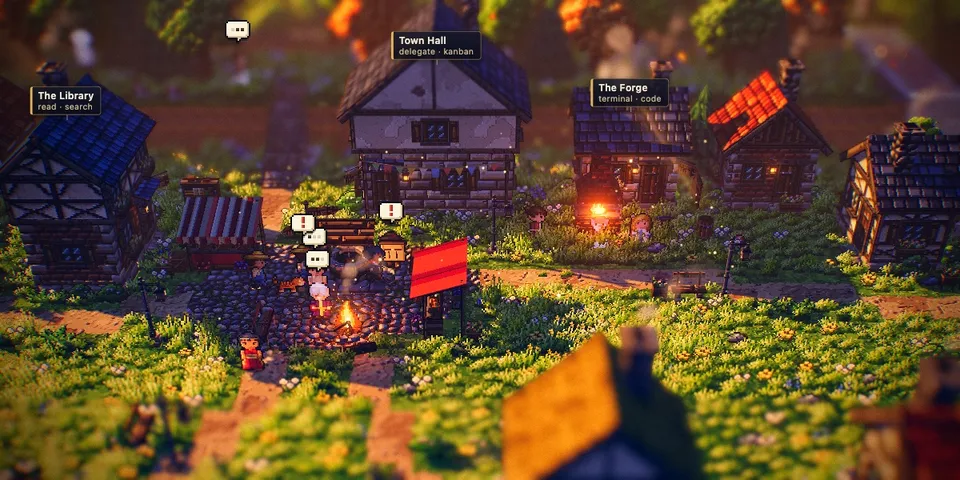
From its catalog listing
An HD-2D pixel-art village page for Hermes Desktop: every chat is a villager who walks to the forge, library, woods or town hall depending on the tool its agent is running, waits at the town hall when the chat needs you, and goes home to sleep when the chat is not active. Click a villager to open its chat. Built on the Luminati engine (MIT). Desktop-only (desktop/plugin.js inside the plugin SDK surface, read-only session.list / session.active_list polling every 3 s); no agent tools, hooks, middleware, env vars or network calls.
How to install
- Install it. Hermes asks for any API keys it needs, then asks whether to turn it on.
hermes plugins install hermesford - Said no? Turn it on later:
hermes plugins enable hermesford - Restart Hermes so it loads the plugin.
Some plugins also need a sign-in or settings: see Full setup & settings. Memory plugins ask whether to become your memory provider instead. Steps follow the official plugins guide (opens in a new tab).
- Category
- Everyday life & fun · Hermes Desktop add-ons
- Maintained by
- XpycT (Community)
- Needs
- No API keys declared
- Needs Hermes
- 0.22.5 or newer
- Version
- 1.0.0
- In the catalog
- 2026-11-05
- GitHub stars
- 3
Using the Hermes desktop app? See where plugins live

Full setup & settings ↗Source code ↗
More in everyday life & fun
All everyday life & fun plugins
New Hermes Agent updates every day on X. Follow @HermesWatcher