
Hermes VNC
From its catalog listing
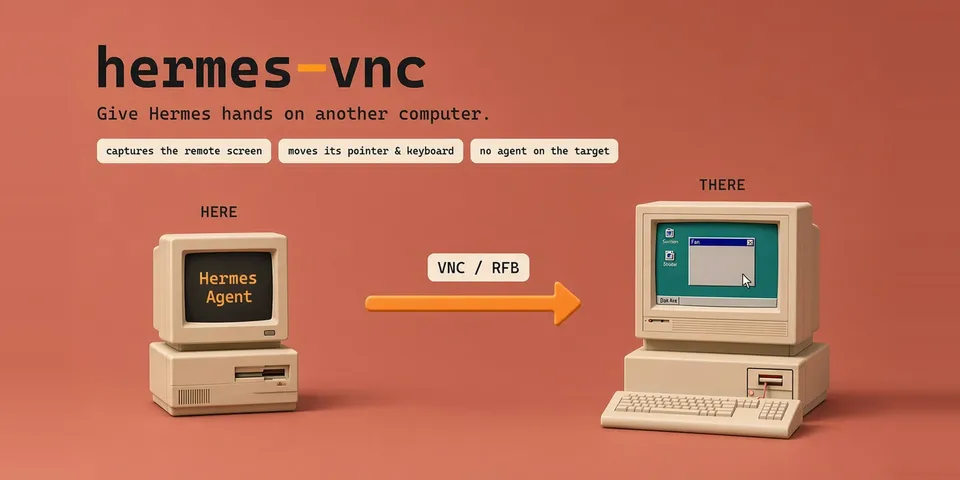
Computer-use backend that drives any machine reachable over VNC (RFB): the stock computer_use tool captures the remote screen and moves that machine's mouse and keyboard, so the agent can work on a second computer, a lab box or a cloud desktop with no Hermes process running on it. Select it with computer_use.backend: hermes-vnc and point computer_use.vnc.host at the target. VNC carries pixels only, so the backend runs in the screenshot lane: capture returns a PNG and no accessibility elements, element-addressed actions (click-by-element, focus_app, set_value) report unsupported_action instead of guessing, and list_apps / list_windows return empty lists rather than inventing an inventory. capture_max_width downscales each capture — vision tokens scale with the image's area, so this is the one setting that changes what a screenshot costs (measured 1920 -> 786 estimated tokens at 1024 wide on a 1600x900 desktop). It also ships an optional desktop pane that shows the remote screen while the agent works — off by default, a viewer that opens its own read-only connection and never sends input.
Good to know before installing
connects only to the VNC server you configure (host and port) and sends it screenshots and input; RFB traffic (screen pixels, keystrokes, clipboard text) is unencrypted, so use it over a private network or an SSH tunnel; the one credential is the VNC password, read from the variable named by password_env through Hermes's secret scope and never written or logged; computer_use.vnc.host/port can also be overridden by the HERMES_VNC_HOST / HERMES_VNC_PORT / HERMES_VNC_PASSWORD_ENV process environment variables; no shell, no files written, no telemetry; one daemon thread runs Twisted's reactor, started on first connect and deliberately never stopped because the reactor is process-wide and cannot be restarted; the optional desktop live-view pane (off by default) opens a second read-only VNC connection served through the plugin's dashboard route; one dependency (vncdotool>=1.2,<2).
From its catalog listing.
How to install
- Install it. Hermes asks for any API keys it needs, then asks whether to turn it on.
hermes plugins install hermes-vnc - Said no? Turn it on later:
hermes plugins enable hermes-vnc - Restart Hermes so it loads the plugin.
Some plugins also need a sign-in or settings: see Full setup & settings. Memory plugins ask whether to become your memory provider instead. Steps follow the official plugins guide (opens in a new tab).
- Category
- Hermes Desktop add-ons
- Maintained by
- YAN-XBT (Community)
- Needs
- No API keys declared
- Works on
- linux, macos, windows
- Needs Hermes
- 0.23.0 or newer
- Version
- 0.2.5
- In the catalog
- 2026-11-11
Known issues (from its catalog listing)
- Needs a VNC server on the machine you want to drive (TightVNC, UltraVNC, TigerVNC, x11vnc, macOS Screen Sharing, or a cloud VM's VNC endpoint). Nothing is installed on the target beyond that.
- Enable the plugin, do not just install it: python_dependencies are installed by `hermes plugins enable hermes-vnc`, and enabling builds a new pm environment that an already-running gateway or CLI does not switch to. Install, enable, then restart the host — otherwise the tool reports vncdotool is not installed even though the environment now has it.
- Pixels only: RFB has no accessibility tree, so every action is by coordinate; focus_app, set_value and click-by-element answer unsupported_action, while list_apps and list_windows return empty lists rather than inventing an inventory.
- Typing covers printable ASCII; text outside Latin-1 (Cyrillic, Greek, CJK) is refused with unsupported_text, because RFB's cut-text message is Latin-1.
- capture_max_width trades click precision for tokens: click coordinates stay in native desktop space, so a downscaled frame makes the model multiply what it reads off the image. Native (0) is the default.
- The optional live view holds a second RFB connection, so the target must accept more than one viewer at a time — x11vnc -shared, TightVNC, UltraVNC and macOS Screen Sharing do by default. Frame rate is set by the round trip: measured ~100 ms per frame (9.7 fps) against a local server, ~1.1 s (0.9 fps) over an SSH tunnel to a cloud host. Do not enable x11vnc -ncache with it: that measured 11-23 s per frame, twenty times worse.
- Authentication is none / VNC password / Apple ARD (Diffie-Hellman) — the three a desktop server realistically asks for, macOS Screen Sharing included. A server offering only another type is refused with its own list of security types in the message, rather than hanging.
- The framebuffer size is whatever the target reports, read on every capture and never cached: TigerVNC 1.13.1's Xvnc returned 675x800 on the first frame of a fresh connection and 1280x800 afterwards, and both were reported as they came.
Using the Hermes desktop app? See where plugins live

Full setup & settings ↗Source code ↗
More in hermes desktop add-ons
All hermes desktop add-ons plugins
New Hermes Agent updates every day on X. Follow @HermesWatcher