
StudioTwin
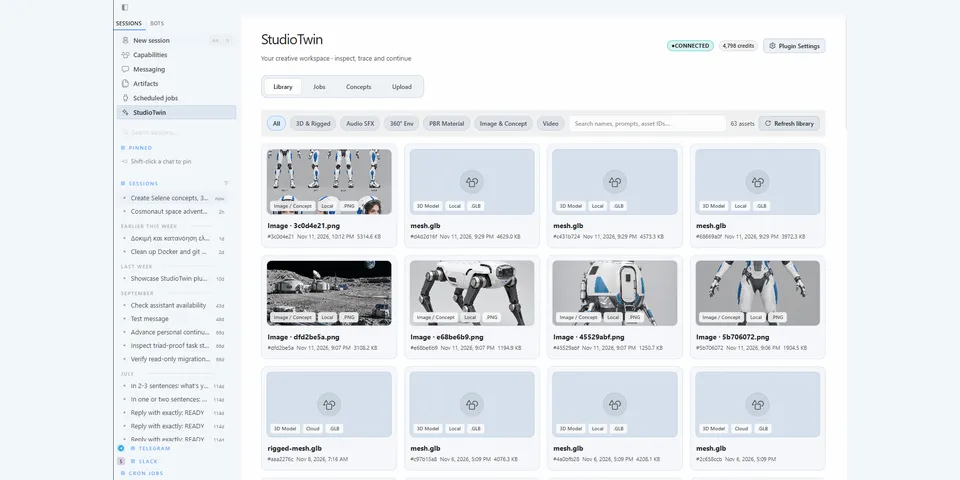
From its catalog listing
StudioTwin cloud images, environments, PBR materials, meshes, rigs, motion, sound effects and Concepts via remote MCP, with an optional Desktop media workspace.
Good to know before installing
Sends prompts and any media you upload to StudioTwin (api.studiotwin.ai; uploads and downloads via StudioTwin's Amazon S3 and assets.studiotwin.ai) with your StudioTwin API key, and StudioTwin passes jobs to its own model providers. Generation spends StudioTwin wallet credits with no plugin spend cap; paid, upload, cancel and delete tools go through Hermes approval. The optional Desktop backend can read media-type files anywhere in your home folder (except hidden folders) for its viewers and stores downloads in its plugin-data folder. The optional local helper scripts run Blender, ffmpeg and headless Chromium with its sandbox disabled, and on first preview download three.js 0.180.0 from npm (integrity-checked).
From its catalog listing.
How to install
- Install it. Hermes asks for any API keys it needs (this one needs
STUDIOTWIN_API_KEY), then asks whether to turn it on.hermes plugins install hermes-studiotwin - Said no? Turn it on later:
hermes plugins enable hermes-studiotwin - Restart Hermes so it loads the plugin.
Some plugins also need a sign-in or settings: see Full setup & settings. Memory plugins ask whether to become your memory provider instead. Steps follow the official plugins guide (opens in a new tab).
- Category
- Work & business · Hermes Desktop add-ons
- Maintained by
- realtwin (Community)
- Needs
STUDIOTWIN_API_KEYAPI key- Needs Hermes
- 0.23.1 or newer
- Version
- 1.0.0
- In the catalog
- 2026-11-12
Known issues (from its catalog listing)
- A StudioTwin account, API key and wallet credits are required for cloud generation; prompts and authorized input media are sent to StudioTwin and its selected providers.
- Paid tools use Hermes native approval. Obtain a fresh estimate for variable costs; the plugin imposes no session spend cap.
- Full Desktop UI requires compatible Hermes SDK surfaces and separate Desktop enablement; remote setups need the UI installed on the client and the package and key on the backend.
- Optional local processing requires backend-local Blender 4.2+, ffmpeg/ffprobe, or Node.js 22+ and Chrome/Chromium as applicable; render helpers disable Chromium's sandbox, so use trusted inputs or a separately isolated environment.
Using the Hermes desktop app? See where plugins live

Full setup & settings ↗Source code ↗
More in work & business
New Hermes Agent updates every day on X. Follow @HermesWatcher