
Hermes Sanctuary
From its catalog listing
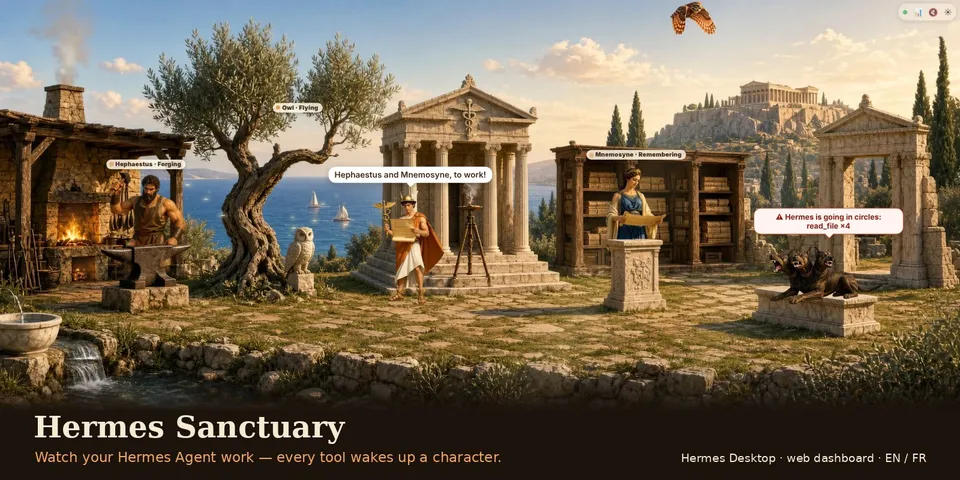
Watch your Hermes Agent work: five animated characters wake up when Hermes uses their tools, in two illustrated worlds (Olympus by default, the Clearing), in Hermes Desktop and the web dashboard, in English or French. The guard barks, with a bubble saying why, on tool and provider errors, silent fallbacks to a backup model, loops (same tool, same arguments, 4 times in a turn), heavy turns, a daily budget overrun and permissions waiting for an answer; a daily journal shows turns, tools, where the work came from, tokens and estimated cost per model hour by hour, with a shareable image of the day and a sped-up replay.
Good to know before installing
observer hooks only (they never block, change or answer anything); records tool names, turn times, platform and scheduled-task names, counters, model names with token counts, the short description Hermes gives for a pending approval (never the command) and one-letter event codes with their time for the replay (never messages, arguments, results, error texts, file paths or ids) under plugin-data/hermes-sanctuary/, files older than 2 days removed; a hash of each tool call is kept in memory for the current turn only to spot loops; read-only dashboard routes serve that activity and the plugin's own theme and images; cost is estimated with Hermes's own agent.usage_pricing module (a private import the validator may warn on); no network calls of its own, no shell commands, no background process, no secrets or .env access, no telemetry and no self-updater; the panorama runs in a sandboxed frame that receives everything by postMessage; Hermes Desktop may show native notifications (at most one per kind every 2 minutes); the daily budget is stored by Hermes Desktop or the browser.
From its catalog listing.
How to install
- Install it. Hermes asks for any API keys it needs, then asks whether to turn it on.
hermes plugins install hermes-sanctuary - Said no? Turn it on later:
hermes plugins enable hermes-sanctuary - Restart Hermes so it loads the plugin.
Some plugins also need a sign-in or settings: see Full setup & settings. Memory plugins ask whether to become your memory provider instead. Steps follow the official plugins guide (opens in a new tab).
- Category
- Everyday life & fun · Hermes Desktop add-ons
- Maintained by
- Med34000 (Community)
- Needs
- No API keys declared
- Adds hooks
pre_tool_callpost_tool_callpre_llm_callpost_llm_callon_session_endpost_api_requestapi_request_errorpre_approval_requestpost_approval_responsesubagent_startsubagent_stop- Needs Hermes
- 0.22.5 or newer
- Version
- 2.7.3
- In the catalog
- 2026-11-07
Known issues (from its catalog listing)
- Hermes Desktop connected to a remote Hermes does not install the pane by itself: use Capabilities, Plugins, Install from Git with Med34000/hermes-sanctuary/hermes-sanctuary (Force reinstall if the plugin is already on the server), then quit and reopen the app.
Using the Hermes desktop app? See where plugins live

Full setup & settings ↗Source code ↗
More in everyday life & fun
All everyday life & fun plugins
New Hermes Agent updates every day on X. Follow @HermesWatcher