
Ghost Run
From its catalog listing
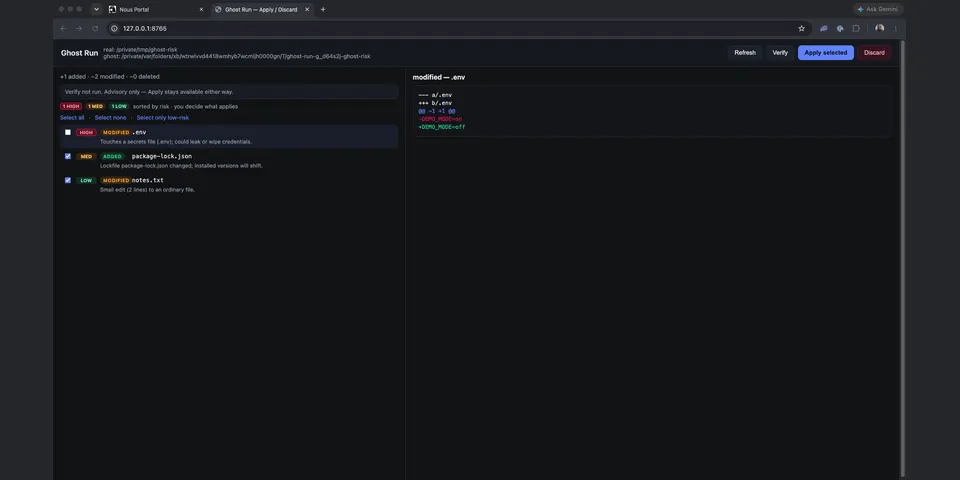
Dry-run mode for Hermes Agent. With /ghost on, file writes, patches, deletes and terminal commands are redirected into a throwaway copy of the working folder, and network-touching tools and commands are blocked. Review the diff in the system browser (hermes ghost ui; the Desktop pane only opens that page), then optionally run one configured Verify command in the ghost (Pass/Fail banner; Apply stays human), then apply selected paths or discard. Commands: /ghost on|off|status|verify; hermes ghost diff|apply|discard|ui|verify.
Good to know before installing
copies the working folder into a temp sandbox (reflink, then copy; never a hard link) and runs the agent's terminal commands on the host with the working directory set to that copy; only literal absolute paths under the real folder are rewritten, so a command naming ~, $HOME or another absolute path still acts on the real disk, and MCP or other plugin tools are not redirected; Ghost Mode is process-wide, so in a gateway it covers every chat in that process; writes session state under the Hermes home from hermes_constants.get_hermes_home() (then HERMES_HOME, then ~/.hermes), in ghost-run/; "apply" writes the chosen changes back to the real folder only after a person presses Apply or runs /ghost apply, and that copy does not pass through Hermes' file-write denylist; /ghost apply and hermes ghost apply with no paths apply every current change and can copy a named path that is in the ghost tree even if it is not in the diff; the review page never auto-ticks HIGH-risk files and asks to confirm any it names; hermes ghost ui binds 127.0.0.1 only, checks Host, requires a per-session token sent in the X-Ghost-Run-Token header (query-string tokens are ignored), sends no CORS headers, and POST /api/apply accepts only a non-empty list of paths that are all in the current diff; Verify runs one command taken from GHOST_RUN_TEST or the project's .ghost-run-test on the host inside the ghost copy, only after you approve that project and exact command, with provider keys stripped from its environment; opt-in outbound only: with GHOST_RUN_AI=1, pending diffs go to your Hermes provider through ctx.llm.complete, or, if that is unavailable, to openrouter.ai using OPENROUTER_API_KEY read only via agent.secret_scope.get_secret; off by default, no credentials stored by the plugin, no telemetry.
From its catalog listing.
How to install
- Install it. Hermes asks for any API keys it needs, then asks whether to turn it on.
hermes plugins install ghost-run - Said no? Turn it on later:
hermes plugins enable ghost-run - Restart Hermes so it loads the plugin.
Some plugins also need a sign-in or settings: see Full setup & settings. Memory plugins ask whether to become your memory provider instead. Steps follow the official plugins guide (opens in a new tab).
- Category
- Web, research & browsing
- Maintained by
- tnvolman (Community)
- Needs
- No API keys declared
- Adds hooks
pre_tool_call- Works on
- linux, macos
- Needs Hermes
- 0.21.7 or newer
- Version
- 0.2.0
- In the catalog
- 2026-11-11
Known issues (from its catalog listing)
- Verified on macOS in Hermes Desktop v0.23.1 at 54badf24: the pane opens the review page in the system browser; Load, Apply, and the HIGH confirm run on that page, not inside the pane. Checklist: docs/desktop-check.md.
- Advisory OpenRouter notes run only when ctx.llm is unbound and agent.secret_scope.get_secret returns OPENROUTER_API_KEY. Otherwise the notes stay off.
- Checked on Linux and macOS (Hermes Desktop v0.23.1 at 54badf24). Windows is untested.
- The demo's headless Chrome fallback puts the review URL, fragment token included, on the browser process command line. curl reads the token from a mode-600 header file that is removed afterwards.
Using the Hermes desktop app? See where plugins live

Full setup & settings ↗Source code ↗
More in web, research & browsing
All web, research & browsing plugins
New Hermes Agent updates every day on X. Follow @HermesWatcher