
Formwork
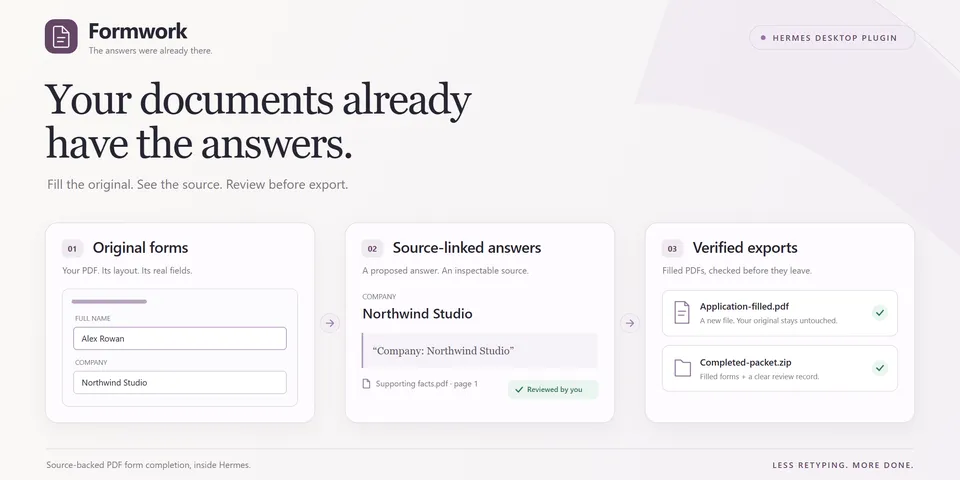
From its catalog listing
Complete a packet of fillable PDFs inside Hermes Desktop. See each suggested answer on the original form, open its exact source page and quote, and review it before export. Enter a missing fact once and choose which matching fields should reuse it. Save editable PDFs and a review record in one ZIP.
Good to know before installing
Formwork sends the full text of your supporting PDFs, form field details and rendered images of each form page to the model in its "Formwork extraction" auxiliary slot (it uses your Hermes Vision model until you set one), and it keeps imported PDFs, previews, exports and archived packets under plugin-data/formwork after the plugin is removed.
From its catalog listing.
How to install
- Install it. Hermes asks for any API keys it needs, then asks whether to turn it on.
hermes plugins install formwork - Said no? Turn it on later:
hermes plugins enable formwork - Restart Hermes so it loads the plugin.
Some plugins also need a sign-in or settings: see Full setup & settings. Memory plugins ask whether to become your memory provider instead. Steps follow the official plugins guide (opens in a new tab).
- Category
- Hermes Desktop add-ons
- Maintained by
- ladyFaye1998 (Community)
- Needs
- No API keys declared
- Works on
- windows
- Needs Hermes
- 0.23.1 or newer
- Version
- 0.1.0
- In the catalog
- 2026-11-11
Known issues (from its catalog listing)
- Native workflow verified on Windows with Hermes 0.23.1.
- Supported AcroForms and text-bearing source PDFs only; printable ASCII for text output. No OCR, XFA, signing or interactive calculations.
- The Formwork extraction auxiliary model must accept images. It inherits Hermes Vision until configured separately.
Using the Hermes desktop app? See where plugins live

Full setup & settings ↗Source code ↗
More in hermes desktop add-ons
All hermes desktop add-ons plugins
New Hermes Agent updates every day on X. Follow @HermesWatcher