
Arachne Flow
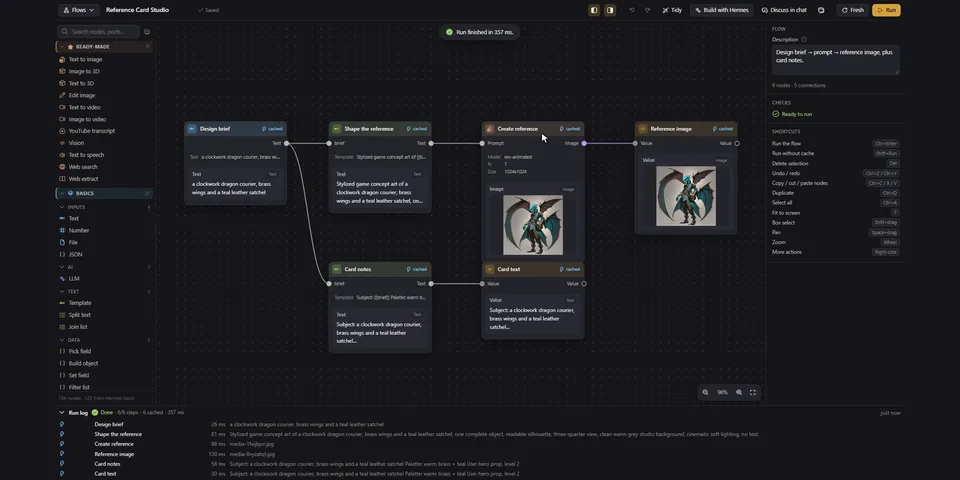
From its catalog listing
Visual workflow canvas for Hermes Desktop: wire Hermes tools, MCP tools and LLM calls into typed graphs with conditions, bounded loops, JSON/list transforms, per-step caching and media previews (image, audio, video and an in-place 3D model viewer). Build with Hermes edits a graph from a description; seven agent tools and /flow list, build, run and inspect the same saved flows; twelve starter templates and user-saved templates.
Good to know before installing
tool nodes execute through ctx.dispatch_tool on a background thread with Hermes' own tools, credentials and approvals (commands held for manual approval are denied or time out on the canvas and under cron), and other plugins' pre_tool_call hooks do not see these calls; shell, file-writing, browser, session-mutating and known code-running MCP tools are blocked by name by default, an explicit allow_tools setting can unblock them, and other MCP tools are not blocked; provider, LLM and media-generation calls can cost money, and Build with Hermes sends the prompt, node catalog and current flow to the active model before any run; a File node reads only files the user dropped (copied into the plugin's uploads folder) or picked with Browse… for that node, any agent edit or flow_run input drops the pick, and those files and media under Hermes' folders can be passed to the tools they are wired to, possibly to remote providers as data URLs; Hermes credential stores and .env files are never read; media URLs in tool output are downloaded with Hermes' SSRF-safe client (every redirect hop checked, 200 MB cap); user regexes in If/Switch run in an isolated Python subprocess killed after 0.5 s; the Send message node uses Hermes' official messaging bridge only after a per-recipient consent bound to flow, node and target plus a separate file consent, never caches or retries, and reports timeouts as unconfirmed; a local HMAC key (messaging-secret) signs that consent and the file picks; flows, runs, uploads and cache live under $HERMES_HOME/plugin-data/flowcanvas/; the Desktop UI uses only @hermes/plugin-sdk; no stored provider credentials, no telemetry, no self-update.
From its catalog listing.
How to install
- Install it. Hermes asks for any API keys it needs, then asks whether to turn it on.
hermes plugins install flowcanvas - Said no? Turn it on later:
hermes plugins enable flowcanvas - Restart Hermes so it loads the plugin.
Some plugins also need a sign-in or settings: see Full setup & settings. Memory plugins ask whether to become your memory provider instead. Steps follow the official plugins guide (opens in a new tab).
- Category
- Images, video, music & 3D · Hermes Desktop add-ons
- Maintained by
- EmotionalThrifty (Community)
- Needs
- No API keys declared
- Adds tools
flow_listflow_getflow_node_typesflow_applyflow_runflow_statusflow_template_save- Needs Hermes
- 0.22 or newer
- Version
- 1.0.0
- In the catalog
- 2026-11-11
- GitHub stars
- 1
Using the Hermes desktop app? See where plugins live

Full setup & settings ↗Source code ↗
More in images, video, music & 3d
All images, video, music & 3d plugins
New Hermes Agent updates every day on X. Follow @HermesWatcher