
CodeCoach
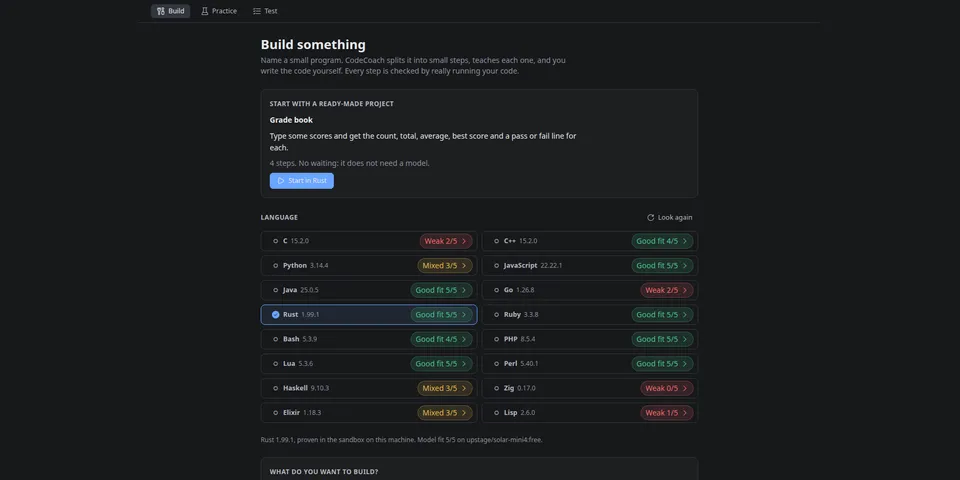
From its catalog listing
Teach yourself to code in C, C++, Python, JavaScript, Java, Go, Rust, Ruby or Bash: build a real program one small step at a time, practice by predicting what code prints, and take no-hints tests. Every example really ran in a sandbox, every pass is a real test, and it warns you when your model is weak in a language.
Good to know before installing
Code runs inside a bubblewrap sandbox (no network; system folders and a language's own toolchain folder are mounted read-only, the rest of your home folder is not mounted); if you turn on `allow_unsandboxed_code` on a machine without bwrap, learner and model-written code runs directly on your host as your user with no Hermes approval prompt. Imported .txt/.md/.pdf files (any non-hidden path you or the agent names) are sent to your configured model. It makes background model calls you did not press a button for (the next step, a spare drill, and five short warm-ups per language; the setting `auto_fit_check` turns the warm-ups off).
From its catalog listing.
How to install
- Install it. Hermes asks for any API keys it needs, then asks whether to turn it on.
hermes plugins install codecoach - Said no? Turn it on later:
hermes plugins enable codecoach - Restart Hermes so it loads the plugin.
Some plugins also need a sign-in or settings: see Full setup & settings. Memory plugins ask whether to become your memory provider instead. Steps follow the official plugins guide (opens in a new tab).
- Category
- Coding & developer tools · Hermes Desktop add-ons
- Maintained by
- heyitstony97-max (Community)
- Needs
- No API keys declared
- Adds tools
codecoach_importcodecoach_nextcodecoach_answercodecoach_hintcodecoach_progresscodecoach_reportcodecoach_ask- Works on
- linux
- Needs Hermes
- 0.22.7 or newer
- Version
- 1.1.1
- In the catalog
- 2026-11-10, updated 2026-11-11
Known issues (from its catalog listing)
- Running code needs bubblewrap (bwrap) and each language's own compiler or interpreter. A language is offered only after a hello-world compiled and ran in the sandbox on your machine; without bwrap CodeCoach refuses to run any code and says what to install. That is why the entry lists Linux only.
- Speed depends on your model. On a local 27B model the first lesson of a project you describe appeared 2 to 3 minutes after Start (measured on 1.0); later steps are built in the background while you code. The ready-made project needs no model and opens in seconds.
- PHP, Lua, Perl, Haskell, Zig, Elixir and Lisp are offered too, without a ready-made project and with less testing than the nine languages in the description. TypeScript is not supported.
- In Practice, a drill's explanation is the model's own prose and can be wrong even when the answer key, the program's real output, is right. Since 1.1.1 an explanation that names a printed number the real output does not hold is left out; one that is wrong in words only can still get through.
Using the Hermes desktop app? See where plugins live

Full setup & settings ↗Source code ↗
More in coding & developer tools
All coding & developer tools plugins
New Hermes Agent updates every day on X. Follow @HermesWatcher