
AWS Manager
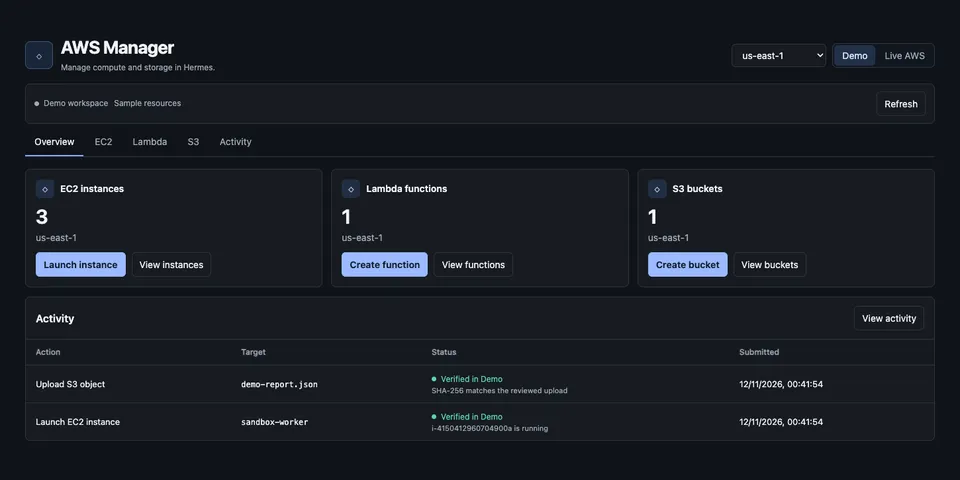
From its catalog listing
Deploy, monitor, and verify AWS resources in Hermes Desktop, including EC2, Lambda, S3, DynamoDB, and API Gateway.
Good to know before installing
uses the AWS access key you enter in plugin settings to create, change and delete real AWS resources (EC2, Lambda, S3, RDS, DynamoDB, API Gateway, VPC, Route 53, ECR/ECS, EventBridge, SQS, CloudFront) in your account from the dashboard; these can incur AWS charges. Every change is reviewed and applied by you in the UI, never by the agent.
From its catalog listing.
How to install
- Install it. Hermes asks for any API keys it needs, then asks whether to turn it on.
hermes plugins install aws-manager - Said no? Turn it on later:
hermes plugins enable aws-manager - Restart Hermes so it loads the plugin.
Some plugins also need a sign-in or settings: see Full setup & settings. Memory plugins ask whether to become your memory provider instead. Steps follow the official plugins guide (opens in a new tab).
- Category
- Hermes Desktop add-ons
- Maintained by
- ParichayMago (Community)
- Needs
- No API keys declared
- Needs Hermes
- 0.22.7 or newer
- Version
- 0.6.0
- In the catalog
- 2026-11-12
Using the Hermes desktop app? See where plugins live

Full setup & settings ↗Source code ↗
More in hermes desktop add-ons
All hermes desktop add-ons plugins
New Hermes Agent updates every day on X. Follow @HermesWatcher