
Afterimage
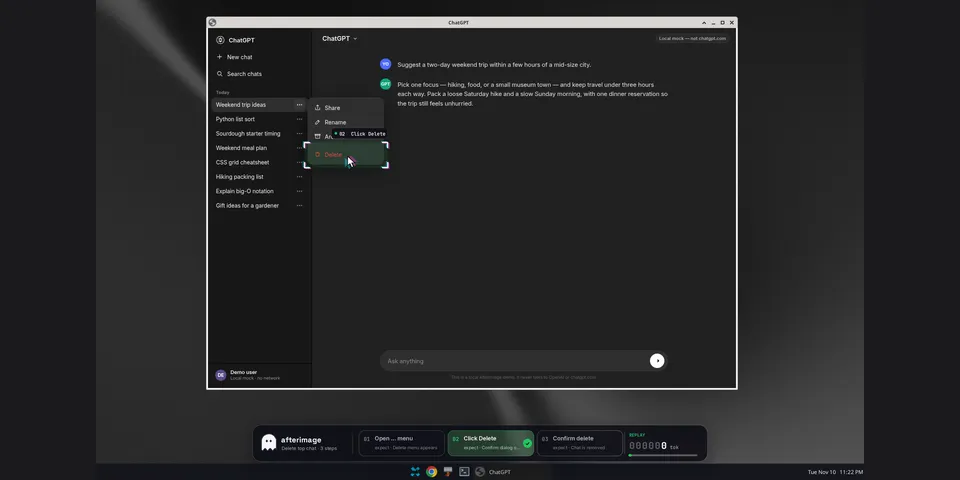
From its catalog listing
Teach a desktop computer_use click-flow once, rehearse it with a click-through HUD that checks live pixels, then replay matching steps at zero model calls.
Good to know before installing
sends computer_use screenshots to the vision model through Hermes (requests the `qwen3-vl-plus` model override, else the session model); saves recorded clicks, typed text and screenshots in plaintext under the plugin data dir; runs a local X11 overlay sidecar over a Unix socket in the system temp directory and replays recorded clicks and keystrokes through computer_use (Hermes computer_use approvals apply).
From its catalog listing.
How to install
- Install it. Hermes asks for any API keys it needs, then asks whether to turn it on.
hermes plugins install afterimage - Said no? Turn it on later:
hermes plugins enable afterimage - Restart Hermes so it loads the plugin.
Some plugins also need a sign-in or settings: see Full setup & settings. Memory plugins ask whether to become your memory provider instead. Steps follow the official plugins guide (opens in a new tab).
- Category
- Automation & multi-agent · Images, video, music & 3D
- Maintained by
- LucianaiB2004 (Community)
- Needs
- No API keys declared
- Adds tools
afterimage_locateafterimage_begin_recordafterimage_end_recordafterimage_listafterimage_rehearseafterimage_replay- Adds hooks
post_tool_callpre_llm_callpost_api_requestpost_auxiliary_callon_session_finalize- Works on
- linux
- Needs Hermes
- 0.23.0 or newer
- Version
- 0.1.0
- In the catalog
- 2026-11-10, updated 2026-11-19
Known issues (from its catalog listing)
- Linux/X11 only; needs a compositor (e.g. picom) for the translucent HUD.
- Replay uses fixed window-relative positions; it stops on a pixel mismatch. Step repair is experimental.
Using the Hermes desktop app? See where plugins live

Full setup & settings ↗Source code ↗
More in automation & multi-agent
All automation & multi-agent plugins
New Hermes Agent updates every day on X. Follow @HermesWatcher