
A11Y Lens
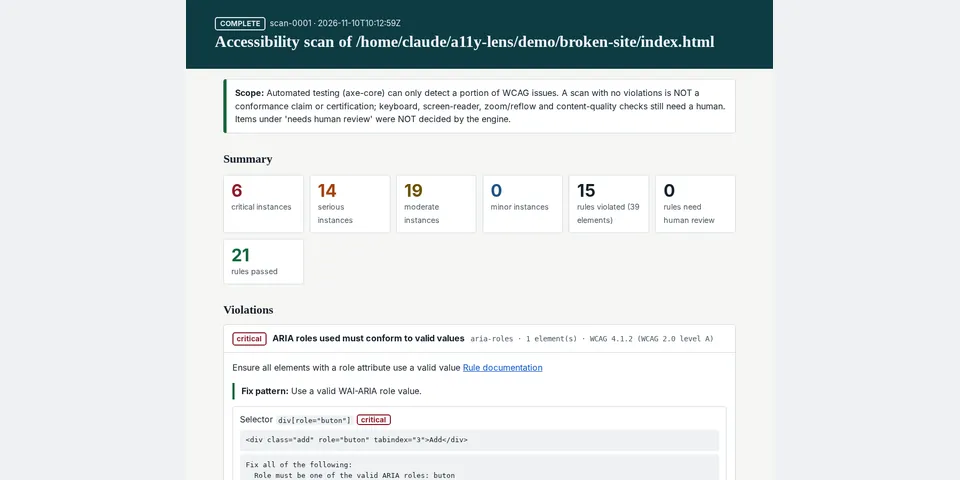
From its catalog listing
Autonomous website accessibility testing and repair verification. Scans pages in a real headless Chromium with the axe-core engine, stores evidence-backed scans, and compares before/after scans (resolved / remaining / newly introduced) so Hermes can prove its fixes in the rendered page.
Good to know before installing
launches a local headless Chromium (Playwright) in an isolated subprocess; network access is limited to loopback and origins a human authorises with `hermes a11y allow`; `hermes a11y install` downloads Playwright's Chromium from Playwright's official CDN on explicit user command; serves a user-supplied local .html folder on 127.0.0.1 for the duration of a scan; stores scan history and reports locally via plugin storage; never submits forms, collects credentials or sends data off-machine.
From its catalog listing.
How to install
- Install it. Hermes asks for any API keys it needs, then asks whether to turn it on.
hermes plugins install a11y-lens - Said no? Turn it on later:
hermes plugins enable a11y-lens - Restart Hermes so it loads the plugin.
Some plugins also need a sign-in or settings: see Full setup & settings. Memory plugins ask whether to become your memory provider instead. Steps follow the official plugins guide (opens in a new tab).
- Category
- Web, research & browsing
- Maintained by
- Johnlocke0347 (Community)
- Needs
- No API keys declared
- Adds tools
a11y_scana11y_reporta11y_compare- Needs Hermes
- 0.23.0 or newer
- Version
- 0.1.0
- In the catalog
- 2026-11-12, updated 2026-11-14
Using the Hermes desktop app? See where plugins live

Full setup & settings ↗Source code ↗
More in web, research & browsing
All web, research & browsing plugins
New Hermes Agent updates every day on X. Follow @HermesWatcher