
Visual Workflow
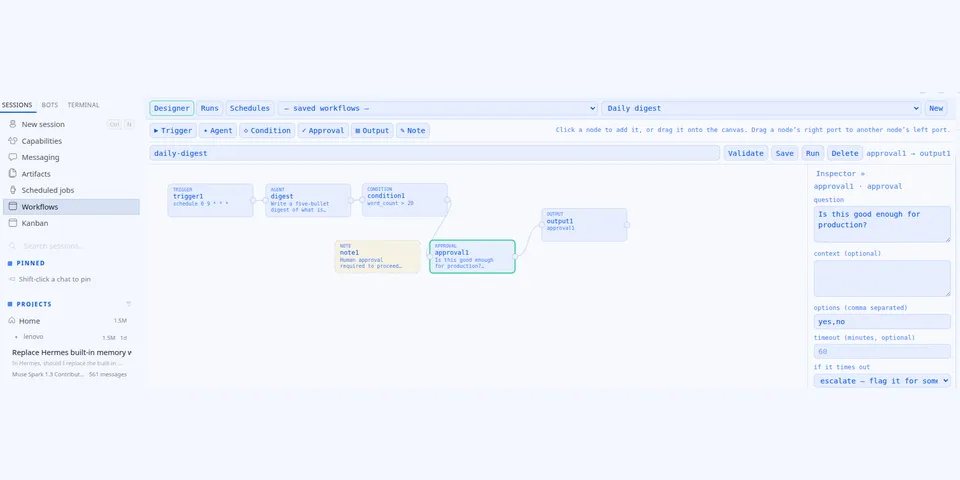
From its catalog listing
Visual drag-and-drop agent-workflow designer for Hermes: Trigger, Agent, Condition, Approval, Output nodes on a canvas, executed by a plugin-owned sequential runner.
Good to know before installing
Workflow Output nodes send text to messaging channels through Hermes's send-message path; a model-started run of a design with a delivering Output node first asks for your approval, and scheduled runs that would send are blocked unless approvals.cron_mode allows them; scheduled workflows run as Hermes cron jobs created from the dashboard; agent steps run Hermes subagents or the plugin LLM facade on your configured models; designs and run records are stored under HERMES_HOME/workflow-designs and HERMES_HOME/workflow-runs.
From its catalog listing.
How to install
- Install it. Hermes asks for any API keys it needs, then asks whether to turn it on.
hermes plugins install visual-workflow - Said no? Turn it on later:
hermes plugins enable visual-workflow - Restart Hermes so it loads the plugin.
Some plugins also need a sign-in or settings: see Full setup & settings. Memory plugins ask whether to become your memory provider instead. Steps follow the official plugins guide (opens in a new tab).
- Category
- Security & privacy · Automation & multi-agent
- Maintained by
- Printaga Publishing LLC (Community)
- Needs
- No API keys declared
- Adds tools
workflow_design_saveworkflow_design_loadworkflow_design_validateworkflow_design_runworkflow_design_respond- Adds hooks
pre_tool_call- Needs Hermes
- 0.21.6 or newer
- Version
- 1.1.0
- In the catalog
- 2026-11-11
Using the Hermes desktop app? See where plugins live

Full setup & settings ↗Source code ↗
More in security & privacy
All security & privacy plugins
New Hermes Agent updates every day on X. Follow @HermesWatcher