
Vibeline
From its catalog listing
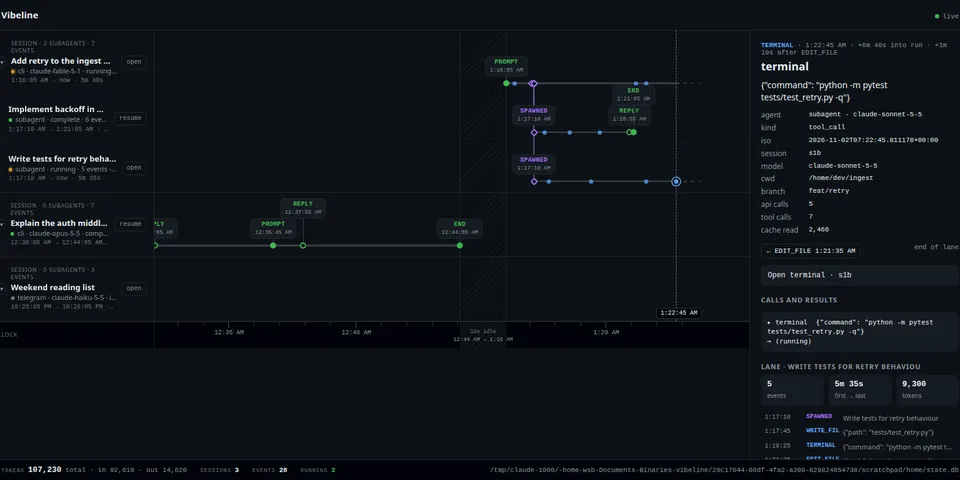
Show agent work as rails in the TUI, web and CLI. One lane per agent, tool calls and acceptance-criteria results as marks.
Good to know before installing
`hermes vibeline web` serves a local web UI (127.0.0.1 by default; a token is required for any non-loopback client) that shows every Hermes session transcript on this machine and can open terminals running `hermes --resume` and rewind sessions (soft-deleting later messages via core's `/rewind`); `--peer` URLs you add receive and forward these requests to other machines, and `--read-only` disables open/rewind.
From its catalog listing.
How to install
- Install it. Hermes asks for any API keys it needs, then asks whether to turn it on.
hermes plugins install vibeline - Said no? Turn it on later:
hermes plugins enable vibeline - Restart Hermes so it loads the plugin.
Some plugins also need a sign-in or settings: see Full setup & settings. Memory plugins ask whether to become your memory provider instead. Steps follow the official plugins guide (opens in a new tab).
- Category
- Cost, speed & monitoring
- Maintained by
- ListeningPost (Community)
- Needs
- No API keys declared
- Adds tools
vibeline_railsvibeline_dashboard- Works on
- linux, macos
- Needs Hermes
- 0.22.0 or newer
- Version
- 0.2.0
- In the catalog
- 2026-11-11
Using the Hermes desktop app? See where plugins live

Full setup & settings ↗Source code ↗
More in cost, speed & monitoring
All cost, speed & monitoring plugins
New Hermes Agent updates every day on X. Follow @HermesWatcher