
Thoth
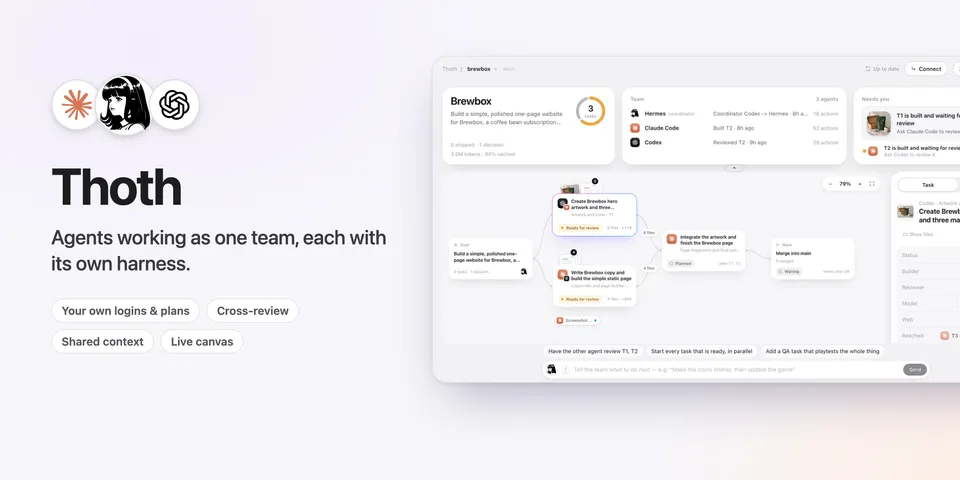
From its catalog listing
Agents working as one team, each with its own harness: Claude Code, Codex and Hermes today. Ask Hermes for a website, an app, artwork or a doc: it plans the work on a shared board and hands each task to the real Claude Code or Codex CLI, on your own logins and plans, so every improvement their makers ship reaches your team. Each agent works in its own git worktree with a brief of what the team decided and made (goal, decisions, handoffs, what its dependencies produced), reviews the other's work, and Hermes merges what passes once you say yes. In Hermes Desktop, Thoth sits beside each project's chat: a side window with the live canvas and a Team & brain tab (who did what, decisions, reviews, versions), and every Thoth project is also a Hermes project on the same folder. Claude Code or Codex can join the board through the bundled MCP server or take over as coordinator, and a task that needs the web gets a clean Chrome, or yours when it needs your logins. When a Claude or ChatGPT plan runs out, the other agent carries on from its work, and the side window and Team card show how much of each plan is used and when it resets. Approve a plan once and autopilot runs it to the end: it starts, cross-reviews and merges each task, and asks you in the chat only when something needs you; any change to the plan pauses it. Once work is merged, the side window offers it to open, download as a zip or find in Finder. Start a project from the project menu or the chat: a new one gets its own folder in ~/Thoth, and a folder you already have becomes a project that keeps every version. After an update, the Thoth page says what's new, once.
Good to know before installing
after you approve each launch in Hermes, or a plan card for autopilot, runs your installed claude and codex CLIs as background processes (stopped on cancel, timeout (30 min by default), unload or exit) under their own logins and plans, which Thoth never reads, with Claude Code's OS sandbox and Codex's workspace-write sandbox; gives them and project commands only PATH, HOME, USER, SHELL, TMPDIR, TERM, LANG, the LC_ locale settings, CODEX_HOME and CLAUDE_CONFIG_DIR from its environment, plus names you list in env_passthrough; inside Codex runs it pre-approves only its own three worker tools (read the board, write a note); writes .thoth/ (SQLite brain, run logs, worktrees), thoth/T<n> branches, exact-path lines in .git/info/exclude and, only when you approve a merge, merge commits on your base branch; makes a new project's folder in ~/Thoth (the projects_dir setting) and, in a folder that is not in git yet, a git repository with its files as the first version (.env and other secrets, dependency folders and files over 50 MB stay in the folder but out of git, through .git/info/exclude), never in your home, Desktop, Documents or Downloads folder; links ignored node_modules/.venv folders into task worktrees, gives each worktree copy-on-write copies of the other files the project keeps out of git (read-only links where the disk can't copy) and moves the new files a merged task made outside git into the project folder without overwriting anything, and never reads or copies .env files or other secrets; a project board is used only if Thoth made it on this computer or you said yes to it on a Hermes card (adopting one starts nothing), and its setup or run command runs as you outside the sandbox only if you approved that exact command for that board on Hermes's card (hashes kept in approvals.json in its data folder, never in the project); starting a run preview asks you first (on a free localhost port from an export under .thoth/previews/); a project whose .thoth folder is committed to git, or a .thoth folder Thoth didn't make, is refused; Thoth's own git commands run without hooks or fsmonitor; static previews are served read-only on 127.0.0.1; the Desktop page's Connect buttons run claude mcp add thoth / codex mcp add thoth only when clicked; in Hermes Desktop it adds two panes (the side window and Team & brain) and a Chat + Thoth layout template that changes your layout only when you pick it, opens one chat per project and pins it in the project's colour once, creates (or reuses) a Hermes project on each Thoth project's folder and moves that project's chat into it through Hermes's own project calls, and keeps which chat and folder belong to which project, and the last version whose notes you saw, in its data folder (chats.json, projects.json, whatsnew.json); reads plan usage from Claude Code's run output and asks `codex app-server` for Codex's limits (a read that uses no tokens), kept in plans.json; autopilot (only after you approve its plan card, never under an always-allow) starts, reviews and merges that plan's tasks without a card for each step, pauses when the plan changes, keeps the Mac from idle sleep with caffeinate -i while it runs and holds .thoth/autopilot.lock; the Download button writes a zip of the merged files (never .env files) to your Downloads folder; completion notices and autopilot's messages reach the chat only with allow_gateway_injection; a task you give a browser has its agent run npx -y chrome-devtools-mcp@1.2.0 (pinned, fetched from npm on first use, usage statistics off): a temporary headless Chrome, or, if you choose your own Chrome, the Chrome you are running once you turn on remote debugging and allow the connection in Chrome, where the agent sees your tab titles, acts with your logins in a tab of its own and is told to only look. No network calls of its own, no telemetry.
From its catalog listing.
How to install
- Install it. Hermes asks for any API keys it needs, then asks whether to turn it on.
hermes plugins install thoth - Said no? Turn it on later:
hermes plugins enable thoth - Restart Hermes so it loads the plugin.
Some plugins also need a sign-in or settings: see Full setup & settings. Memory plugins ask whether to become your memory provider instead. Steps follow the official plugins guide (opens in a new tab).
- Category
- Coding & developer tools
- Maintained by
- cayden970207 (Community)
- Needs
- No API keys declared
- Adds tools
thoth_initthoth_planthoth_assignthoth_reviewthoth_waitthoth_statusthoth_notethoth_mergethoth_contextthoth_cancelthoth_update_taskthoth_completethoth_revisethoth_restorethoth_syncthoth_previewthoth_modelsthoth_coordinatorthoth_autopilot- Adds hooks
pre_tool_callpost_tool_callpre_llm_call- Works on
- linux, macos
- Needs Hermes
- 0.22.5 or newer
- Version
- 0.9.1
- In the catalog
- 2026-11-09
Known issues (from its catalog listing)
- Needs the Claude Code and/or Codex CLI installed and signed in; agents run on your own Claude and ChatGPT plans
- Agent sandboxes have no network: for per-task installs give the project a setup command (e.g. npm ci), approved once
- Completion notices and autopilot's messages in chat need plugins.entries.thoth.allow_gateway_injection: true; without it Hermes hears about finished runs through thoth_wait, and you follow autopilot in the side window
- Browsing in your own Chrome needs Chrome 144+ with remote debugging on (chrome://inspect/#remote-debugging), and Chrome asks you to allow each run's connection
Using the Hermes desktop app? See where plugins live

Full setup & settings ↗Source code ↗
More in coding & developer tools
All coding & developer tools plugins
New Hermes Agent updates every day on X. Follow @HermesWatcher