
Taint Sentry
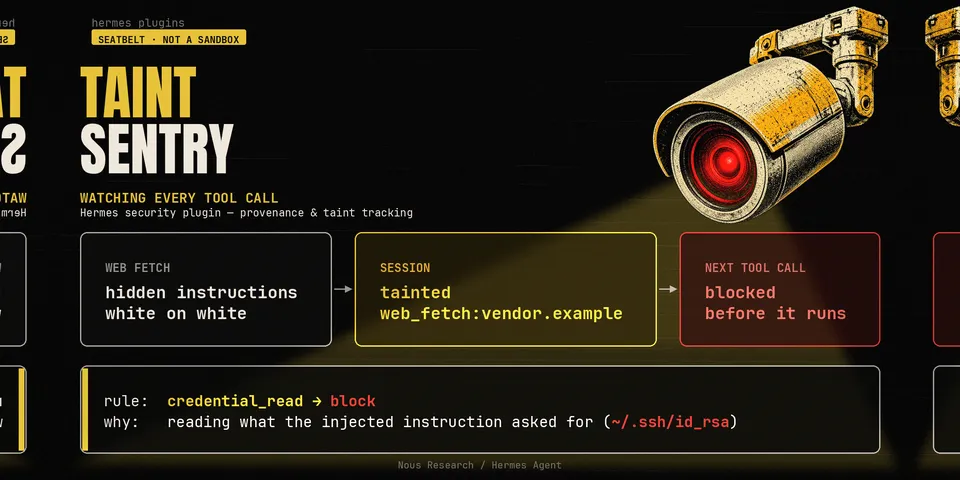
From its catalog listing
Provenance and taint tracking for tool results. Every tool result is stamped with where it came from; content authored by a third party (web fetches, MCP servers, screenshots, images, and files written from untrusted content) is stripped of invisible characters, wrapped in an <untrusted> marker, and marks the session as tainted. While a session is tainted, side-effecting tool calls are checked against a policy: credential reads, and writes into files the agent reads as instructions (AGENTS.md, SKILL.md, hook handlers, Hermes' own config), are refused; network egress and writes outside the workspace go to Hermes's own approval gate, which is never auto-approved. A call is evaluated as the call it really makes: tool_call, execute_code and process_manage are unwrapped to what they actually run, taint is copied into subagents, and an encoded payload is decoded and judged by what it decodes to. What is reliable and what is not: the taint mark is provenance-based — it comes from which tool produced the content, not from guessing at it. The credential, egress and write detectors are best-effort pattern matching over tool arguments, so an obfuscated command, a payload assembled to avoid the patterns, and writes through the memory or cron tools can get past them. A seatbelt, not a sandbox; the README's Known limitations lists exactly what is out of scope. Ten rules, each tunable to allow/monitor/escalate/block; a receipts ledger; a `hermes taint-sentry` CLI with a dry-run policy tester. Ships a Desktop half in the same package: a pane, a status-bar chip and ⌘K commands showing live taint state, the receipt feed and per-rule actions, backed by `/api/plugins/taint-sentry/`. The pane changes a rule on the user's click; a tool call that tries the same thing — the CLI, `config.yaml`, or that API over loopback — is refused.
Good to know before installing
no network access, no credentials, no python dependencies and no core overrides: it reads tool arguments and results in-process, writes its decisions to a local SQLite ledger under the plugin's own data dir, and reads an optional policy file there. Nothing needs configuring; `mode: monitor` records without interfering and `mode: off` disables enforcement.
From its catalog listing.
How to install
- Install it. Hermes asks for any API keys it needs, then asks whether to turn it on.
hermes plugins install taint-sentry - Said no? Turn it on later:
hermes plugins enable taint-sentry - Restart Hermes so it loads the plugin.
Some plugins also need a sign-in or settings: see Full setup & settings. Memory plugins ask whether to become your memory provider instead. Steps follow the official plugins guide (opens in a new tab).
- Category
- Cost, speed & monitoring
- Maintained by
- YAN-XBT (Community)
- Needs
- No API keys declared
- Adds tools
taint_statustaint_receipts- Adds hooks
transform_tool_resultpre_tool_callpre_llm_callsubagent_start- Works on
- windows, macos, linux
- Needs Hermes
- 0.22 or newer
- Version
- 0.1.0
- In the catalog
- 2026-11-09, updated 2026-11-10
Using the Hermes desktop app? See where plugins live

Full setup & settings ↗Source code ↗
More in cost, speed & monitoring
All cost, speed & monitoring plugins
New Hermes Agent updates every day on X. Follow @HermesWatcher