
Tune-up
From its catalog listing
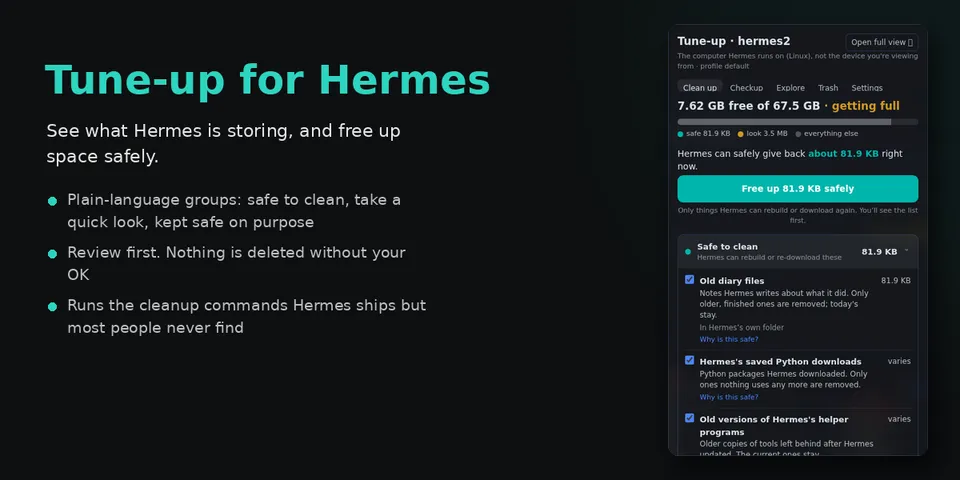
Keep Hermes fast, healthy and tidy from one Desktop panel. Clean up sorts the Hermes home into Safe to clean, Take a quick look and Kept safe on purpose, with plain-language answers to what is it, is it safe and can I undo; it reviews exact items before anything happens and reports the measured space recovered. It runs the maintenance Hermes ships but few people find (sessions prune with preview, pm gc, uv cache prune, checkpoints, worktree prune, session-database packing), finds folders Hermes created elsewhere from its own session history, and moves reviewable items to a restorable 30-day Trash. Checkup explains down or crash-looping Hermes services and stops leftover agent processes; Explore shows a size map with folder descriptions and duplicate finding; optional consented AI explanation via its own auxiliary task.
Good to know before installing
Linux/systemd only; no network except an optional, consented AI explanation (folder totals and counts only) through Hermes's routing; reads home metadata, tool caches, session history, /proc process and open-file info, systemd unit settings, journal lines, crontab and git ls-files (never .env, auth.json, env files, start scripts or /proc/<pid>/environ); on user confirmation it permanently deletes chosen files in Hermes-created project folders and ~/.cache, ~/.npm and ~/.pnpm-store tool caches, moves other items to a restorable 30-day Trash, runs allow-listed hermes/uv/pnpm/git maintenance plus journalctl --vacuum-size and apt-get clean when root, starts/restarts/stops/disables Hermes systemd services, can write a Restart=always drop-in and enable the disk-cleanup plugin, sends SIGTERM to selected leftover processes, and briefly stops Hermes services to pack state.db; non-Hermes child processes get only PATH, HOME and locale.
From its catalog listing.
How to install
- Install it. Hermes asks for any API keys it needs, then asks whether to turn it on.
hermes plugins install storage-utility - Said no? Turn it on later:
hermes plugins enable storage-utility - Restart Hermes so it loads the plugin.
Some plugins also need a sign-in or settings: see Full setup & settings. Memory plugins ask whether to become your memory provider instead. Steps follow the official plugins guide (opens in a new tab).
- Category
- Coding & developer tools
- Maintained by
- ShawnCRMer (Community)
- Needs
- No API keys declared
- Works on
- linux
- Needs Hermes
- 0.23.0 or newer
- Version
- 0.7.3
- In the catalog
- 2026-11-10
Known issues (from its catalog listing)
- Tested with Hermes on Linux with systemd; service checks and session-database packing need systemd. macOS and Windows hosts are not certified.
- Packing the session database pauses Hermes services for a few minutes; it asks first and restarts what it stopped.
Using the Hermes desktop app? See where plugins live

Full setup & settings ↗Source code ↗
More in coding & developer tools
All coding & developer tools plugins
New Hermes Agent updates every day on X. Follow @HermesWatcher