
Stock Runway
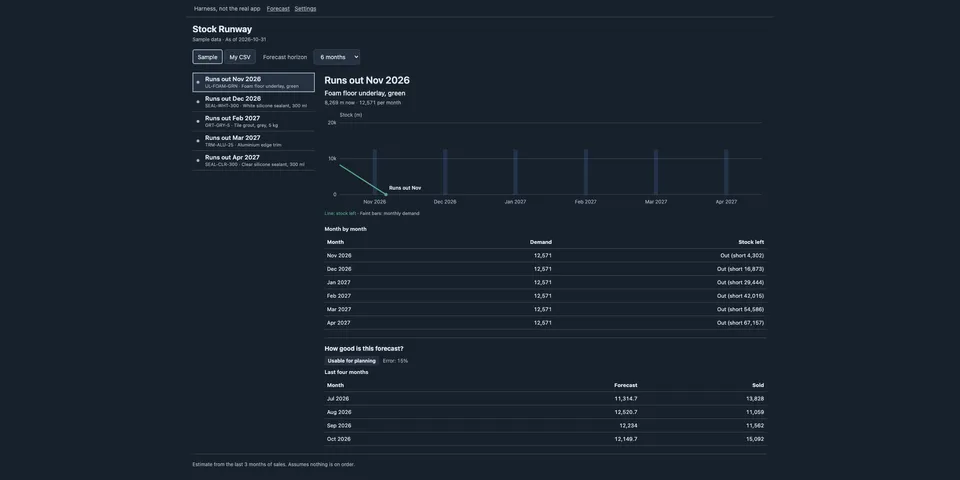
From its catalog listing
See when each product will run out and when to reorder. Forecasts seasonal monthly demand, shows past demand, deliveries and stock on one chart, grades forecast accuracy, and lists what to order now (quantity and order-by date, with lead time, MOQ and pack size). Works from the bundled sample, a local CSV (reads SAP, NetSuite, Zoho, Odoo, Sage, QuickBooks and Dynamics export column names as is), or an optional read-only Odoo connection configured through Hermes secrets. Adds a /stock command, a stock_runway tool and a Desktop page.
Good to know before installing
with the Odoo source it makes read-only XML-RPC calls to the Odoo server you configure; the sample and CSV sources make no network calls.
From its catalog listing.
How to install
- Install it. Hermes asks for any API keys it needs, then asks whether to turn it on.
hermes plugins install stock-runway - Said no? Turn it on later:
hermes plugins enable stock-runway - Restart Hermes so it loads the plugin.
Some plugins also need a sign-in or settings: see Full setup & settings. Memory plugins ask whether to become your memory provider instead. Steps follow the official plugins guide (opens in a new tab).
- Category
- Work & business · Everyday life & fun
- Maintained by
- usegreymatter (Community)
- Needs
- No API keys declared
- Adds tools
stock_runway- Needs Hermes
- 0.22.2 or newer
- Version
- 0.1.0
- In the catalog
- 2026-11-12
Using the Hermes desktop app? See where plugins live

Full setup & settings ↗Source code ↗
More in work & business
New Hermes Agent updates every day on X. Follow @HermesWatcher