
Skill Court
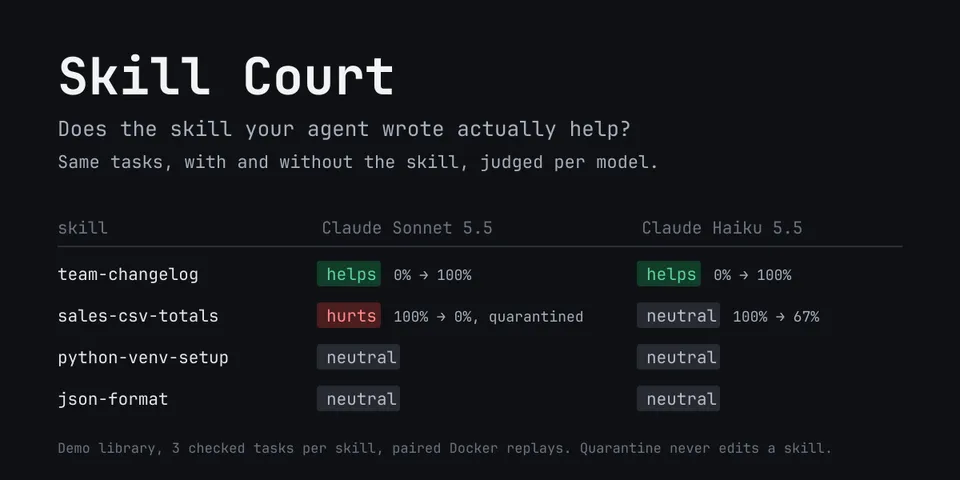
From its catalog listing
Skill Court tests the skills your agent writes. With automatic trials turned on (opt-in: `hermes court auto on` or the Desktop page's Turn on switch), after the agent writes or changes a skill, and the first time each agent-written skill's current version is used on a model, it replays that skill's real tasks with and without it in the background, in Docker sandboxes when Docker answers or answer-only (skills, todo and web tools only, judged on final answers) when it does not; `hermes court trial` runs one on demand. Each pair is scored by the task's check or a blind pairwise judge; a skill that hurts is hidden from that model only (skill index, skills_list, skill_view), and the next turn shows the verdict, the cause and the SKILL.md line behind it. An appeal drafts a fix, proves it on the same tasks and writes it only when you apply it (undo restores the original). Usage evidence per skill and model from recent sessions, read-only. CLI (hermes court trial/report/appeal/auto/tasks/quarantine/release/list) plus a Desktop page.
Good to know before installing
automatic trials are off until the user turns them on (the first turn after install and after-install.md say how; `hermes court auto off` stops them), within $1.00 a day of provider-reported replay spend plus 300,000 judge tokens (runs already under way finish). Trials run hermes and docker/podman commands, create and delete two replay profiles cloned from yours (config, API keys, SOUL, memory, skills; never messaging channels; no MCP, other plugins, context engine, shell hooks or inline shell). Replays are single-query sessions with approvals denied, never -z. The judge (your provider, via ctx.llm) sees task text, both runs' answers and sandbox files, and for a cause a transcript excerpt and the skill. Verdicts are posted with ctx.post_message to the conversation that changed or used the skill, never into the model's context. A live SKILL.md is written only by `hermes court appeal apply` or Apply fix.
From its catalog listing.
How to install
- Install it. Hermes asks for any API keys it needs, then asks whether to turn it on.
hermes plugins install skill-court - Said no? Turn it on later:
hermes plugins enable skill-court - Restart Hermes so it loads the plugin.
Some plugins also need a sign-in or settings: see Full setup & settings. Memory plugins ask whether to become your memory provider instead. Steps follow the official plugins guide (opens in a new tab).
- Category
- Coding & developer tools
- Maintained by
- saatvik333 (Community)
- Needs
- No API keys declared
- Adds hooks
pre_tool_calltransform_tool_resulton_skill_lifecycleon_session_finalizepre_llm_call- Works on
- linux, macos
- Needs Hermes
- 0.23.0 or newer
- Version
- 1.2.1
- In the catalog
- 2026-11-07, updated 2026-11-10
Known issues (from its catalog listing)
- Without a reachable Docker or Podman, trials run answer-only: they test what a skill makes the agent say or decide, not procedures that need terminal or file tools.
- In codex_app_server mode only quarantines set for every model apply.
- Appeals import Hermes' skill frontmatter parser and skills_guard scan, which are not in the published plugin API yet (issue #150975); without them an appeal refuses to draft or apply.
- Rapid replay-profile create/delete can trigger a Hermes core race that leaks a hosted-room poller (repeating 'state.db was replaced' log lines until a gateway restart); fix offered in #150937 was closed unmerged.
Using the Hermes desktop app? See where plugins live

Full setup & settings ↗Source code ↗
More in coding & developer tools
All coding & developer tools plugins
New Hermes Agent updates every day on X. Follow @HermesWatcher