
Network X-ray
From its catalog listing
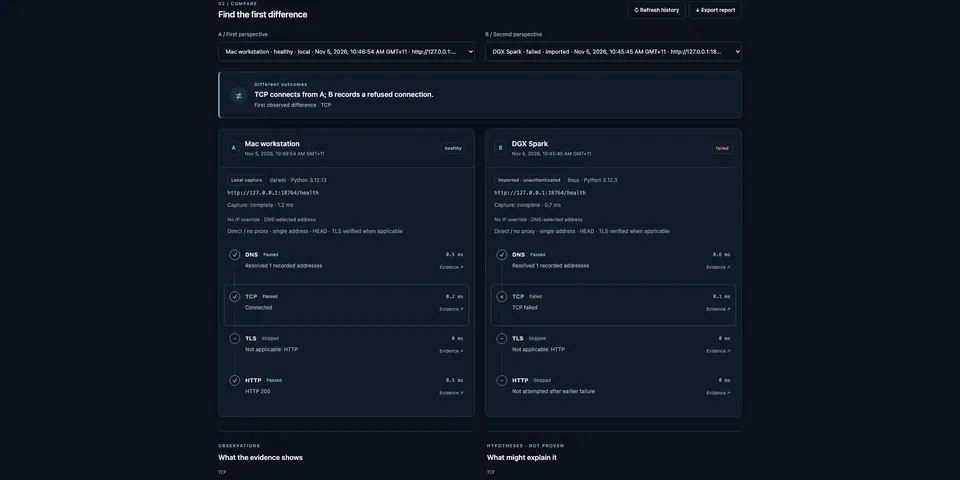
Compare DNS, TCP, verified TLS and HTTP HEAD captures of one URL from two machines, find the first observed difference and export a local evidence report. Read-only and local-first, with native agent tools, a Desktop workbench and a stdlib-only portable collector for the second machine.
Good to know before installing
the network_xray_probe tool, the CLI and the Desktop page connect from the Hermes machine to a URL the model or user names, including private and loopback addresses (link-local, multicast and unspecified are refused): DNS, TCP, verified TLS and one HTTP HEAD request, with no query, credentials, redirects or body, run in an isolated Python child with a minimal environment; it saves the target, resolved IPs, certificate fingerprint and the server/content-type headers under the profile's plugin-data/network-xray/ folder, and imported bundles from a second machine are unauthenticated; no telemetry.
From its catalog listing.
How to install
- Install it. Hermes asks for any API keys it needs, then asks whether to turn it on.
hermes plugins install network-xray - Said no? Turn it on later:
hermes plugins enable network-xray - Restart Hermes so it loads the plugin.
Some plugins also need a sign-in or settings: see Full setup & settings. Memory plugins ask whether to become your memory provider instead. Steps follow the official plugins guide (opens in a new tab).
- Category
- Coding & developer tools
- Maintained by
- rusty4444 (Community)
- Needs
- No API keys declared
- Adds tools
network_xray_probenetwork_xray_importnetwork_xray_comparenetwork_xray_history- Works on
- linux, macos
- Needs Hermes
- 0.22.5 or newer
- Version
- 0.1.1
- In the catalog
- 2026-11-05, updated 2026-11-07
Using the Hermes desktop app? See where plugins live

Full setup & settings ↗Source code ↗
More in coding & developer tools
All coding & developer tools plugins
New Hermes Agent updates every day on X. Follow @HermesWatcher