
MORPH
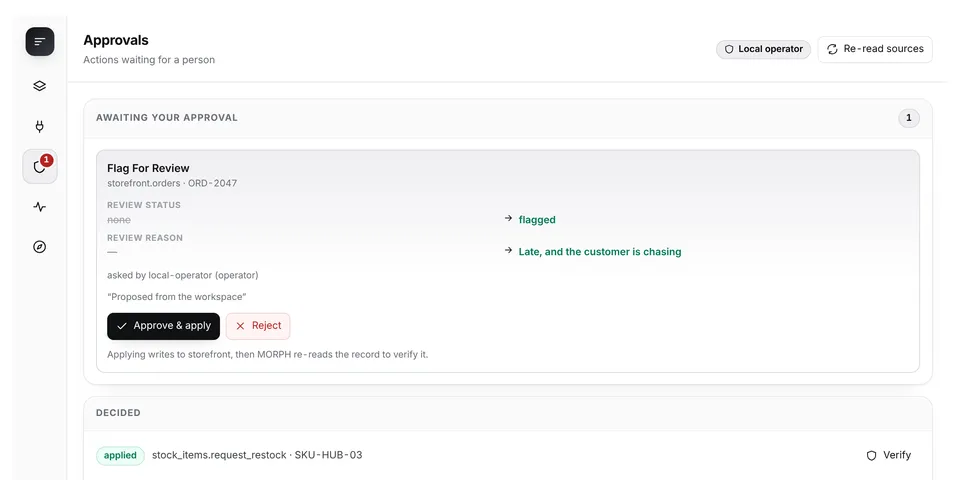
From its catalog listing
One adaptive workspace across the applications you use, with human-approved, verified actions: an approval gate between the agent and the APIs it can write to. Connect a GitHub repository (`hermes morph connect github owner/name`) or any service that publishes an OpenAPI document, and MORPH learns from the schema what can be read and what can be safely changed. The agent gets tools to read and to propose; it has no tool that approves and is never given the token an approval needs. A human approves each change in the dashboard, seeing the exact before and after; MORPH writes it, then re-reads the record from the API and reports it verified only if it matches what was promised. Only operations with a checkable effect are offered — for GitHub issues: close, close as not planned, reopen, set labels, set title, assign, unassign. The dashboard has five views (Workspace, Connections, Approvals, Activity, Context) and composes tables, boards and charts over the connected data from a goal stated in plain language. Every proposal, approval and result is kept in a hash-chained audit log.
Good to know before installing
MORPH makes outbound HTTPS calls to the services the operator connects, including api.github.com when a repository is connected (loopback only with an explicit opt-in; private, link-local, reserved and cloud-metadata targets are refused, redirects are never followed, and the address actually dialled is validated at connect time); it stores its connection list, workspaces, pending proposals, read cursors and the audit log in its own plugin-data directory; it reads bearer tokens through agent.secret_scope by environment-variable name and never logs, stores or returns them; it calls the host model through ctx.llm for interface planning with a deterministic offline fallback, and sends the model schema only, never a record value. No telemetry, no shell commands, no self-updating code. Ships three workflow skills and an optional offline sandbox of three loopback services (`hermes morph connect sandbox`, started only by `hermes morph up`) so the whole loop can be tried with no account and no key.
From its catalog listing.
How to install
- Install it. Hermes asks for any API keys it needs, then asks whether to turn it on.
hermes plugins install morph - Said no? Turn it on later:
hermes plugins enable morph - Restart Hermes so it loads the plugin.
Some plugins also need a sign-in or settings: see Full setup & settings. Memory plugins ask whether to become your memory provider instead. Steps follow the official plugins guide (opens in a new tab).
- Category
- Security & privacy
- Maintained by
- timioni001 (Community)
- Needs
- No API keys declared
- Adds tools
morph_discovermorph_plan_workspacemorph_workspace_statemorph_refreshmorph_inspect_recordmorph_propose_actionmorph_verify_action- Adds hooks
on_session_startpre_tool_callpost_tool_call- Needs Hermes
- 0.19.0 or newer
- Version
- 1.0.0
- In the catalog
- 2026-11-10
Using the Hermes desktop app? See where plugins live

Full setup & settings ↗Source code ↗
More in security & privacy
All security & privacy plugins
New Hermes Agent updates every day on X. Follow @HermesWatcher