
Lumina
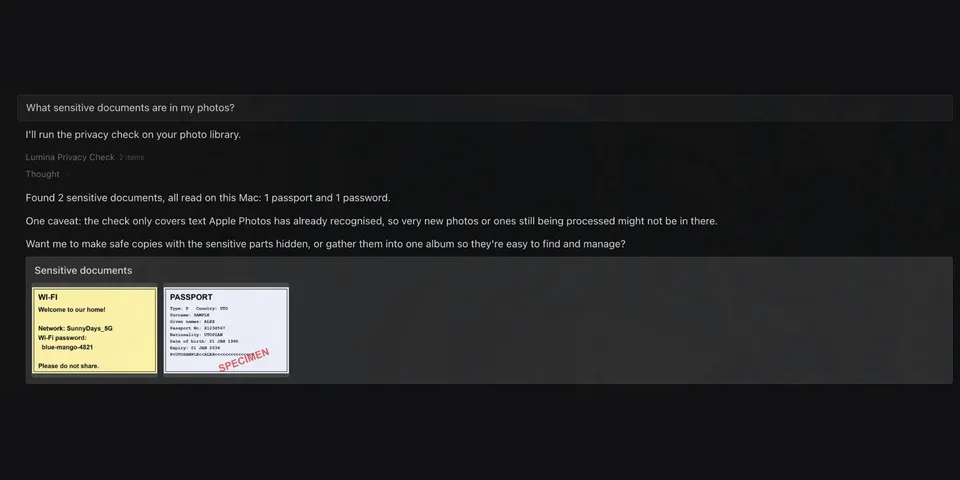
From its catalog listing
Protects the private documents in your Apple Photos library, on-device. A privacy check-up finds passports, payment cards, passwords and ID documents; Safe Send makes a redacted copy and re-reads it to prove nothing sensitive remains; Leak Guard, a pre_tool_call hook, blocks any Hermes tool call that would send a raw image of an ID document off the Mac. Also searches photos by person, place, scene or text in the image, lists expiry dates, creates albums and renders memory videos.
Good to know before installing
macOS only; reads the Apple Photos library database and image files (needs Full Disk Access) through osxphotos; creates albums in Photos via AppleScript (photoscript) only when asked; runs Apple Vision text recognition locally and the local sips and ffmpeg binaries; the pre_tool_call hook inspects every tool call's arguments and reads image files they name; a transform_llm_output hook edits Hermes's replies (adds photo-grid/redaction cards or MEDIA lines, removes MEDIA lines for images that look like ID documents and Lumina file paths); exported photos, redacted copies and memory videos are written to the plugin's data folder and, on messaging platforms, delivered through Hermes's MEDIA lines to that chat service; the lumina_redact tool accepts any image file path on the Mac; recognised text is cached in the plugin's own data folder; Lumina makes no network requests of its own, stores no credentials and has no telemetry. Text of matched photos (snippets, or full text of up to 5 photos when asked) is returned to the model.
From its catalog listing.
How to install
- Install it. Hermes asks for any API keys it needs, then asks whether to turn it on.
hermes plugins install lumina - Said no? Turn it on later:
hermes plugins enable lumina - Restart Hermes so it loads the plugin.
Some plugins also need a sign-in or settings: see Full setup & settings. Memory plugins ask whether to become your memory provider instead. Steps follow the official plugins guide (opens in a new tab).
- Category
- Security & privacy
- Maintained by
- samirsawarkar (Community)
- Needs
- No API keys declared
- Adds tools
lumina_searchlumina_create_albumlumina_library_infolumina_on_this_daylumina_exportlumina_read_textlumina_expirylumina_make_memorylumina_redactlumina_privacy_check- Adds hooks
pre_tool_callpost_tool_calltransform_llm_outputpre_llm_call- Works on
- macos
- Needs Hermes
- 0.23.0 or newer
- Version
- 0.1.0
- In the catalog
- 2026-11-11
Known issues (from its catalog listing)
- macOS only. Hermes (or the terminal running it) needs Full Disk Access to read the Photos library; album creation asks for Automation permission for Photos.
- Text search, expiry and the privacy check-up rely on the text Apple Photos has already recognised; photos added in the last few days are read directly, a few seconds at a time, and a partial result says so.
- Leak Guard catches the common routes (image paths in terminal, code, browser and message tool calls) and is not a guarantee against a determined attacker. LUMINA_LEAK_GUARD=off disables it.
- The check-up reports four kinds (passports, payment cards, passwords, ID documents) and prefers missing a document over a false alarm. Tested on a small library; very large libraries are not yet measured.
- Memory videos use ffmpeg when installed and fall back to an animated GIF.
Using the Hermes desktop app? See where plugins live

Full setup & settings ↗Source code ↗
More in security & privacy
All security & privacy plugins
New Hermes Agent updates every day on X. Follow @HermesWatcher