
Kestra On-Call
From its catalog listing
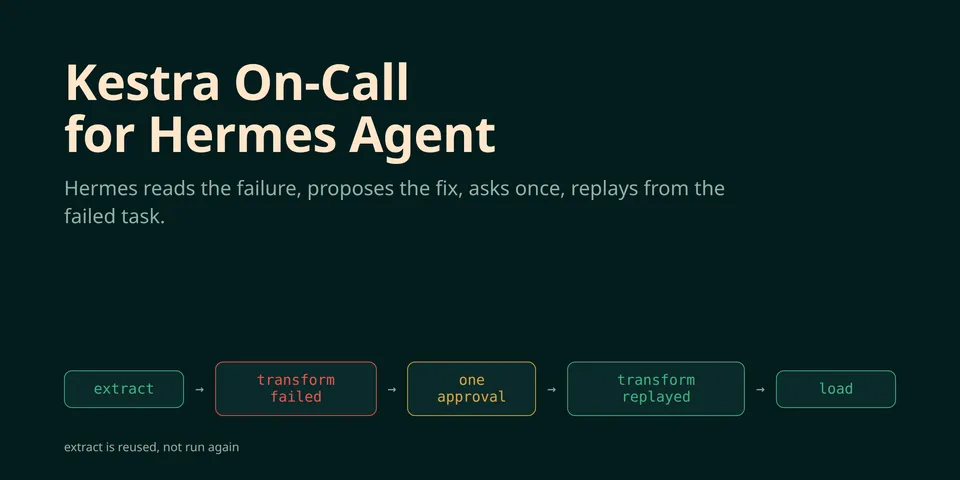
Puts Hermes on call for Kestra. When an execution in an allowed namespace fails, Hermes reads the failed task, its error logs and what changed since the last good run, proposes the smallest fix to the flow and asks you in chat. After one approval it saves the fix as a new flow revision, replays the failed execution from the task that failed (tasks that already succeeded are not rerun), follows the replay and checks the result. A failed replay restores the previous revision if the flow is still at the fixed one. Kestra Pause tasks become chat questions you can answer from any Hermes surface. A Kestra on-call dashboard tab and Desktop pane list incidents, proposals and pauses (read-only).
Good to know before installing
network: only the Kestra URL you configure (kestra_url, HTTPS required except for loopback and explicitly allowed private hosts), with the Kestra credentials you give Hermes (KESTRA_USERNAME and KESTRA_PASSWORD or KESTRA_API_TOKEN, read through Hermes secret scope). No other host, no telemetry. Writes to Kestra: a flow update, a replay, a rollback to the previous revision and resume or kill of a paused execution. Each needs a person: the typed command /kestra apply <id> <hash> (the hash must match the stored proposal) or Hermes's approval card for the two write tools with the whole stored diff, bound to the proposal hash. Diffs too long to read in full are refused. The write tools refuse in webhook, cron, single-query and unknown surfaces and the model-driven path refuses while Hermes approvals are bypassed. Fails closed: an empty namespaces setting allows nothing and protected_flows are diagnosis-only. Stored data: incidents, flow sources, error logs, task outputs, diffs, proposals and decision records in the plugin's profile-scoped SQLite database. Data sent elsewhere: the tools return flow sources, error logs, task outputs and execution inputs to the model, so they go to the profile's LLM provider. The dashboard routes under /api/plugins/kestra-oncall only read and show diffs and logs to anyone who can open the Hermes dashboard. hermes kestra-oncall setup --apply adds one named webhook route to config.yaml and never deploys a Kestra flow. Anyone holding WEBHOOK_SECRET can start a read-only model run against your Kestra. AI-assisted implementation.
From its catalog listing.
How to install
- Install it. Hermes asks for any API keys it needs, then asks whether to turn it on.
hermes plugins install kestra-oncall - Said no? Turn it on later:
hermes plugins enable kestra-oncall - Restart Hermes so it loads the plugin.
Some plugins also need a sign-in or settings: see Full setup & settings. Memory plugins ask whether to become your memory provider instead. Steps follow the official plugins guide (opens in a new tab).
- Category
- Security & privacy · Automation & multi-agent
- Maintained by
- zkasuran (Community)
- Needs
- No API keys declared
- Adds tools
kestra_statuskestra_incident_openkestra_incidentskestra_propose_fixkestra_apply_fixkestra_pauseskestra_pause_decide- Adds hooks
pre_tool_call- Needs Hermes
- 0.23.0 or newer
- Version
- 0.1.0
- In the catalog
- 2026-11-10
Known issues (from its catalog listing)
- Kestra has no compare-and-set on flow updates, so the check-then-write window is narrowed by a fresh re-read and a read-back, not removed.
- Slash-command writes are typed approvals (/kestra apply <id> <hash>) because ctx.dispatch_tool does not run pre_tool_call hooks on Hermes main or v0.23.0 and a plugin command has no way to raise an approval card in a chat.
- Model-driven writes are refused while Hermes approvals are bypassed (--yolo, /yolo, approvals.mode: off). The check imports tools.approval.is_approval_bypass_active, which hermes plugins validate reports as one non-public import.
- Built for plugins.isolation: in_process (Hermes's default). Host isolation skips CLI registration and was not tested.
- Tested on Kestra 2.0.9 only. A failed Loop cannot be replayed on that version and a failed Subflow is diagnosis-only.
- The end-to-end run used Hermes main at c3354ea. On v0.23.0 scenarios S1, S1b, S2 and S3 passed, as did validate, doctor and the live plugin test.
Using the Hermes desktop app? See where plugins live

Full setup & settings ↗Source code ↗
More in security & privacy
All security & privacy plugins
New Hermes Agent updates every day on X. Follow @HermesWatcher