
Hermes Ark
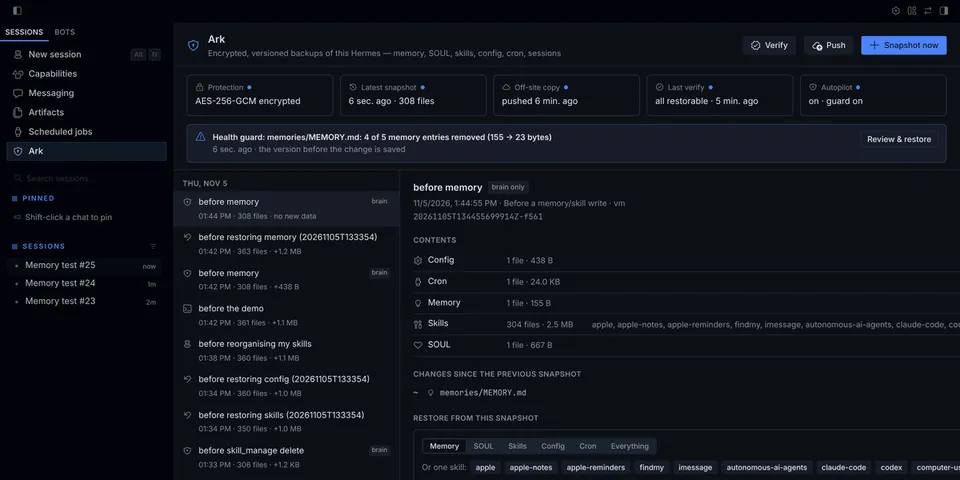
From its catalog listing
Encrypted, versioned backups of your whole Hermes — memory, SOUL, skills, config, cron, sessions and every profile — with item-level restore. Snapshots happen automatically before every memory/skill write and after sessions; a health guard tells the agent (and you) when memory or skills suddenly shrink, with the exact /ark restore command that undoes it. Off-site copies to any S3-compatible storage (AWS, R2, B2, MinIO) or a folder, new-machine recovery (hermes ark pull), and hermes ark verify to prove every snapshot restores. AES-256-GCM, deduplicated, retention pruning; a Hermes Desktop page with timeline, diffs and one-click restore. Self-defense: a prompt-injected agent cannot prune, delete, reconfigure or switch off Ark. Commands: hermes ark …, /ark …; tool: ark_checkpoint.
Good to know before installing
reads the Hermes home and its profiles; Hermes credential files (.env, auth.json, vault, pairing, browser logins, Webapp session token) are never read, captured or restored; ARK_PASSPHRASE and the S3 keys come only through the secret scope and are never stored. Writes snapshots to the configured repository folder (default $HERMES_HOME/plugin-data/hermes-ark/repo) and restores into the Hermes home only on an explicit user command or Desktop confirmation (the agent has no restore tool). tool_execution middleware on every tool call: snapshots before memory/skill writes and adds a note when the guard fires; refuses tool calls that would delete, rewrite or reconfigure Ark's backups or settings or disable it (allow_agent_admin lifts this); raises a tamper alarm when Ark is changed anyway, and never writes back settings, enabled state, secrets or its own plugin files — the user's changes always stick. The only repair is Ark's own repository key file after an agent tool call deleted it. Background threads: periodic snapshot/auto-push after sessions, and a 10-second watchdog in the agent process that stops when the plugin is disabled or unloaded. Network only to the user-configured S3 endpoint (HTTPS; plain http only for localhost). No subprocesses, no telemetry, no self-updater.
From its catalog listing.
How to install
- Install it. Hermes asks for any API keys it needs (this one needs
ARK_PASSPHRASE,ARK_S3_ACCESS_KEY_ID,ARK_S3_SECRET_ACCESS_KEY), then asks whether to turn it on.hermes plugins install hermes-ark - Said no? Turn it on later:
hermes plugins enable hermes-ark - Restart Hermes so it loads the plugin.
Some plugins also need a sign-in or settings: see Full setup & settings. Memory plugins ask whether to become your memory provider instead. Steps follow the official plugins guide (opens in a new tab).
- Category
- Memory & notes
- Maintained by
- medomohamed22 (Community)
- Needs
ARK_PASSPHRASEARK_S3_ACCESS_KEY_IDARK_S3_SECRET_ACCESS_KEYAPI keys- Adds tools
ark_checkpoint- Adds hooks
on_session_end- Needs Hermes
- 0.21.6 or newer
- Version
- 0.6.3
- In the catalog
- 2026-11-09
Using the Hermes desktop app? See where plugins live

Full setup & settings ↗Source code ↗
More in memory & notes
New Hermes Agent updates every day on X. Follow @HermesWatcher