
Gambit for Hermes
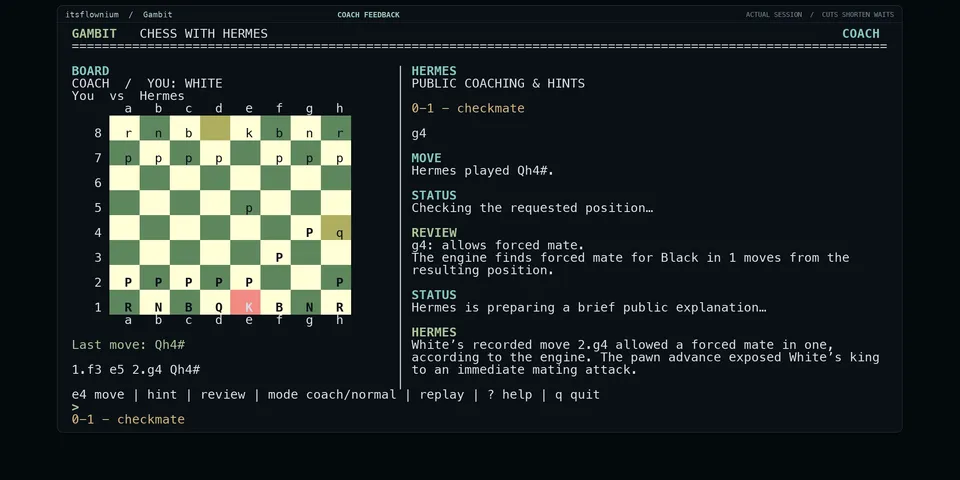
From its catalog listing
Play chess in a Hermes terminal or Desktop pane, understand mistakes, and replay or practice public Chess.com and Lichess matches.
Good to know before installing
runs a locally installed Stockfish executable (the path you set in plugin settings, or one found on PATH) as a subprocess that inherits Hermes' environment; fetches public games for a username you enter from api.chess.com and lichess.org; uses your configured Hermes model for each opponent move; and in Coach mode the Desktop pane automatically sends coaching requests into the bound chat when it is idle, each starting a model turn.
From its catalog listing.
How to install
- Install it. Hermes asks for any API keys it needs, then asks whether to turn it on.
hermes plugins install gambit - Said no? Turn it on later:
hermes plugins enable gambit - Restart Hermes so it loads the plugin.
Some plugins also need a sign-in or settings: see Full setup & settings. Memory plugins ask whether to become your memory provider instead. Steps follow the official plugins guide (opens in a new tab).
- Category
- Everyday life & fun
- Maintained by
- itsflownium (Community)
- Needs
- No API keys declared
- Adds tools
chess_statechess_startchess_movechess_gameschess_replaychess_reviewchess_hintchess_action- Adds hooks
pre_llm_call- Works on
- macos
- Needs Hermes
- 0.23.0 or newer
- Version
- 0.3.0
- In the catalog
- 2026-11-10
Known issues (from its catalog listing)
- Requires a separately installed local Stockfish executable; it is not bundled or downloaded automatically. Hermes Desktop is optional for the graphical pane.
- The standalone terminal board requires an interactive terminal with Python curses support and uses a separate Gambit session in the active profile.
- Hermes skips standalone CLI command registration with plugins.isolation set to host; /chess remains available in a Hermes conversation.
- Slash shortcuts return direct board or local engine evidence; use ordinary chat or the standalone coaching pane for model explanations.
- Full-match recap completion is announced through Desktop only. CLI/TUI chat can retrieve the result on a later request; the standalone dashboard has no summary command.
- Imports completed public standard-chess games only; source publication delays and rate limits may apply. Chess.com Bot and Coach games are unavailable through public username lookup.
- Uses the configured Hermes provider for moves and coaching; normal provider usage applies, and legal engine fallback is labelled when used.
- The 60-second deadline covers board replies; separate explanations have their own provider response time.
- Verified platform scope is macOS only; Linux, Windows and another physical computer have not been verified.
Using the Hermes desktop app? See where plugins live

Full setup & settings ↗Source code ↗
More in everyday life & fun
All everyday life & fun plugins
New Hermes Agent updates every day on X. Follow @HermesWatcher