
Fine Print
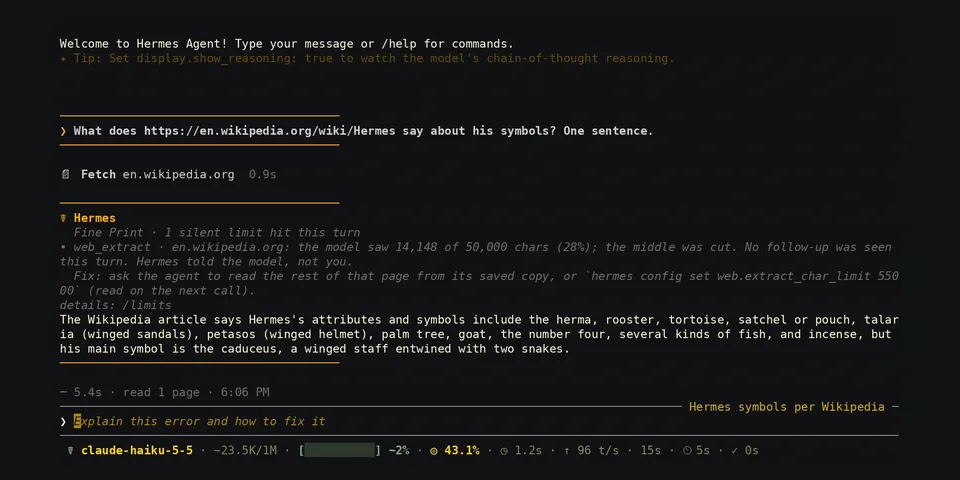
From its catalog listing
Shows where Hermes silently shrinks, cuts, swaps or hides what the model sees. When a turn ends in which a limit bit and no follow-up by the model was seen, the user gets one card with before/after numbers and the fix (a `hermes config set` command, a workaround, or "hardcoded in v0.23.0"): a web page cut to head and tail, an image downscaled 4x or more, a search page that stopped at 50 with no "more" flag, a failed search backend swapped for the keyless tier, a file read whose lines were all cut at 2,000 chars, terminal output of which under half was kept, a tool result replaced by a 1,500-char preview, a context compaction, loaded images that the request no longer carries, an attached image that reached the model as a helper model's description, a pinned context window that is not in force, a sixth URL that web_extract never requested, a workbook read up to row 5,000 with its hidden sheet skipped. The model gets one short note inside the tool result only where Hermes itself tells nobody. `/limits` shows the session's hits, explains 81 catalogued limits of v0.23.0 (`/limits explain <id>`), replays the same detectors and card policy over your own history (`/limits report`, or `/limits report html` for one self-contained page) and lists every detector with its status (`/limits self-test`): 16 are verified (on real history, or in a live session for limits that leave no stored row) and may raise cards, 19 are fixture-only and only log.
Good to know before installing
no LLM calls, no network, no Python dependencies, no tools, no middleware. Reads tool results in memory through hooks (failed calls included) and, by structure and size only, each request's message lists and the user message of a turn (image parts, Hermes's own placeholder and image notes); keeps a metadata-only ledger (sizes, counts, a URL host or file basename, hashes) in its plugin-data directory. Adds one `_fine_print` key or first line to a tool result for limits where core tells nobody (never on failed calls, images, write_file, patch or skill_manage; `/limits notes off`), and a section of under 1,000 chars to the system prompt of new sessions (`/limits sheet off`). Reads outside its own data, read-only: the profile's session database for `/limits report` (aggregates only; the FINE_PRINT_STATE_DB variable can name another copy), the .xlsx/.docx file that read_file just extracted (to count rows, sheets and tables), and the Hermes config. Writes one file only when asked (`/limits report html`, into the profile's cache folder). Posts one notice per turn into the chat in the CLI and the TUI (in Desktop 0.23.0 the notice call was refused in my check; there the hits are listed by `/limits`); off on messaging platforms by default.
From its catalog listing.
How to install
- Install it. Hermes asks for any API keys it needs, then asks whether to turn it on.
hermes plugins install fine-print - Said no? Turn it on later:
hermes plugins enable fine-print - Restart Hermes so it loads the plugin.
Some plugins also need a sign-in or settings: see Full setup & settings. Memory plugins ask whether to become your memory provider instead. Steps follow the official plugins guide (opens in a new tab).
- Category
- Coding & developer tools
- Maintained by
- Joko-F (Community)
- Needs
- No API keys declared
- Adds hooks
transform_tool_resultpost_llm_callon_session_endpre_llm_callpre_api_requestapi_request_errorpost_api_requestpost_auxiliary_callpost_compactionsubagent_starton_session_delete- Needs Hermes
- 0.23.0 or newer
- Version
- 0.1.0
- In the catalog
- 2026-11-12
Using the Hermes desktop app? See where plugins live

Full setup & settings ↗Source code ↗
More in coding & developer tools
All coding & developer tools plugins
New Hermes Agent updates every day on X. Follow @HermesWatcher