
Faultline
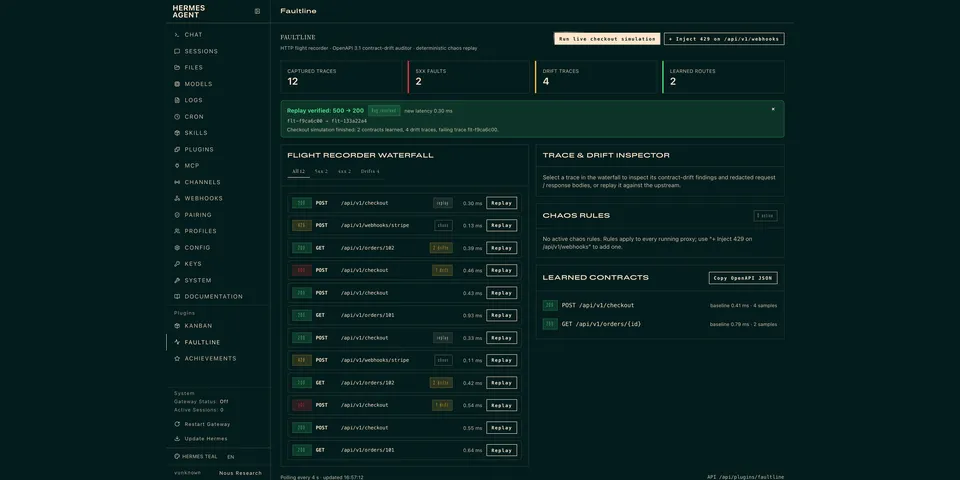
From its catalog listing
Local API flight recorder for debugging HTTP services with Hermes. The agent starts a loopback reverse proxy in front of your service, captures every request and response (auth headers and secret JSON fields redacted before storage), learns an OpenAPI 3.1 contract from healthy traffic and flags drift (type changes, missing fields, 5xx, latency regressions), injects chaos faults (429/5xx, latency, truncated JSON), and after a fix replays the exact failing request to prove 500 -> 200. Ships six tools, a tool_execution middleware, /faultline and `hermes faultline` commands, a bundled skill, a Faultline tab in the web dashboard, and a Hermes Desktop studio page, waterfall pane, status chip and inline ::faultline-trace card.
Good to know before installing
the proxy listens on 127.0.0.1 only and forwards to the target_url you give it (normally local; any http(s) host is accepted except literal link-local, cloud-metadata and reserved addresses and the cloud-metadata hostnames, and the URL may not carry a query, fragment or credentials); replay re-sends captured requests to the upstream they were recorded from only (the agent cannot choose another host), resolves it first and refuses link-local and cloud-metadata addresses, reaches loopback/private targets only when the owner enables the allow_local_replay setting (off by default), and replaying a POST repeats its side effects; captured traffic, contracts and chaos rules are stored in SQLite under $HERMES_HOME/plugin-data/faultline/; each running proxy is a daemon thread in the Hermes process; no telemetry, no other network calls, no credentials read, no shell commands, no Python dependencies.
From its catalog listing.
How to install
- Install it. Hermes asks for any API keys it needs, then asks whether to turn it on.
hermes plugins install faultline - Said no? Turn it on later:
hermes plugins enable faultline - Restart Hermes so it loads the plugin.
Some plugins also need a sign-in or settings: see Full setup & settings. Memory plugins ask whether to become your memory provider instead. Steps follow the official plugins guide (opens in a new tab).
- Category
- Security & privacy
- Maintained by
- bigmantech001 (Community)
- Needs
- No API keys declared
- Adds tools
faultline_proxyfaultline_tracesfaultline_replayfaultline_contractfaultline_chaosfaultline_simulate- Adds hooks
post_tool_callon_session_start- Works on
- linux, macos
- Needs Hermes
- 0.22.5 or newer
- Version
- 0.1.1
- In the catalog
- 2026-11-10
Known issues (from its catalog listing)
- Replay against a local service needs the owner setting allow_local_replay: true (off by default). faultline_simulate's built-in service is exempt because the plugin starts it itself.
- Redacted auth headers are not replayed; pass fresh ones with faultline_replay(override_headers=...) for authenticated endpoints.
- Compressed (gzip/br) response bodies are proxied untouched but stored as a placeholder, so schema drift is only learned from uncompressed JSON.
- Chaos rules persist in the database and apply to every running proxy until removed.
- Both halves ship opt-in: enable the agent half (hermes plugins enable faultline, then restart the gateway) and flip the Desktop switch in Capabilities -> Plugins.
Using the Hermes desktop app? See where plugins live

Full setup & settings ↗Source code ↗
More in security & privacy
All security & privacy plugins
New Hermes Agent updates every day on X. Follow @HermesWatcher