
Cardlake
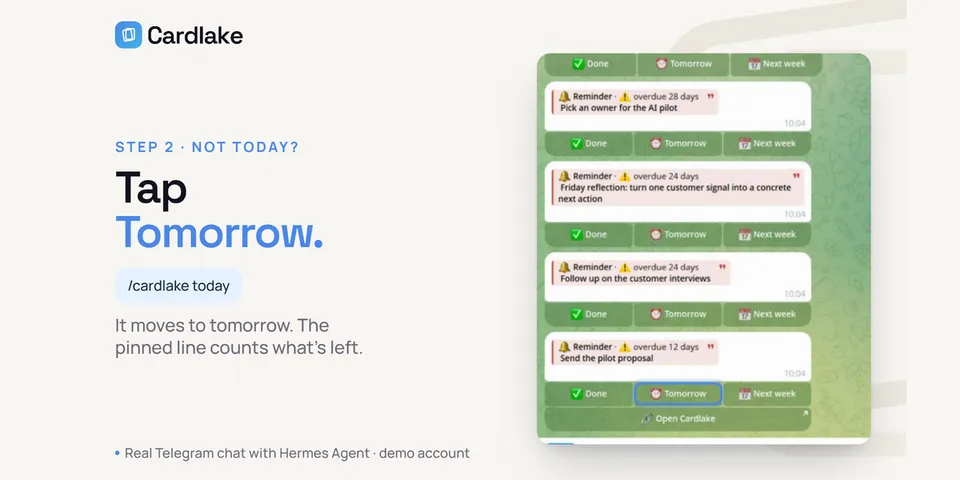
From its catalog listing
Cardlake keeps what you mean to get back to (reminders, articles and videos to learn from, links, work) in one daily feed. This plugin puts that feed in your Telegram chat with Hermes: /cardlake feed and today show your cards with Done, Tomorrow, Next week and Undo buttons and a pinned Today checklist, a morning message sends what's due, and you can send Hermes a link to save it. Free account at cardlake.app, or host your own.
Good to know before installing
talks to Cardlake only through Hermes' "cardlake" MCP connection (cardlake.app or a self-hosted copy); sends and pins card messages in your private Telegram chat, and adds /cardlake to the bot's command menu unless you set that menu up yourself, through the bot Hermes already runs; /cardlake save sends your text (with passwords, keys and tokens removed in code) to your own Hermes model; stores only the id of the pinned Today message in plugin state. No shell commands, credentials, background processes or telemetry; the morning job exists only if you create it from the blueprint, and it cannot change cards.
From its catalog listing.
How to install
- Install it. Hermes asks for any API keys it needs, then asks whether to turn it on.
hermes plugins install cardlake - Said no? Turn it on later:
hermes plugins enable cardlake - Restart Hermes so it loads the plugin.
Some plugins also need a sign-in or settings: see Full setup & settings. Memory plugins ask whether to become your memory provider instead. Steps follow the official plugins guide (opens in a new tab).
- Category
- Memory & notes · Work & business
- Maintained by
- cardleforall (Community)
- Needs
- No API keys declared
- Adds tools
cardlake_todaycardlake_show_cards- Adds hooks
pre_tool_callpost_tool_calltransform_llm_output- Needs Hermes
- 0.22.5 or newer
- Version
- 0.7.9
- In the catalog
- 2026-11-10
Using the Hermes desktop app? See where plugins live

Full setup & settings ↗Source code ↗
More in memory & notes
New Hermes Agent updates every day on X. Follow @HermesWatcher