
Cacheguard
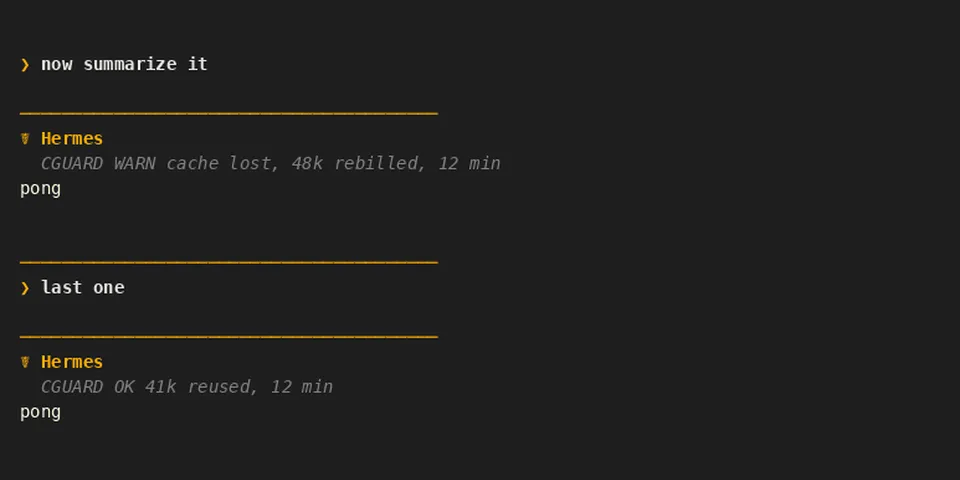
From its catalog listing
Warns or blocks a large chat message sent after a pause, when the provider's prompt cache may have expired. Afterwards it shows how many tokens were reused or rebilled, and /cacheguard shows how often your cache was lost after pauses of each length. Modes (off, warn, block) are set per surface (terminal, desktop, gateway), and a model can have its own pause, size and mode. In block mode the message is not sent: the reply says so, and you send it with /retry or by sending the same text again. If the plugin fails, the message is sent.
Good to know before installing
no network call, no LLM call, no subprocess, no credentials, no telemetry. Middleware llm_request reads every message of the request to hash the start of the chat (sha256, only the hash is kept) and removes cacheguard's own "message not sent" replies from what the model receives. Middleware llm_execution reads the token usage of each response; the provider call is Hermes's own next_call(), never repeated. Hook pre_llm_call returns a block for a large message after a pause. Hook transform_llm_output posts a result line with ctx.post_message and never changes the reply. Reads config.yaml (its own settings through ctx.get_config) and the environment variables HERMES_SINGLE_QUERY_SESSION, HERMES_KANBAN_TASK, HERMES_PLATFORM, HERMES_INTERACTIVE. Writes its settings with ctx.set_config (/cacheguard set and setup) and, under <HERMES_HOME>/cacheguard/, observations.jsonl (token counts, times and model name of calls after a pause; no message text, no session id) and one small json file per chat (times, token counts, hash). /cacheguard reset deletes them. Unattended runs (cron, kanban, subagents, curator, API server, webhooks) pass through untouched; one-shot runs (-Q, -z, --oneshot) are never blocked and show no line (a -Q run may be counted in the stats); with chat -q, block acts as warn. Private Hermes names: tools.approval_context._is_single_query_approval_context (a run with no screen only warns) and agent.usage_pricing.normalize_usage (read the cache token counts). If one is missing, the plugin says so in /cacheguard and degrades: it only warns, or result lines are missing.
From its catalog listing.
How to install
- Install it. Hermes asks for any API keys it needs, then asks whether to turn it on.
hermes plugins install cacheguard - Said no? Turn it on later:
hermes plugins enable cacheguard - Restart Hermes so it loads the plugin.
Some plugins also need a sign-in or settings: see Full setup & settings. Memory plugins ask whether to become your memory provider instead. Steps follow the official plugins guide (opens in a new tab).
- Category
- Security & privacy
- Maintained by
- AIverflow (Community)
- Needs
- No API keys declared
- Adds hooks
transform_llm_outputpre_llm_call- Needs Hermes
- 0.22.6 or newer
- Version
- 0.6.0
- In the catalog
- 2026-11-07
- GitHub stars
- 3
Known issues (from its catalog listing)
- Uses two private Hermes names (single-query check, token usage); without them it only warns, or result lines are missing.
- In-process plugin mode only: ctx.post_message needs the live gateway adapter.
Using the Hermes desktop app? See where plugins live

Full setup & settings ↗Source code ↗
More in security & privacy
All security & privacy plugins
New Hermes Agent updates every day on X. Follow @HermesWatcher