
Bench Rewind
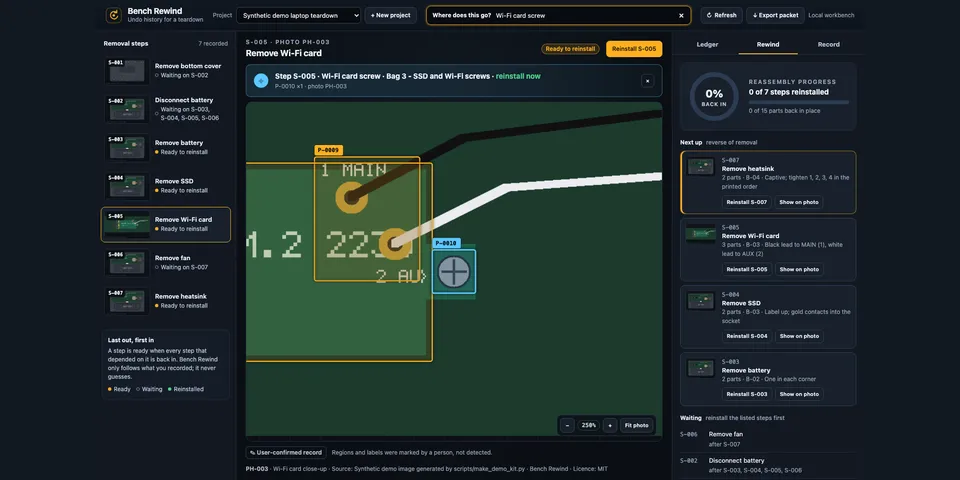
From its catalog listing
An undo history for a physical teardown: record removal steps on your own photos, keep a parts ledger by bag, answer "where does this go?" and reassemble in a valid reverse order. Human-confirmed records only, with native agent tools, a live Desktop page and a printable reassembly packet.
Good to know before installing
no network, model, shell or subprocess use and no telemetry; it reads only an image or kit file the user names (or picks in Desktop) and refuses symlinks; it strips photo metadata (GPS, camera, XMP, text, content credentials) before storing a copy, and keeps projects and photo copies under the profile's plugin-data/bench-rewind/ folder (0700/0600); exported reassembly packets embed the user's photos unless the text-only variant is chosen.
From its catalog listing.
How to install
- Install it. Hermes asks for any API keys it needs, then asks whether to turn it on.
hermes plugins install bench-rewind - Said no? Turn it on later:
hermes plugins enable bench-rewind - Restart Hermes so it loads the plugin.
Some plugins also need a sign-in or settings: see Full setup & settings. Memory plugins ask whether to become your memory provider instead. Steps follow the official plugins guide (opens in a new tab).
- Category
- Cost, speed & monitoring
- Maintained by
- rusty4444 (Community)
- Needs
- No API keys declared
- Adds tools
bench_rewind_projectsbench_rewind_recordbench_rewind_locatebench_rewind_rewind- Works on
- linux, macos
- Needs Hermes
- 0.22.5 or newer
- Version
- 0.1.0
- In the catalog
- 2026-11-07
Using the Hermes desktop app? See where plugins live

Full setup & settings ↗Source code ↗
More in cost, speed & monitoring
All cost, speed & monitoring plugins
New Hermes Agent updates every day on X. Follow @HermesWatcher