
Archytan Lite
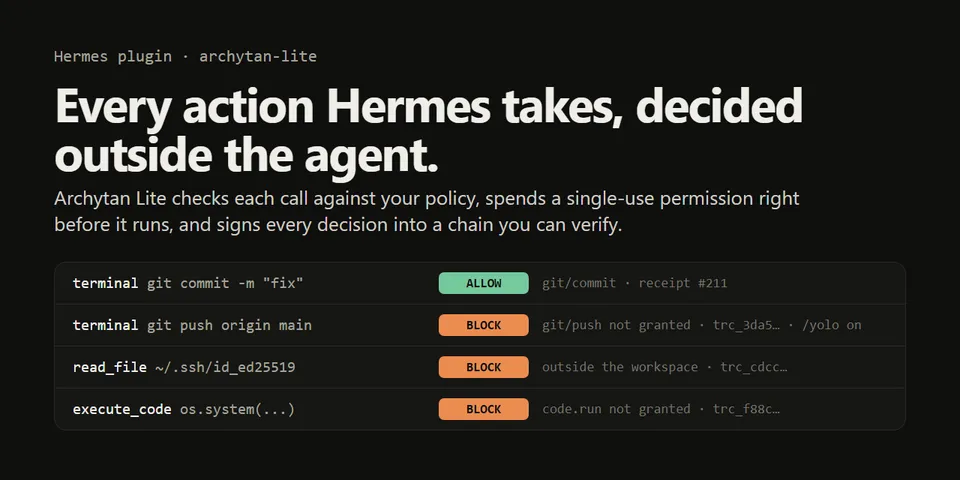
From its catalog listing
Every tool call is decided by Archytan Lite, an authorization gate that runs outside Hermes with its own signing key, before the tool runs. A call becomes checks on what it touches (each file path, each program and git subcommand a command runs, every path and URL it names, each host fetched, MCP and plugin tools by name); all must be ALLOWed, and each ALLOW is a single-use permission spent just before the tool runs. Refusals use the block directive, so they hold under /yolo and approvals.mode: off. Anything the plugin can't read precisely ($VAR, $(...), loops, unpinnable paths), any error, an unreachable gate or a bad signature is refused. Every decision is an Ed25519-signed, hash-chained receipt; `hermes archytan verify` checks the whole log. Starter policy for one workspace, edited as JSON and applied with `hermes archytan reload`.
Good to know before installing
the gate is proprietary software by the plugin's maintainer, free under its Community license, run from ghcr.io/high-archytech-solutions/archytan-lite@sha256:205703a7fc67a9e96aa0930fd9dda83fe2b9694b724b13dea8c1854948e82071 (2.7.1), which the plugin never pulls unless you pass --pull; `hermes archytan setup|reload|verify` and `/archytan verify` run docker with a minimal environment and create the volume archytan-hermes-data and the container archytan-hermes (restart unless-stopped, bound to 127.0.0.1:8431); the hook sends each gated call's action, resource (path, program, host or tool name) and hermes:<session id> to that local gate, never argument contents or results; stores its caller token through Hermes's credential store as ARCHYTAN_LITE_HERMES_TOKEN; writes the gate's policy, callers file (token hash only), public key and a capped decisions.jsonl under plugin-data/archytan-lite; carries the gate's MIT Python client (archytan-lite 2.1.1 client.py, byte-identical) so it has no Python dependencies; no telemetry. Until setup has run, every gated tool call is refused.
From its catalog listing.
How to install
- Install it. Hermes asks for any API keys it needs, then asks whether to turn it on.
hermes plugins install archytan-lite - Said no? Turn it on later:
hermes plugins enable archytan-lite - Restart Hermes so it loads the plugin.
Some plugins also need a sign-in or settings: see Full setup & settings. Memory plugins ask whether to become your memory provider instead. Steps follow the official plugins guide (opens in a new tab).
- Category
- Coding & developer tools
- Maintained by
- High-ArchyTech-Solutions (Community)
- Needs
- No API keys declared
- Adds hooks
pre_tool_call- Needs Hermes
- 0.22.6 or newer
- Version
- 0.1.0
- In the catalog
- 2026-11-07
Known issues (from its catalog listing)
- Needs Docker for the gate, and in-process plugins (Hermes's default): under plugins.isolation: host the `hermes archytan` commands aren't available.
- Another plugin's modify directive can change a tool's arguments after this plugin checked them; don't combine it with plugins that rewrite arguments.
Using the Hermes desktop app? See where plugins live

Full setup & settings ↗Source code ↗
More in coding & developer tools
All coding & developer tools plugins
New Hermes Agent updates every day on X. Follow @HermesWatcher