
Hermes command cheat sheet
The commands you actually use, on one page. Reviewed Nov 2, 2026 against the official Hermes Agent docs.
Replace anything in <angle brackets> with your own value. [Square brackets] mean optional. Type hermes in a terminal and / or ! in a chat.
Cheat sheet results
hermes skills browseBrowse skills from the hubs. Group: Skills
Install and update
On Apple Silicon Macs and Windows 11, the docs recommend the Hermes Desktop installer.
curl -fsSL https://hermes-agent.nousresearch.com/ install.sh | bash Install on Linux, macOS or WSL2. Group: Install and update
iex (irm https://hermes-agent.nousresearch.com/ install.ps1) Install on native Windows (run it in PowerShell). Group: Install and update
hermes desktopBuild and open the desktop app after a terminal install. Group: Install and update
hermes --versionShow the installed version. Group: Install and update
hermes updateUpdate to the latest stable release. The desktop app updates itself. Group: Install and update
hermes update --checkCheck whether an update is available, without installing it. Group: Install and update
hermes uninstall --dry-runPreview what uninstall would remove.
--fullalso deletes your data. Group: Install and update
Pick a model
Choose the AI model Hermes uses. Do this right after installing.
hermes setupRun the setup wizard for your model, tools, terminal and messaging apps. Group: Pick a model
hermes setup --portalSign in with a Nous Portal subscription and use it for your model and tools in one step. Group: Pick a model
hermes modelAdd a provider, enter an API key or log in, and choose your default model. Group: Pick a model
/model [model-name]Switch to a model you already set up. To add a provider, exit and run
hermes model. Group: Pick a model/reasoning <level>Set the model's reasoning effort (low, medium, high and more).
--globalsaves it. Group: Pick a modelhermes auth add <provider> --api-key <key>Add another API key for a provider, so Hermes can rotate between keys. Group: Pick a model
Start chatting
Open a chat in your terminal and pick up where you left off.
hermesStart a chat in the classic terminal interface. Group: Start chatting
hermes --tuiStart a chat in the TUI, the interface the docs recommend. Group: Start chatting
hermes chat -q "Summarize the latest PRs"Start a chat with your first message already sent. Group: Start chatting
hermes --continueResume your most recent session (short:
-c). Group: Start chattinghermes --resume <id|title>Resume a session by ID or title, or
latestfor the newest (short:-r). Group: Start chattinghermes -z "What's the capital of France?"Ask one question and print only the final answer, for scripts. Group: Start chatting
What the classic CLI looks like
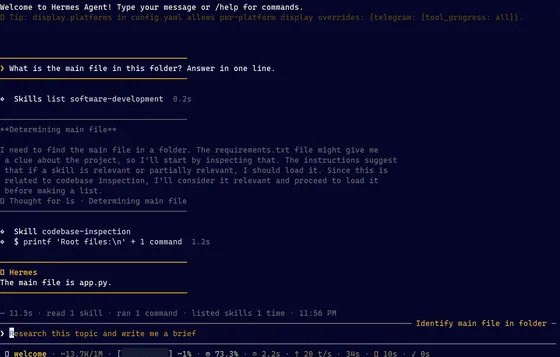
Commands inside a chat
Type these at the Hermes prompt. Type / to see them all.
/helpShow available commands. Group: Commands inside a chat
/newStart a fresh session (alias
/reset). Group: Commands inside a chat/retrySend your last message again. Group: Commands inside a chat
/undoRemove your last message and its reply. Group: Commands inside a chat
/compressSummarize older messages to free up context. Group: Commands inside a chat
/title <name>Name this session so it is easy to find later. Group: Commands inside a chat
/resume [name]Switch to a named session (with no name, list them). Group: Commands inside a chat
/usageShow token usage and cost. Group: Commands inside a chat
/context [all]Show what is filling the context window. Group: Commands inside a chat
/btw <question>Ask a side question about the chat without interrupting it. Group: Commands inside a chat
/bg <prompt>Run a prompt in a separate background session. Group: Commands inside a chat
/personality <name>Switch personality, e.g. concise or pirate (
noneturns it off). Group: Commands inside a chat!<command>Run a shell command yourself, without using a model turn. Group: Commands inside a chat
/quitExit the CLI (alias
/exit). Group: Commands inside a chat
Sessions and usage
Find, rename, export and clean up past chats.
hermes sessions browsePick a past session from a searchable list and resume it. Group: Sessions and usage
hermes sessions listList sessions with title, preview and last-active time. Group: Sessions and usage
hermes sessions rename <id> <title>Rename a session. Group: Sessions and usage
hermes sessions export --format md --session-id <id>Export one session as a Markdown file. Group: Sessions and usage
hermes sessions prune --dry-runPreview deleting ended sessions older than 90 days. Group: Sessions and usage
hermes insightsShow token, cost and activity stats for the last 30 days. Group: Sessions and usage
Settings
Change Hermes settings from the terminal.
hermes config editOpen config.yaml in your editor. Group: Settings
hermes config set <key> <value>Set a value. Dotted keys go to config.yaml, UPPER_SNAKE keys to .env. Group: Settings
hermes config get <key>Print one value (secrets stay masked unless you add
--raw). Group: Settingshermes config checkFind missing or stale options after an update. Group: Settings
hermes config set terminal.backend dockerRun agent commands in a Docker container instead of directly on your machine. Group: Settings
Skills
Add reusable instructions that Hermes loads when a task needs them.
hermes skills search <query>Search skill registries by keyword. Group: Skills
hermes skills inspect <id>Preview a skill before installing it. Group: Skills
hermes skills install <id>Install a skill (it gets a security scan first). Group: Skills
hermes skills listList installed skills. Group: Skills
hermes skills updateReinstall hub skills that changed upstream. Group: Skills
hermes skills uninstall <name>Remove a skill you installed from a hub. Group: Skills
hermes -s <skill>Start a session with a skill already loaded. Group: Skills
/<skill-name> [args]Load an installed skill and add your instruction. Group: Skills
/learn <source>Turn a file, URL, workflow or notes into a skill. Group: Skills
/reload-skillsRescan skills and refresh their slash commands. Group: Skills
Tools, MCP and plugins
Choose what Hermes can do and connect outside tools.
hermes toolsChoose which tools are on for each platform (interactive). Group: Tools, MCP and plugins
/toolsList tools, or turn one off or on for this session (turning one off resets the session). Group: Tools, MCP and plugins
hermes chat --toolsets "web,terminal,skills"Turn on specific toolsets for one run. Group: Tools, MCP and plugins
hermes pluginsTurn installed plugins on or off and pick a memory provider. Group: Tools, MCP and plugins
hermes plugins install <name>Install a plugin from the Hermes catalog, a Git URL or owner/repo. Group: Tools, MCP and plugins
hermes plugins listList installed plugins and whether each is on. Group: Tools, MCP and plugins
hermes mcpBrowse approved MCP servers and install or turn them on. Group: Tools, MCP and plugins
hermes mcp install <name>Install an MCP server from the catalog (e.g. deepwiki). Group: Tools, MCP and plugins
hermes mcp add <name> --url <url>Add your own MCP server (use
--commandfor a local one). Group: Tools, MCP and pluginshermes mcp test <name>Check that an MCP server connects. Group: Tools, MCP and plugins
/reload-mcpReload MCP servers after config changes. Group: Tools, MCP and plugins
hermes plugins install mcp-serveLet other apps use Hermes as an MCP server. Then run
hermes mcp-serve. Group: Tools, MCP and pluginshermes acpRun Hermes as an ACP server for code editors (install ACP support first). Group: Tools, MCP and plugins
Memory
See and control what Hermes remembers about you and your work.
hermes memory setupSet up an external memory provider. Group: Memory
hermes journeyShow a timeline of the skills and memories Hermes has learned. Group: Memory
/refineRun the memory and skill review now. Group: Memory
/memory pendingList memory changes waiting for your approval. Approve with
/memory approve all. Group: Memory
Messaging apps
Talk to Hermes from Telegram, Discord, Slack, WhatsApp and more, through one gateway.
hermes gateway setupConnect messaging apps with a step-by-step wizard. Group: Messaging apps
hermes gatewayRun the gateway in this terminal (best for WSL, Docker and Termux). Group: Messaging apps
hermes gateway installRun the gateway as a background service (systemd, launchd or Windows Task Scheduler). Group: Messaging apps
hermes gateway startStart the background service (also
stopandrestart). Group: Messaging appshermes gateway statusCheck whether the gateway service is running. Group: Messaging apps
hermes pairing listSee pending and approved users. Group: Messaging apps
hermes pairing approve <platform> <code>Let a new user in with the pairing code your bot sent them. Group: Messaging apps
/sethomeIn a messaging app: make this chat the home channel for deliveries. Group: Messaging apps
/stopIn a messaging app: stop the reply and any background processes. Group: Messaging apps
/approveIn a messaging app: approve a pending risky command (
/denyrejects it). Group: Messaging apps
Scheduled tasks
Run prompts on a schedule. Jobs run inside the gateway, so keep it running.
hermes cron create "every 2h" "Check server status"Create a recurring job. Group: Scheduled tasks
/cron add "in 30m" "Remind me to check the build"Create a one-time job from the chat prompt. Group: Scheduled tasks
hermes cron listShow scheduled jobs. Group: Scheduled tasks
hermes cron statusCheck that the scheduler is running and see the next job. Group: Scheduled tasks
hermes cron edit <job_id> --schedule "every 4h"Change a job's schedule. Group: Scheduled tasks
hermes cron pause <job_id>Pause a job without deleting it (
hermes cron resumeturns it back on). Group: Scheduled taskshermes cron run <job_id>Run a job on the next scheduler tick. Group: Scheduled tasks
hermes cron remove <job_id>Delete a job. Group: Scheduled tasks
Profiles
Run separate agents, each with its own settings, memory and skills.
hermes profile create <name>Create a separate profile, plus a command with the same name to launch it. Group: Profiles
hermes profile create <name> --cloneCreate a profile that copies config, .env, SOUL.md, skills and memory from this one. Group: Profiles
hermes profile listList profiles and their status. Group: Profiles
hermes profile use <name>Make a profile the default (
hermes profile use defaultswitches back). Group: Profileshermes -p <name> chatUse a profile for one command only. Group: Profiles
hermes profile export <name>Pack a profile into a .tar.gz file without its keys (
-osets the path). Group: Profiles
Safety and undo
Control approval prompts and undo file changes.
hermes --yoloSkip approval prompts for risky commands. Use only in a disposable setup. Group: Safety and undo
/yoloTurn approval prompts off or back on for this session. Group: Safety and undo
hermes chat --checkpointsSnapshot files before risky changes so
/rollbackcan undo them. Group: Safety and undo/rollbackList checkpoints, then
/rollback <N>to undo file changes. Checkpoints are off until you turn them on. Group: Safety and undohermes pauseEmergency stop: no new scheduled jobs or agent turns start until
hermes resume. Group: Safety and undo
Fix problems and back up
Check health, read logs, get help and keep a backup.
hermes doctorFind config and dependency problems (
--fixtries to repair them). Group: Fix problems and back uphermes statusShow model, provider, gateway and scheduled jobs on one screen (
--fullfor all). Group: Fix problems and back uphermes logs -fFollow the agent log live (other logs: errors, gateway, mcp). Group: Fix problems and back up
hermes dumpPrint a setup summary to paste when asking for help. Group: Fix problems and back up
hermes debug shareUpload a redacted debug report to a public paste site and get a link to share. Group: Fix problems and back up
hermes backupBack up your Hermes data, keys included, to a zip (restore with
hermes import). Group: Fix problems and back uphermes import <zipfile>Restore a backup made with
hermes backup(stop the gateway first). Group: Fix problems and back up
No commands match “hermes skills browse”. Show all 108 commands or search the site for “hermes skills browse”.
Keyboard shortcuts
Keys for the chat prompt.
Alt+Enter, Ctrl+J or Shift+Enter
New line. Shift+Enter works only in some terminals. On Windows Terminal, use Ctrl+J.
Ctrl+C
Clear what you typed, or stop the agent if the prompt is empty
Tab
Accept a suggestion or complete a slash command
Key files and folders
Where Hermes keeps its settings, keys and data.
~/.hermes/ Hermes home and default profile. Set
HERMES_HOMEto use another folder.~/.hermes/ config.yaml Main settings (no secrets): model, terminal backend, memory, skills, display, MCP servers
~/.hermes/ .env API keys and other secrets
~/.hermes/ auth.json OAuth credentials (e.g. Nous Portal)
~/.hermes/ SOUL.md The agent's identity, loaded first in the system prompt
~/.hermes/ memories/ MEMORY.md The agent's own notes, capped at 2,200 characters by default
~/.hermes/ memories/ USER.md Your user profile, capped at 1,375 characters by default
~/.hermes/ skills/ <category>/ <skill>/ SKILL.md Installed and agent-created skills
~/.hermes/ state.db Session history and its search index, for the CLI, TUI and messaging apps
~/.hermes/ sessions/ Gateway session files and
/savesnapshots (sessions/saved/)~/.hermes/ cron/ jobs.json Scheduled job definitions; run output goes to
~/.hermes/cron/output/~/.hermes/ checkpoints/ File snapshots used by
/rollback, when checkpoints are on~/.hermes/ plugins/ Installed plugins
~/.hermes/ logs/ Logs such as agent.log, errors.log and gateway.log, with secrets redacted
~/.hermes/ profiles/ <name>/ A named profile's own config, .env, memories, skills, sessions and cron
~/.hermes/ hermes-agent/ Hermes code, from the Linux/macOS install script
~/.local/ bin/ hermes The hermes command from the Linux/macOS install script. Profile aliases live here too.
%LOCALAPPDATA%\hermes\ Windows script install: your data, with the code in
hermes-agent\and the CLI inbin\<repo>/.hermes/ skills/ Project skills. Run
hermes skills trustin the project before they load.
Flags change between releases. Run hermes <command> --help to see the options in your version.
Primary sources
- CLI Commands Reference (opens in a new tab)
- Slash Commands Reference (opens in a new tab)
- CLI Interface (opens in a new tab)
- TUI (opens in a new tab)
- Quickstart (opens in a new tab)
- Installation (opens in a new tab)
- Updating & Uninstalling (opens in a new tab)
- Configuration (opens in a new tab)
- Sessions (opens in a new tab)
- Profiles (opens in a new tab)
- Persistent Memory (opens in a new tab)
- Skills System (opens in a new tab)
- Tools & Toolsets (opens in a new tab)
- MCP (Model Context Protocol) (opens in a new tab)
- Plugins (opens in a new tab)
- Scheduled Tasks (Cron) (opens in a new tab)
- Messaging Gateway (opens in a new tab)
- Security (opens in a new tab)
- Checkpoints and /rollback (opens in a new tab)
- NousResearch/hermes-agent README (opens in a new tab)
- NousResearch/hermes-agent releases (opens in a new tab)