
Hermes command cheat sheet
The commands you actually use, on one page. Reviewed Nov 2, 2026 against the official Hermes Agent docs.
Replace anything in <angle brackets> with your own value. [Square brackets] mean optional. Type hermes in a terminal and / or ! in a chat.
Cheat sheet results
hermes chat --toolsets "web,terminal,skills"Turn on specific toolsets for one run. Group: Tools, MCP and plugins
Install and update
On Apple Silicon Macs and Windows 11, the docs recommend the Hermes Desktop installer.
curl -fsSL https://hermes-agent.nousresearch.com/ install.sh | bash Install on Linux, macOS or WSL2. Group: Install and update
iex (irm https://hermes-agent.nousresearch.com/ install.ps1) Install on native Windows (run it in PowerShell). Group: Install and update
hermes desktopBuild and open the desktop app after a terminal install. Group: Install and update
hermes --versionShow the installed version. Group: Install and update
hermes updateUpdate to the latest stable release. The desktop app updates itself. Group: Install and update
hermes update --checkCheck whether an update is available, without installing it. Group: Install and update
hermes uninstall --dry-runPreview what uninstall would remove.
--fullalso deletes your data. Group: Install and update
Pick a model
Choose the AI model Hermes uses. Do this right after installing.
hermes setupRun the setup wizard for your model, tools, terminal and messaging apps. Group: Pick a model
hermes setup --portalSign in with a Nous Portal subscription and use it for your model and tools in one step. Group: Pick a model
hermes modelAdd a provider, enter an API key or log in, and choose your default model. Group: Pick a model
/model [model-name]Switch to a model you already set up. To add a provider, exit and run
hermes model. Group: Pick a model/reasoning <level>Set the model's reasoning effort (low, medium, high and more).
--globalsaves it. Group: Pick a modelhermes auth add <provider> --api-key <key>Add another API key for a provider, so Hermes can rotate between keys. Group: Pick a model
Start chatting
Open a chat in your terminal and pick up where you left off.
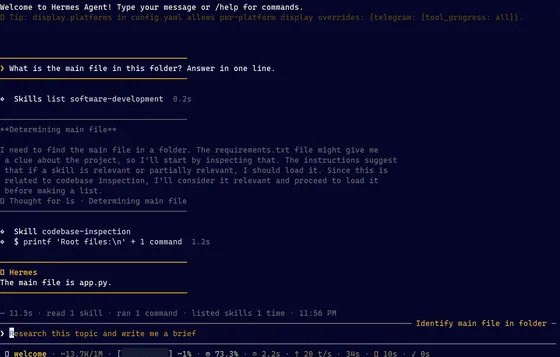
hermesStart a chat in the classic terminal interface. Group: Start chatting
hermes --tuiStart a chat in the TUI, the interface the docs recommend. Group: Start chatting
hermes chat -q "Summarize the latest PRs"Start a chat with your first message already sent. Group: Start chatting
hermes --continueResume your most recent session (short:
-c). Group: Start chattinghermes --resume <id|title>Resume a session by ID or title, or
latestfor the newest (short:-r). Group: Start chattinghermes -z "What's the capital of France?"Ask one question and print only the final answer, for scripts. Group: Start chatting
What the classic CLI looks like
Commands inside a chat
Type these at the Hermes prompt. Type / to see them all.
/helpShow available commands. Group: Commands inside a chat
/newStart a fresh session (alias
/reset). Group: Commands inside a chat/retrySend your last message again. Group: Commands inside a chat
/undoRemove your last message and its reply. Group: Commands inside a chat
/compressSummarize older messages to free up context. Group: Commands inside a chat
/title <name>Name this session so it is easy to find later. Group: Commands inside a chat
/resume [name]Switch to a named session (with no name, list them). Group: Commands inside a chat
/usageShow token usage and cost. Group: Commands inside a chat
/context [all]Show what is filling the context window. Group: Commands inside a chat
/btw <question>Ask a side question about the chat without interrupting it. Group: Commands inside a chat
/bg <prompt>Run a prompt in a separate background session. Group: Commands inside a chat
/personality <name>Switch personality, e.g. concise or pirate (
noneturns it off). Group: Commands inside a chat!<command>Run a shell command yourself, without using a model turn. Group: Commands inside a chat
/quitExit the CLI (alias
/exit). Group: Commands inside a chat
Sessions and usage
Find, rename, export and clean up past chats.
hermes sessions browsePick a past session from a searchable list and resume it. Group: Sessions and usage
hermes sessions listList sessions with title, preview and last-active time. Group: Sessions and usage
hermes sessions rename <id> <title>Rename a session. Group: Sessions and usage
hermes sessions export --format md --session-id <id>Export one session as a Markdown file. Group: Sessions and usage
hermes sessions prune --dry-runPreview deleting ended sessions older than 90 days. Group: Sessions and usage
hermes insightsShow token, cost and activity stats for the last 30 days. Group: Sessions and usage
Settings
Change Hermes settings from the terminal.
hermes config editOpen config.yaml in your editor. Group: Settings
hermes config set <key> <value>Set a value. Dotted keys go to config.yaml, UPPER_SNAKE keys to .env. Group: Settings
hermes config get <key>Print one value (secrets stay masked unless you add
--raw). Group: Settingshermes config checkFind missing or stale options after an update. Group: Settings
hermes config set terminal.backend dockerRun agent commands in a Docker container instead of directly on your machine. Group: Settings
Skills
Add reusable instructions that Hermes loads when a task needs them.
hermes skills browseBrowse skills from the hubs. Group: Skills
hermes skills search <query>Search skill registries by keyword. Group: Skills
hermes skills inspect <id>Preview a skill before installing it. Group: Skills
hermes skills install <id>Install a skill (it gets a security scan first). Group: Skills
hermes skills listList installed skills. Group: Skills
hermes skills updateReinstall hub skills that changed upstream. Group: Skills
hermes skills uninstall <name>Remove a skill you installed from a hub. Group: Skills
hermes -s <skill>Start a session with a skill already loaded. Group: Skills
/<skill-name> [args]Load an installed skill and add your instruction. Group: Skills
/learn <source>Turn a file, URL, workflow or notes into a skill. Group: Skills
/reload-skillsRescan skills and refresh their slash commands. Group: Skills
Tools, MCP and plugins
Choose what Hermes can do and connect outside tools.
hermes toolsChoose which tools are on for each platform (interactive). Group: Tools, MCP and plugins
/toolsList tools, or turn one off or on for this session (turning one off resets the session). Group: Tools, MCP and plugins
hermes pluginsTurn installed plugins on or off and pick a memory provider. Group: Tools, MCP and plugins
hermes plugins install <name>Install a plugin from the Hermes catalog, a Git URL or owner/repo. Group: Tools, MCP and plugins
hermes plugins listList installed plugins and whether each is on. Group: Tools, MCP and plugins
hermes mcpBrowse approved MCP servers and install or turn them on. Group: Tools, MCP and plugins
hermes mcp install <name>Install an MCP server from the catalog (e.g. deepwiki). Group: Tools, MCP and plugins
hermes mcp add <name> --url <url>Add your own MCP server (use
--commandfor a local one). Group: Tools, MCP and pluginshermes mcp test <name>Check that an MCP server connects. Group: Tools, MCP and plugins
/reload-mcpReload MCP servers after config changes. Group: Tools, MCP and plugins
hermes plugins install mcp-serveLet other apps use Hermes as an MCP server. Then run
hermes mcp-serve. Group: Tools, MCP and pluginshermes acpRun Hermes as an ACP server for code editors (install ACP support first). Group: Tools, MCP and plugins
Memory
See and control what Hermes remembers about you and your work.
hermes memory setupSet up an external memory provider. Group: Memory
hermes journeyShow a timeline of the skills and memories Hermes has learned. Group: Memory
/refineRun the memory and skill review now. Group: Memory
/memory pendingList memory changes waiting for your approval. Approve with
/memory approve all. Group: Memory
Messaging apps
Talk to Hermes from Telegram, Discord, Slack, WhatsApp and more, through one gateway.
hermes gateway setupConnect messaging apps with a step-by-step wizard. Group: Messaging apps
hermes gatewayRun the gateway in this terminal (best for WSL, Docker and Termux). Group: Messaging apps
hermes gateway installRun the gateway as a background service (systemd, launchd or Windows Task Scheduler). Group: Messaging apps
hermes gateway startStart the background service (also
stopandrestart). Group: Messaging appshermes gateway statusCheck whether the gateway service is running. Group: Messaging apps
hermes pairing listSee pending and approved users. Group: Messaging apps
hermes pairing approve <platform> <code>Let a new user in with the pairing code your bot sent them. Group: Messaging apps
/sethomeIn a messaging app: make this chat the home channel for deliveries. Group: Messaging apps
/stopIn a messaging app: stop the reply and any background processes. Group: Messaging apps
/approveIn a messaging app: approve a pending risky command (
/denyrejects it). Group: Messaging apps
Scheduled tasks
Run prompts on a schedule. Jobs run inside the gateway, so keep it running.
hermes cron create "every 2h" "Check server status"Create a recurring job. Group: Scheduled tasks
/cron add "in 30m" "Remind me to check the build"Create a one-time job from the chat prompt. Group: Scheduled tasks
hermes cron listShow scheduled jobs. Group: Scheduled tasks
hermes cron statusCheck that the scheduler is running and see the next job. Group: Scheduled tasks
hermes cron edit <job_id> --schedule "every 4h"Change a job's schedule. Group: Scheduled tasks
hermes cron pause <job_id>Pause a job without deleting it (
hermes cron resumeturns it back on). Group: Scheduled taskshermes cron run <job_id>Run a job on the next scheduler tick. Group: Scheduled tasks
hermes cron remove <job_id>Delete a job. Group: Scheduled tasks
Profiles
Run separate agents, each with its own settings, memory and skills.
hermes profile create <name>Create a separate profile, plus a command with the same name to launch it. Group: Profiles
hermes profile create <name> --cloneCreate a profile that copies config, .env, SOUL.md, skills and memory from this one. Group: Profiles
hermes profile listList profiles and their status. Group: Profiles
hermes profile use <name>Make a profile the default (
hermes profile use defaultswitches back). Group: Profileshermes -p <name> chatUse a profile for one command only. Group: Profiles
hermes profile export <name>Pack a profile into a .tar.gz file without its keys (
-osets the path). Group: Profiles
Safety and undo
Control approval prompts and undo file changes.
hermes --yoloSkip approval prompts for risky commands. Use only in a disposable setup. Group: Safety and undo
/yoloTurn approval prompts off or back on for this session. Group: Safety and undo
hermes chat --checkpointsSnapshot files before risky changes so
/rollbackcan undo them. Group: Safety and undo/rollbackList checkpoints, then
/rollback <N>to undo file changes. Checkpoints are off until you turn them on. Group: Safety and undohermes pauseEmergency stop: no new scheduled jobs or agent turns start until
hermes resume. Group: Safety and undo
Fix problems and back up
Check health, read logs, get help and keep a backup.
hermes doctorFind config and dependency problems (
--fixtries to repair them). Group: Fix problems and back uphermes statusShow model, provider, gateway and scheduled jobs on one screen (
--fullfor all). Group: Fix problems and back uphermes logs -fFollow the agent log live (other logs: errors, gateway, mcp). Group: Fix problems and back up
hermes dumpPrint a setup summary to paste when asking for help. Group: Fix problems and back up
hermes debug shareUpload a redacted debug report to a public paste site and get a link to share. Group: Fix problems and back up
hermes backupBack up your Hermes data, keys included, to a zip (restore with
hermes import). Group: Fix problems and back uphermes import <zipfile>Restore a backup made with
hermes backup(stop the gateway first). Group: Fix problems and back up
No commands match “hermes chat --toolsets "web,terminal,skills"”. Show all 108 commands or search the site for “hermes chat --toolsets "web,terminal,skills"”.
Keyboard shortcuts
Keys for the chat prompt.
Alt+Enter, Ctrl+J or Shift+Enter
New line. Shift+Enter works only in some terminals. On Windows Terminal, use Ctrl+J.
Ctrl+C
Clear what you typed, or stop the agent if the prompt is empty
Tab
Accept a suggestion or complete a slash command
Key files and folders
Where Hermes keeps its settings, keys and data.
~/.hermes/ Hermes home and default profile. Set
HERMES_HOMEto use another folder.~/.hermes/ config.yaml Main settings (no secrets): model, terminal backend, memory, skills, display, MCP servers
~/.hermes/ .env API keys and other secrets
~/.hermes/ auth.json OAuth credentials (e.g. Nous Portal)
~/.hermes/ SOUL.md The agent's identity, loaded first in the system prompt
~/.hermes/ memories/ MEMORY.md The agent's own notes, capped at 2,200 characters by default
~/.hermes/ memories/ USER.md Your user profile, capped at 1,375 characters by default
~/.hermes/ skills/ <category>/ <skill>/ SKILL.md Installed and agent-created skills
~/.hermes/ state.db Session history and its search index, for the CLI, TUI and messaging apps
~/.hermes/ sessions/ Gateway session files and
/savesnapshots (sessions/saved/)~/.hermes/ cron/ jobs.json Scheduled job definitions; run output goes to
~/.hermes/cron/output/~/.hermes/ checkpoints/ File snapshots used by
/rollback, when checkpoints are on~/.hermes/ plugins/ Installed plugins
~/.hermes/ logs/ Logs such as agent.log, errors.log and gateway.log, with secrets redacted
~/.hermes/ profiles/ <name>/ A named profile's own config, .env, memories, skills, sessions and cron
~/.hermes/ hermes-agent/ Hermes code, from the Linux/macOS install script
~/.local/ bin/ hermes The hermes command from the Linux/macOS install script. Profile aliases live here too.
%LOCALAPPDATA%\hermes\ Windows script install: your data, with the code in
hermes-agent\and the CLI inbin\<repo>/.hermes/ skills/ Project skills. Run
hermes skills trustin the project before they load.
Flags change between releases. Run hermes <command> --help to see the options in your version.
Primary sources
- CLI Commands Reference (opens in a new tab)
- Slash Commands Reference (opens in a new tab)
- CLI Interface (opens in a new tab)
- TUI (opens in a new tab)
- Quickstart (opens in a new tab)
- Installation (opens in a new tab)
- Updating & Uninstalling (opens in a new tab)
- Configuration (opens in a new tab)
- Sessions (opens in a new tab)
- Profiles (opens in a new tab)
- Persistent Memory (opens in a new tab)
- Skills System (opens in a new tab)
- Tools & Toolsets (opens in a new tab)
- MCP (Model Context Protocol) (opens in a new tab)
- Plugins (opens in a new tab)
- Scheduled Tasks (Cron) (opens in a new tab)
- Messaging Gateway (opens in a new tab)
- Security (opens in a new tab)
- Checkpoints and /rollback (opens in a new tab)
- NousResearch/hermes-agent README (opens in a new tab)
- NousResearch/hermes-agent releases (opens in a new tab)